

Last updated October 30, 2026. Versions, tool counts, and prices were checked against the Playwright MCP and Chrome DevTools MCP repositories, npm, and Browserbase docs and pricing on that date.
In the Playwright MCP vs Chrome DevTools MCP decision, pick Playwright MCP to automate and test flows across browsers, Chrome DevTools MCP to debug and speed up pages in Chrome, and Browserbase when your agent needs many cloud browsers at once. All three let an AI agent drive a real browser through the Model Context Protocol, but they were built for different jobs.
A browser MCP server is a tool server that lets an agent open pages, click, type, and read what is on screen. This comparison sits in our MCP coverage hub and the wider agent protocols hub, and it goes deeper than our best MCP servers roundup on the three browser servers developers ask about most.
On October 30, 2026 we installed Playwright MCP 0.0.83 and Chrome DevTools MCP 1.12.0 on Linux, ran the same pages through both, and listed the tools on the hosted Browserbase server. No vendor paid for placement or reviewed this page, per our editorial standards and disclosure policy.
TL;DR
- Chrome DevTools MCP is the debugging pick. Its 32 default tools add performance traces, Lighthouse audits, network and console reads, and heap snapshots that Playwright MCP does not offer.
- Playwright MCP is the automation pick. It drives Chromium, Firefox, and WebKit, keeps a persistent or isolated profile, and loads 25 tools by default, or 72 with every capability turned on.
- Browserbase MCP is the cloud pick. Its hosted server exposes 6 plain English tools on remote browsers, with paid plans from $20 a month for 25 concurrent browsers.
- Snapshots cost context. In our test, Chrome DevTools MCP page snapshots were 25% to 54% smaller than Playwright MCP snapshots of the same pages.
- Mind the defaults. Chrome DevTools MCP sends usage statistics to Google unless you opt out, and the Playwright MCP README says it is not a security boundary.
Playwright MCP vs Chrome DevTools MCP vs Browserbase: Quick Verdict
Choose by the job, not the brand: Playwright MCP for repeatable cross-browser automation, Chrome DevTools MCP for front end debugging and performance work, and Browserbase for scale, proxies, and browsers you do not host. The picks below weigh fit for the job first, then context cost, then price.
- Playwright MCP: best for test authoring and multi-step automation across Chromium, Firefox, and WebKit, free and open source under Apache 2.0.
- Chrome DevTools MCP: best for coding agents that must check their own front end changes, with traces, Lighthouse, network, console, and memory tools in Chrome.
- Browserbase MCP: best for production web agents that need many parallel cloud sessions, CAPTCHA solving, and proxies without running Chrome yourself.
Playwright MCP, Chrome DevTools MCP, and Browserbase at a Glance
Two of the three are free open source servers you run next to your agent, while Browserbase is a hosted service that rents you browsers in its cloud. That split decides who pays for compute, where browser data lives, and how far you can scale. The table sums up each one as checked on October 30, 2026.
| Server | Maker and version | Browsers | Default tools | Price |
|---|---|---|---|---|
| Playwright MCP | Microsoft, 0.0.83 | Chromium, Chrome, Edge, Firefox, WebKit | 25 (72 with all caps) | Free, Apache 2.0 |
| Chrome DevTools MCP | Google Chrome team, 1.12.0 | Chrome and Chrome for Testing | 32 (3 in slim mode) | Free, Apache 2.0 |
| Browserbase MCP | Browserbase, hosted server | Browserbase cloud Chromium | 6 | Free tier, then $20 to $99 a month or custom |
Verdict: Playwright MCP covers the most browsers, Chrome DevTools MCP covers the most debugging depth, and Browserbase covers the most scale. Most teams that ship web apps end up running one local server plus Browserbase for production agents.
What Our Hands-On Test Found
Our test found that Chrome DevTools MCP returned page snapshots 25% to 54% smaller than Playwright MCP on the same three pages, while Playwright MCP loaded fewer tool definitions by default. Page loads took about the same time on both servers, so context size is the real difference.
We wrote a small Python harness that starts each server over stdio, calls tools/list, and then loads and snapshots developer.chrome.com, modelcontextprotocol.io, and the Playwright MCP GitHub page. We estimated tokens at 4 characters each, with headless Chrome on Node.js 20.
$ python mcptest.py   # October 30, 2026, Linux, headless Chrome
playwright-mcp 0.0.83      tools 25   schema 21,332 chars  ~5,333 tokens
playwright-mcp all caps    tools 72   schema 48,169 chars  ~12,042 tokens
chrome-devtools-mcp 1.12.0 tools 32   schema 31,096 chars  ~7,774 tokens
chrome-devtools-mcp slim   tools  3   schema  1,277 chars  ~319 tokens
browserbase hosted         tools  6   schema  3,731 chars  ~933 tokens
snapshot developer.chrome.com       pw 22,996  cdt 10,631 chars
snapshot modelcontextprotocol.io    pw 16,975  cdt  9,895 chars
snapshot github.com/microsoft/...   pw 63,171  cdt 47,532 chars
cdt lighthouse_audit developer.chrome.com  10.42s  a11y 93  best 100  seo 92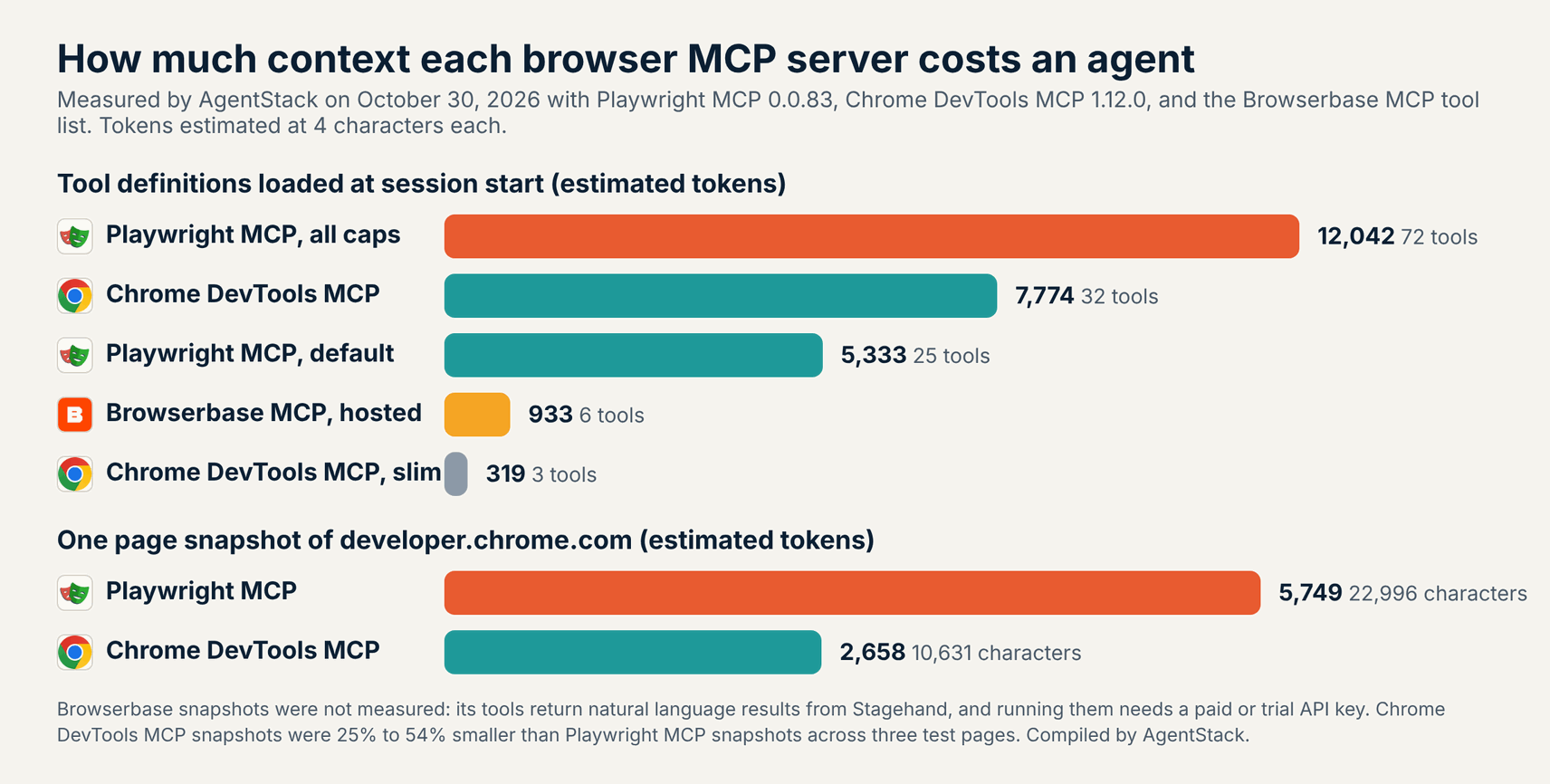
| Test page | Playwright MCP snapshot | Chrome DevTools MCP snapshot | Difference |
|---|---|---|---|
| developer.chrome.com | 22,996 characters | 10,631 characters | 54% smaller |
| modelcontextprotocol.io | 16,975 characters | 9,895 characters | 42% smaller |
| github.com/microsoft/playwright-mcp | 63,171 characters | 47,532 characters | 25% smaller |
Both snapshots are accessibility trees with element references the agent uses to click or type, so neither needs a vision model. Playwright MCP adds more structure per element, which helps on long forms. Chrome DevTools MCP also ran a Lighthouse audit in 10.42 seconds and listed 67 network requests for the same page.
We did not run Browserbase sessions, since tool calls need a Browserbase API key, so its numbers cover the tool list only. Its act, observe, and extract tools return short natural language results from a model on Browserbase’s side rather than a full page tree.
What this means for buyers: on a long session, snapshots cost far more context than tool definitions. If your agent reads many pages, the leaner snapshot matters more than the shorter tool list.
Playwright MCP: Best for Cross-Browser Automation and Tests
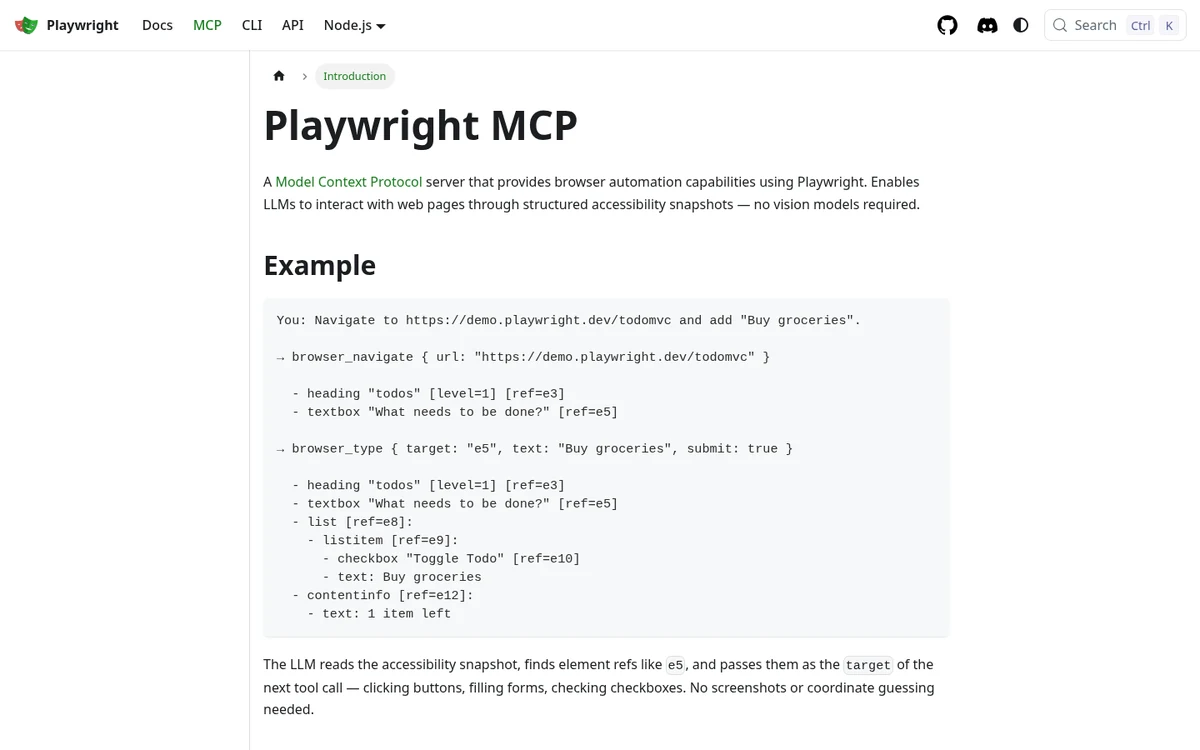
Playwright MCP is the right pick when an agent must repeat the same flow reliably across browsers, because it runs on the Playwright engine that QA teams already use for end to end tests. The Playwright MCP docs describe it as a server that lets models work with pages through structured accessibility snapshots, with no screenshots or vision model needed.
The microsoft/playwright-mcp repository had 38,849 GitHub stars on October 30, 2026, and version 0.0.83 shipped on September 28, 2026. It supports Chrome, Edge, Firefox, and WebKit, runs headed or headless, and offers a Docker image that supports headless Chromium only.
Profiles are its strongest point. By default it keeps a persistent profile, so logins survive between sessions. The --isolated flag keeps the profile in memory, --storage-state loads saved cookies, and the Playwright Extension connects to tabs in your running Chrome or Edge. One persistent profile serves one browser at a time, so parallel clients need --isolated or separate profile folders.
Extra tools sit behind the --caps flag, including vision, PDF, network, storage, testing, and DevTools groups. Microsoft’s README also says coding agents may do better with the Playwright CLI and skills, which skip large tool schemas, and keeps MCP for long, stateful agent loops.
- Best for: QA and platform teams that want agents to explore, fill forms, and write Playwright tests across Chromium, Firefox, and WebKit.
- Runs on: Your laptop, a CI runner, or a Docker container; it can also attach to a remote browser through a CDP endpoint.
- Pricing (October 2026): Free and open source. You pay only for your machine and the model tokens the agent spends.
- Watch out for: Larger snapshots than Chrome DevTools MCP, and 72 tools when every capability is on.
Chrome DevTools MCP: Best for Debugging and Performance
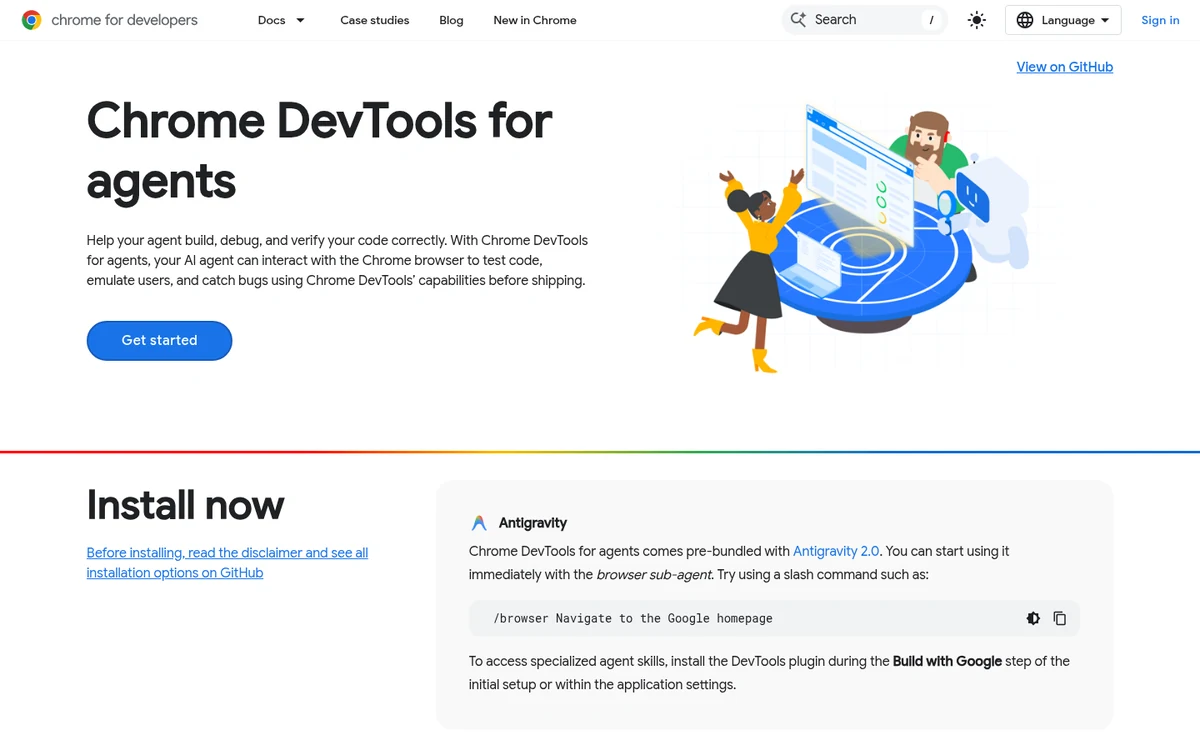
Chrome DevTools MCP is the right pick when a coding agent needs to see why a page is slow or broken, because it exposes the same traces, network panel, console, and memory tools a front end developer opens by hand. Google’s Chrome DevTools for agents page pitches it for testing code, emulating users, and catching bugs before shipping.
The ChromeDevTools/chrome-devtools-mcp repository had 54,481 stars on October 30, 2026, and version 1.12.0 shipped on October 22, 2026. The tool reference covers input, navigation, emulation, performance, network, debugging, memory, extensions, and more, with lighthouse_audit and performance_start_trace among the defaults.
It runs on Puppeteer and officially supports Chrome and Chrome for Testing only. The configuration guide adds --autoConnect for a running Chrome 144 or later, --browserUrl and --wsEndpoint for remote browsers, --isolated for a throwaway profile, and --slim, which cuts the server to 3 tools.
Two defaults need a look before rollout. Google collects usage statistics unless you pass --no-usage-statistics or set the CI variable, and performance tools may send trace URLs to the Chrome UX Report API unless you pass --no-performance-crux.
- Best for: Front end developers and coding agents that need traces, Lighthouse scores, console errors, and network requests in Chrome.
- Runs on: Your machine with Chrome installed; it can connect to a running or remote Chrome over a debugging URL or WebSocket.
- Pricing (October 2026): Free and open source. Costs are your machine and model tokens.
- Watch out for: Chrome only, plus usage statistics on by default and CrUX lookups from performance tools.
Browserbase MCP: Best for Cloud Browsers at Scale
Browserbase MCP is the right pick when agents run in production and need many browsers at once, because the browsers run in the Browserbase cloud with proxies and CAPTCHA solving handled for you. The Browserbase MCP page lists web agents, workflow automation, scraping, and QA testing as its main uses.
The setup docs point to a hosted Streamable HTTP endpoint at mcp.browserbase.com that takes your API key in the URL. It exposes 6 tools: start and end for sessions, one tool that opens a URL, and act, observe, and extract. Those last three take plain English, and Stagehand turns them into browser actions using Gemini 2.5 Flash Lite by default.
Per the configuration docs, you can swap in another model with your own key and turn on keepAlive, proxies, and verified sessions. Every tool takes an optional sessionId, which keeps clients such as ChatGPT that open a new connection per call on the same browser.
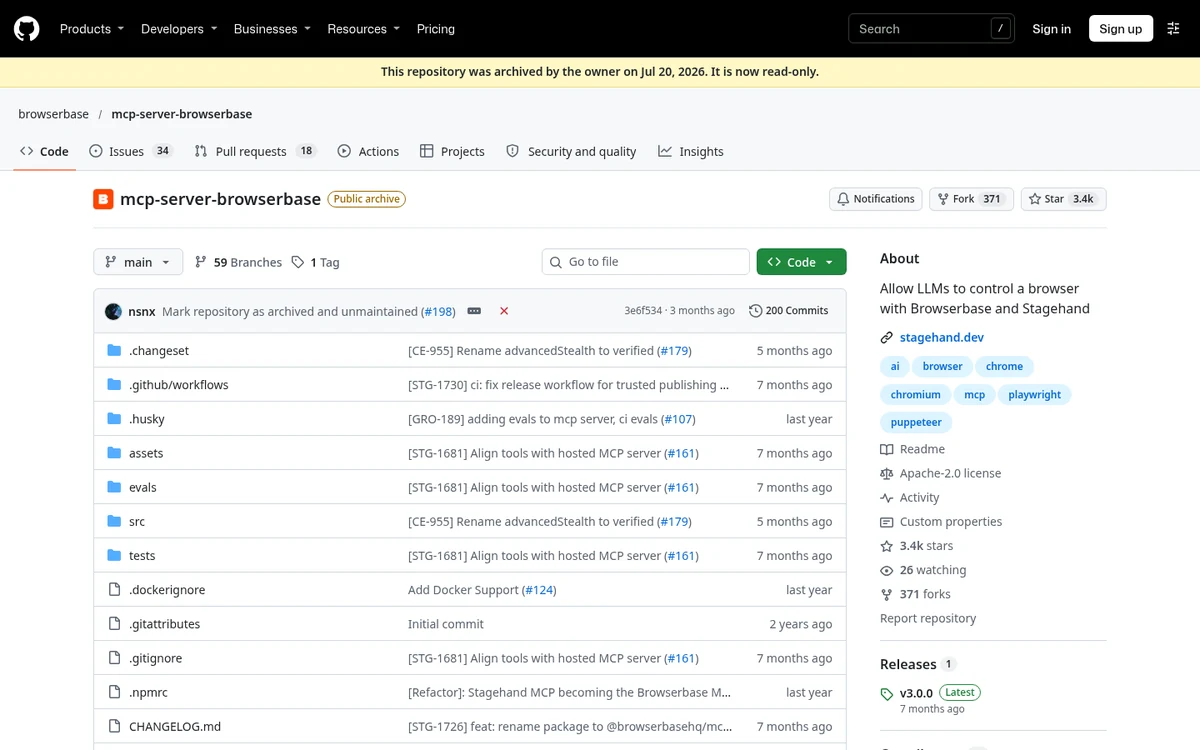
The self-hosted path has changed. The original GitHub repository was archived on July 20, 2026, and the npm package moved to @browserbasehq/mcp, last published as 3.0.0 in March 2026. Plan on the hosted endpoint unless you are ready to maintain a fork.
- Best for: Teams running web agents in production that need parallel sessions, proxies, CAPTCHA solving, and no browser fleet to manage.
- Runs on: Browserbase’s cloud, reached through a hosted MCP endpoint from Claude, ChatGPT, Cursor, or any client that speaks Streamable HTTP.
- Pricing (October 2026): Free plan with 1 browser hour; Developer $20 a month with 100 hours, then $0.12 an hour; Startup $99 a month with 500 hours, then $0.10 an hour, per the pricing page.
- Watch out for: Browser data runs on a third party, natural language actions add model calls, and the open source repo is archived.
Feature Comparison: What Each Server Can Do
Chrome DevTools MCP is the only one of the three with performance traces, Lighthouse audits, and heap snapshots, while Browserbase is the only one with natural language actions and cloud scale built in. Playwright MCP sits between them, with the widest browser support and the richest profile options.
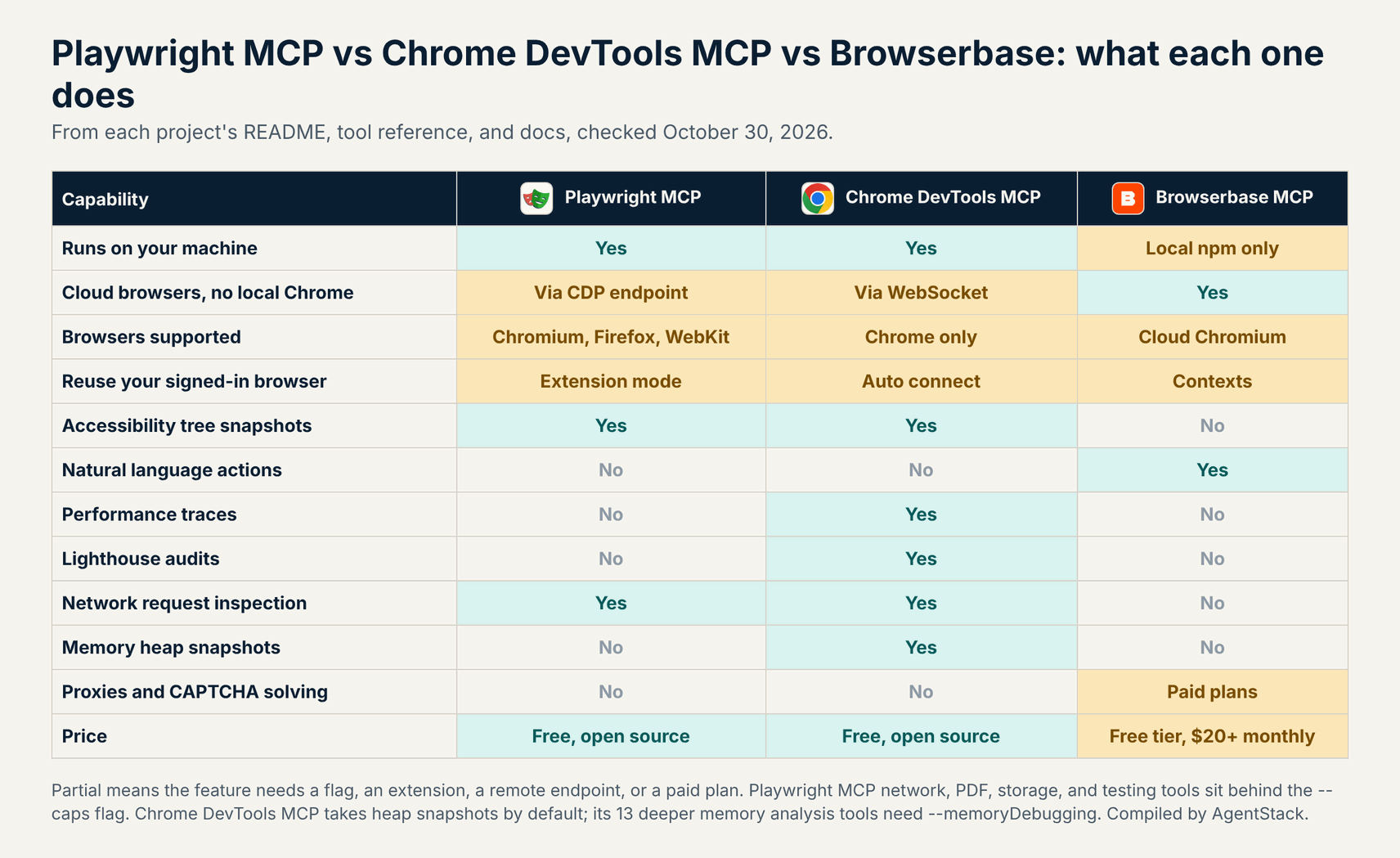
Both local servers can point at remote browsers, so the cloud column is not exclusive to Browserbase. Playwright MCP takes a --cdp-endpoint and Chrome DevTools MCP takes a --wsEndpoint, which lets either one drive a browser you host elsewhere. Browserbase’s edge is that the fleet, proxies, and CAPTCHA solving come managed.
Playwright MCP vs Chrome DevTools MCP vs Browserbase Pricing
Playwright MCP and Chrome DevTools MCP cost nothing to license, so your bill is your own compute plus model tokens, while Browserbase charges for browser hours and concurrency on top of tokens. Context size still matters for the free servers, since every snapshot is paid for in tokens.
| Server or plan | Monthly price | Concurrent browsers | Browser hours included | Overage |
|---|---|---|---|---|
| Playwright MCP | $0 | Limited by your machine | Unlimited | None |
| Chrome DevTools MCP | $0 | Limited by your machine | Unlimited | None |
| Browserbase Free | $0 | 3 | 1, with 15 minute sessions | Not offered |
| Browserbase Developer | $20 | 25 | 100 | $0.12 per browser hour |
| Browserbase Startup | $99 | 100 | 500 | $0.10 per browser hour |
| Browserbase Scale | Custom | 250 or more | Usage based | Custom |
Verdict: for one developer the free servers win on cost. Browserbase pays off once you count the hours spent keeping browsers, proxies, and CAPTCHA handling alive for dozens of parallel agent sessions.
Security and Privacy Limits to Check Before You Deploy
Every browser MCP server hands an agent a live browser, so the main risk is what that browser can reach and which signed-in sessions it carries. Each project documents a different limit, and none of them replaces a sandbox or the MCP security best practices.
| Server | Documented limit | Default to change | Ask before rollout |
|---|---|---|---|
| Playwright MCP | README says it is not a security boundary; origin lists do not block redirects | Use –isolated for untrusted sites | Which profile and cookies the agent can reach |
| Chrome DevTools MCP | Exposes all browser content to the MCP client | Pass –no-usage-statistics and –no-performance-crux | Whether agents may attach to a personal Chrome |
| Browserbase MCP | Pages and sessions run on Browserbase’s cloud | Keep API keys out of shared config files | Data retention, region, and HIPAA or SSO needs |
Verdict: run local servers in a separate profile, never your daily one, and route remote servers through an MCP gateway if many agents share them. Prompt injection from web pages is the open risk for all three, as our MCP security tools guide covers.
Which One Should You Choose?
Match the server to the job the agent does most often, and add a second server only when a real task needs it, since each one adds tools to the context window. The table maps common situations to a first pick and a fallback.
| Your situation | First pick | Fallback |
|---|---|---|
| Agent writes and runs end to end tests | Playwright MCP | Chrome DevTools MCP |
| Coding agent fixes front end bugs | Chrome DevTools MCP | Playwright MCP |
| Need Lighthouse or performance traces | Chrome DevTools MCP | None of the others |
| Must test Firefox or Safari engines | Playwright MCP | None of the others |
| Production agent with many parallel sessions | Browserbase MCP | Playwright MCP on your own fleet |
| Tight context budget | Chrome DevTools MCP slim mode | Browserbase MCP |
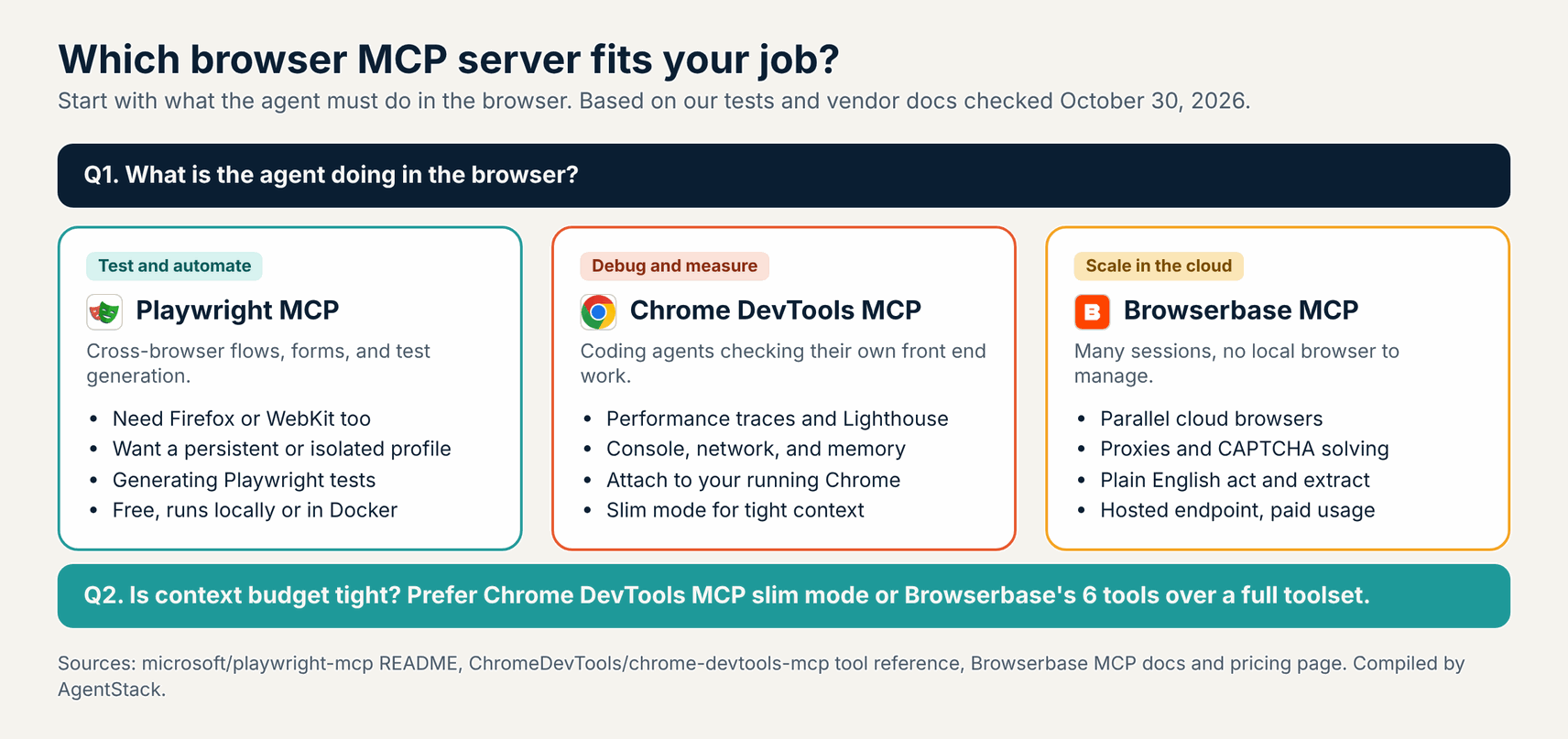
Verdict: Playwright MCP is the safest general default, Chrome DevTools MCP is the sharper tool for web developers, and Browserbase is the one to buy when browsers become infrastructure. Many teams pair Chrome DevTools MCP in the editor with Browserbase in production.
You build and test web apps
- Start with Chrome DevTools MCP in your coding agent and ask it to run a Lighthouse audit after each change.
- Add Playwright MCP when the agent needs to write tests that run on Firefox or WebKit too.
- Turn off usage statistics in shared team configs.
You run QA or test automation
- Use Playwright MCP with
--isolatedso each run starts clean. - Load saved logins with
--storage-stateinstead of a personal profile. - Score agent runs with the evaluation tools in our AI agent testing tools guide.
You ship web agents to customers
- Prototype on the Browserbase free plan, then size concurrency before picking Developer or Startup.
- Pass
sessionIdon every call if your client opens a new connection per tool call. - Trace each session with one of the AI agent observability tools we reviewed.
When a Browser MCP Server Is the Wrong Tool
Skip a browser MCP server when the site offers an API or its own MCP server, because driving a page costs more tokens, runs slower, and breaks more often than a direct call. Browsers are for sites with no better interface.
- The app has an API: use a vendor MCP server from our MCP servers list or an agent integration platform instead.
- You only need code checks: Microsoft points coding agents to the Playwright CLI, which costs less context than MCP.
- You need hosting for your own server: compare options in our MCP hosting platforms guide and the Cloudflare vs Vercel vs AgentCore test.
- Agents hold real credentials: scope them with non-human identity tools and add controls from our AI agent security tools roundup.
Frequently Asked Questions
Is Playwright MCP or Chrome DevTools MCP better?
Chrome DevTools MCP is better for debugging, since it adds performance traces, Lighthouse audits, console, network, and memory tools, and its snapshots were 25% to 54% smaller in our test. Playwright MCP is better for automation and tests across Chromium, Firefox, and WebKit, with persistent, isolated, and extension profile modes.
Can I use Playwright MCP and Chrome DevTools MCP together?
Yes. Many developers run both, with Chrome DevTools MCP for debugging and Playwright MCP for test flows. Expect about 13,000 tokens of tool definitions with both default toolsets loaded, so turn on the second server only in projects that need it, or use Chrome DevTools MCP slim mode with 3 tools.
Is Browserbase MCP free?
Browserbase has a free plan with 3 concurrent browsers, 1 browser hour, and 15 minute sessions, which suits prototypes. Paid plans start at $20 a month for 25 browsers and 100 hours, then $0.12 per extra hour. The Startup plan costs $99 a month for 100 browsers and 500 hours.
Does Chrome DevTools MCP send data to Google?
By default it sends usage statistics such as tool success rates, latency, and environment details to Google. Opt out with the –no-usage-statistics flag or by setting the CI variable. Performance tools may also send trace URLs to the Chrome UX Report API unless you start the server with –no-performance-crux.
Which browser MCP server works with Claude Code and Cursor?
All three do. Playwright MCP and Chrome DevTools MCP install as local npx commands in Claude Code, Cursor, VS Code, and Codex, and Chrome DevTools MCP also ships as a Claude Code plugin with skills. Browserbase connects as a remote server through its hosted URL with your API key.
Related Guides
Keep going with the MCP hub, our MCP explainer, the best MCP servers roundup, MCP registries, the Smithery vs Glama vs official MCP registry comparison, and MCP gateways. Each one covers a layer around the browser servers compared here, from finding servers to controlling them.
More context sits in MCP security tools, MCP tool security bugs, AI agent frameworks, and AI agent testing tools.
The Bottom Line
Pick Playwright MCP for cross-browser automation and tests, Chrome DevTools MCP for debugging and performance in Chrome, and Browserbase when agents need cloud browsers at scale. Playwright MCP vs Chrome DevTools MCP is less a contest than a split of jobs, and Browserbase is the answer once browsers become infrastructure. If you are building a browser MCP server rather than picking a hosted one, our MCP server frameworks guide compares FastMCP, official SDKs and other kits. To inspect traffic from these browser servers during development, see our guide to MCP testing and debugging tools.
These projects ship often, so recheck versions and flags before you standardize, and test your finalist on your own pages. Send corrections or your own results through our contact page.