
Last updated October 23, 2026. We installed all three packages that day, ran the same tool calling job in each with every model request captured, and checked releases, downloads, and advisories on GitHub, PyPI, and OSV.
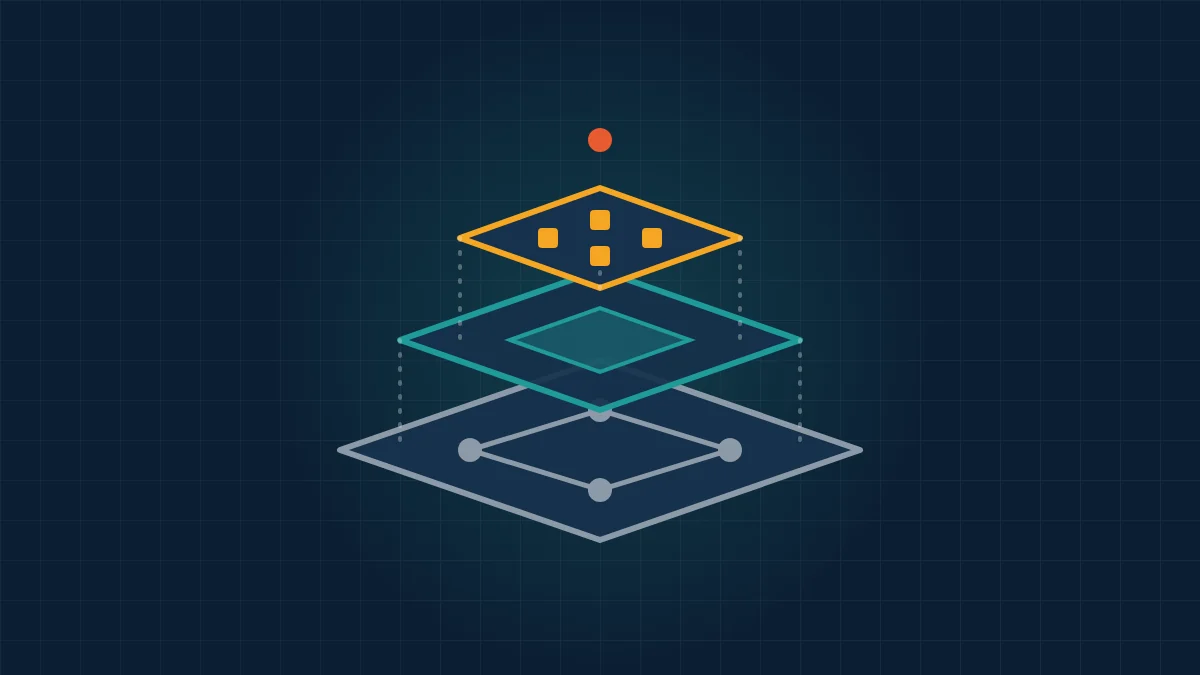
LangChain vs LangGraph vs Deep Agents is a choice between three layers of one stack: LangGraph is the runtime, LangChain is the agent framework built on it, and Deep Agents is a ready made harness built on LangChain. All three come from the same company, share the same core packages, and are free under MIT, so the question is how much behavior you want handed to you.
This page sits in our agent frameworks hub, and our guide to the 12 best AI agent frameworks compares LangGraph with independent options such as CrewAI and Pydantic AI. Here we stay inside the LangChain family and show what each layer adds, what it costs in tokens and disk space, and when to drop down a layer.
On October 23, 2026 we installed each package into a clean Python 3.12 environment and ran one identical job five times per setting against a scripted local model, saving every request body the model received. No vendor paid for placement or reviewed this page, per our editorial standards and disclosure policy.
TL;DR
- They are layers, not rivals. LangChain 1.x is built on LangGraph, and Deep Agents is built on LangChain, so installing Deep Agents gives you all three.
- Deep Agents sends about 20 times more to the model by default. Our 2 call job sent 22,166 request bytes with Deep Agents against 1,112 with LangChain or LangGraph, because 8 built in tool schemas ride along on every call.
- You can trim Deep Agents back to the same size. Excluding the built in tools with a harness profile brought it to 1,112 bytes, identical to plain LangChain.
- LangChain and LangGraph cost the same at runtime. Both made 2 model calls, sent identical requests, and finished in a median 1.17 and 1.16 seconds.
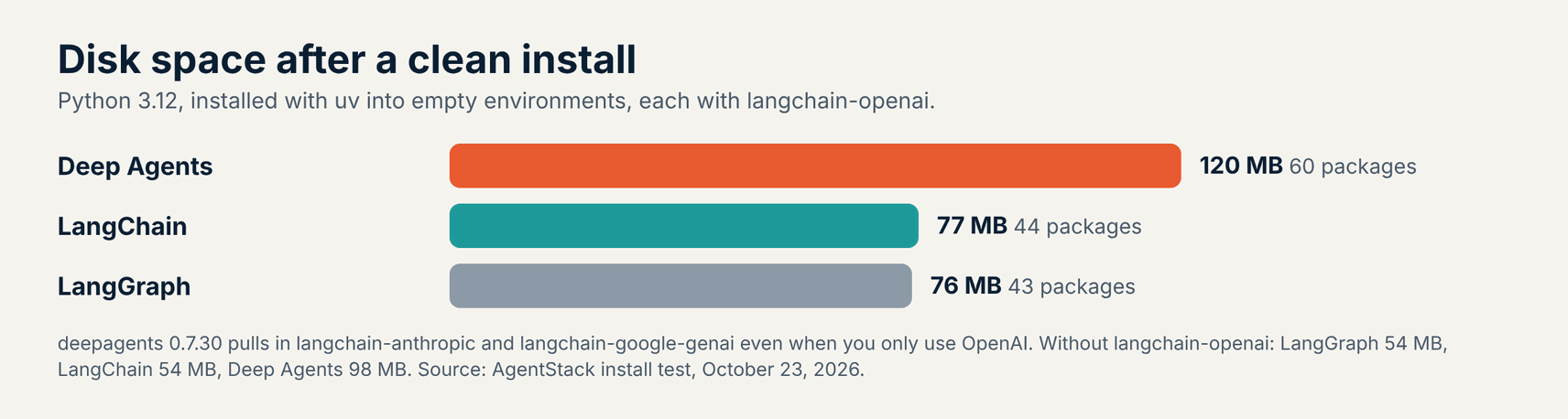
- Deep Agents is the heaviest install. It took 120 MB and 60 packages with the OpenAI integration, against 77 MB for LangChain and 76 MB for LangGraph.
- None of them phoned home by default. Each made 0 outside connections until we switched LangSmith tracing on.
LangChain vs LangGraph vs Deep Agents at a Glance
LangGraph gives you a low level graph runtime, LangChain gives you a configurable agent loop with middleware, and Deep Agents gives you a finished agent with planning, files, and subagents. The table compares fit, abstraction level, maintenance, and cost per call, using each project’s repository, documentation, PyPI, and our own test on October 23, 2026.
| Package | Layer | Best for | Latest release | Request bytes, our job | Install size |
|---|---|---|---|---|---|
| LangChain | Agent framework | Custom agents built from a model, tools, and middleware | 1.4.7, October 21, 2026 | 1,112 | 44 packages, 77 MB |
| LangGraph | Runtime | Stateful workflows that mix fixed steps with agent steps | 1.2.16, October 16, 2026 | 1,112 | 43 packages, 76 MB |
| Deep Agents | Agent harness | Long, multi step tasks with files, plans, and subagents | 0.7.30, October 22, 2026 | 22,166 (1,112 trimmed) | 60 packages, 120 MB |
Verdict: Start with LangChain’s create_agent for most tool calling agents, move to LangGraph when you need explicit control over steps, branches, and pauses, and pick Deep Agents when the task is long and open ended enough to need a scratch filesystem and subagents. Trim Deep Agents tools you do not use, because each one is billed on every call.
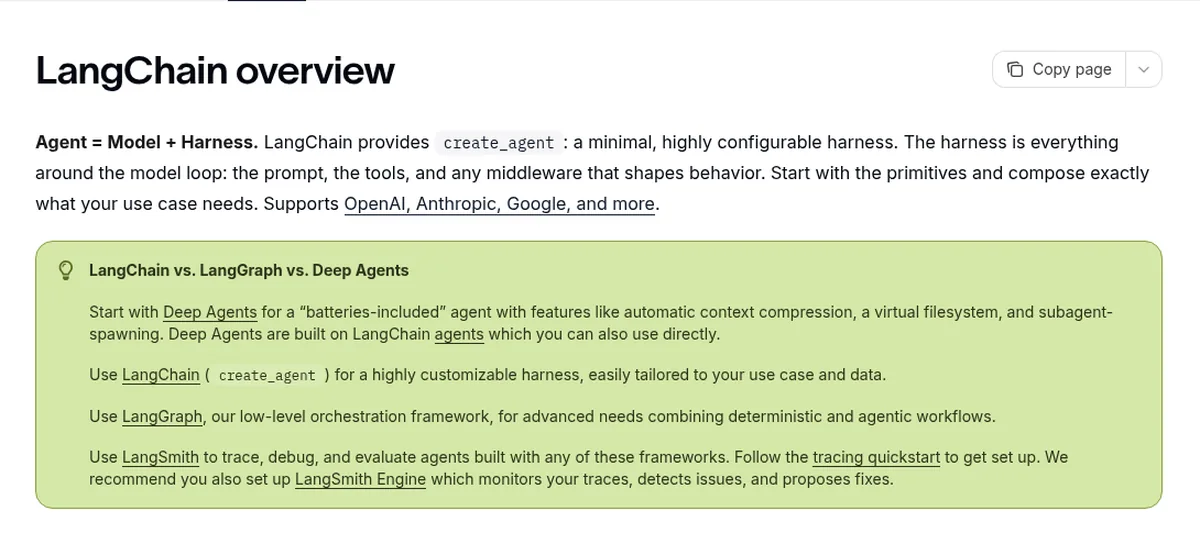
LangChain’s own overview gives the same split: start with Deep Agents for a batteries included agent, use LangChain for a highly customizable harness, and use LangGraph for advanced needs that combine deterministic and agentic workflows. Our test adds the cost side of that advice.
How We Tested the Three Packages
To compare the three packages on equal terms, we built the same job in each: a shop assistant calls one price lookup tool, then writes a one line summary. We pointed every package at a local server that played the model’s part with fixed replies, so runs were offline, free, and repeatable, and every request body was saved.
- Same code path where possible:
create_agentfor LangChain, aStateGraphwith aToolNodefor LangGraph, andcreate_deep_agentfor Deep Agents, all with the same system prompt and tool. - Defaults first: five runs per package with default settings, counting model calls, tool calls, request bytes, and run time.
- Memory test: a two turn conversation on one thread with an in memory checkpointer, where the second turn asks for an order code given in the first.
- Network check: all traffic went through a logging proxy that refused outside connections, with and without
LANGSMITH_TRACING=true. - Install, advisories, and health: package count and disk size after
uv pip install, OSV lookups for every installed package, and release, download, and star counts checked the same day.
What Our October 23 Hands-On Test Found
All three finished the job correctly in 5 of 5 runs with 2 model calls and 1 tool call, but Deep Agents sent the model 20 times more data to do it. LangChain and LangGraph produced byte for byte identical requests, which fits LangChain 1.x being a layer on top of LangGraph.
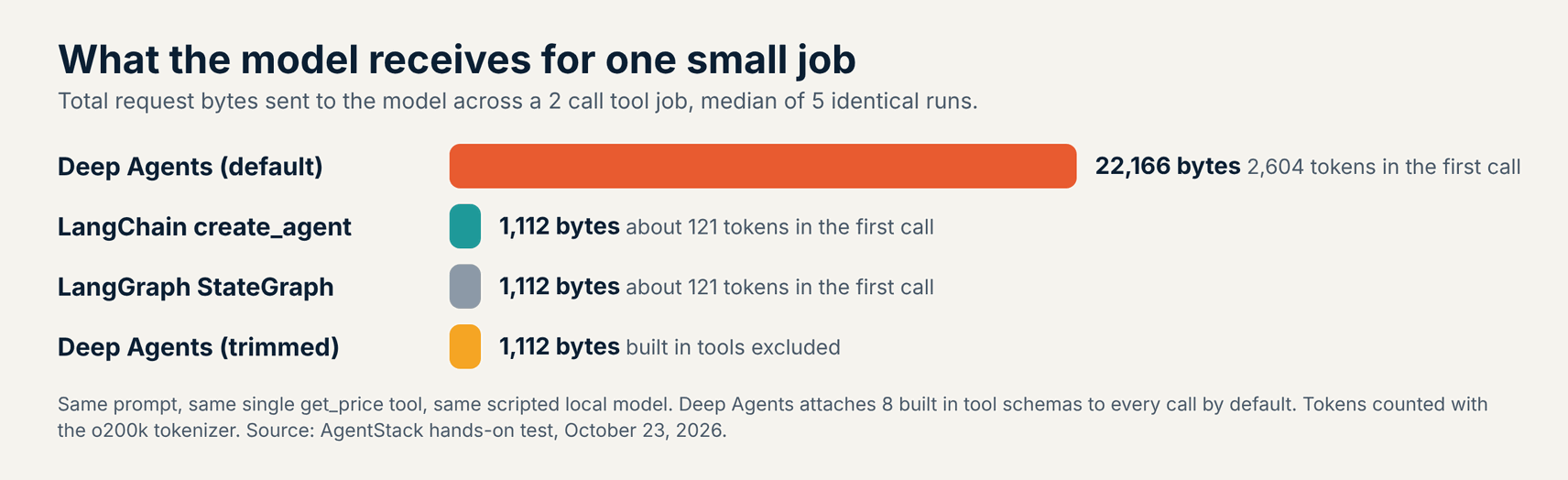
- LangChain: 2 model calls, 1,112 request bytes, about 121 tokens in the first call, and a median run of 1.17 seconds including a 0.72 second import.
- LangGraph: the same 2 calls and 1,112 bytes, with a median run of 1.16 seconds and the fastest import at 0.63 seconds.
- Deep Agents: 2 calls and 22,166 bytes, with 2,604 tokens in the first call and 9 tools offered instead of 1. The median run took 2.16 seconds, mostly a 1.97 second import.
- Memory: all three recalled the order code in 5 of 5 runs. Over 3 model calls, LangChain and LangGraph sent 2,001 bytes and Deep Agents sent 33,582.
Deep Agents added no hidden system prompt in our test, so the whole overhead came from tool schemas. The first request carried 10,739 bytes of tool definitions, and our own price tool was only 210 of them.
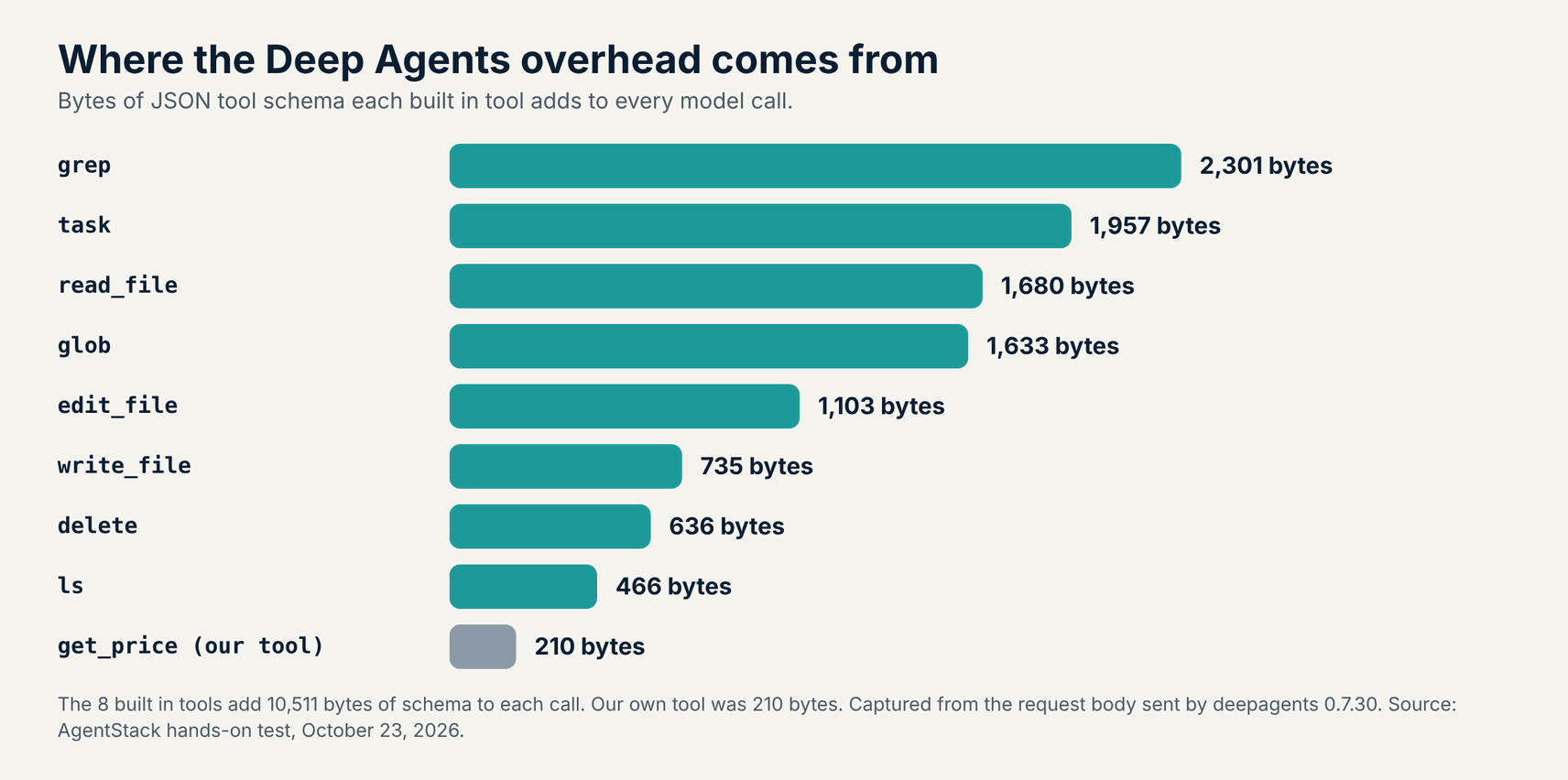
At around 2,500 extra input tokens per call, a 20 call research task carries about 50,000 extra tokens before any file content. Prompt caching on supported models cuts the price of that repeated block, and a cost monitoring tool will show whether it matters for your traffic.
1. LangChain: Best for Most Tool Calling Agents
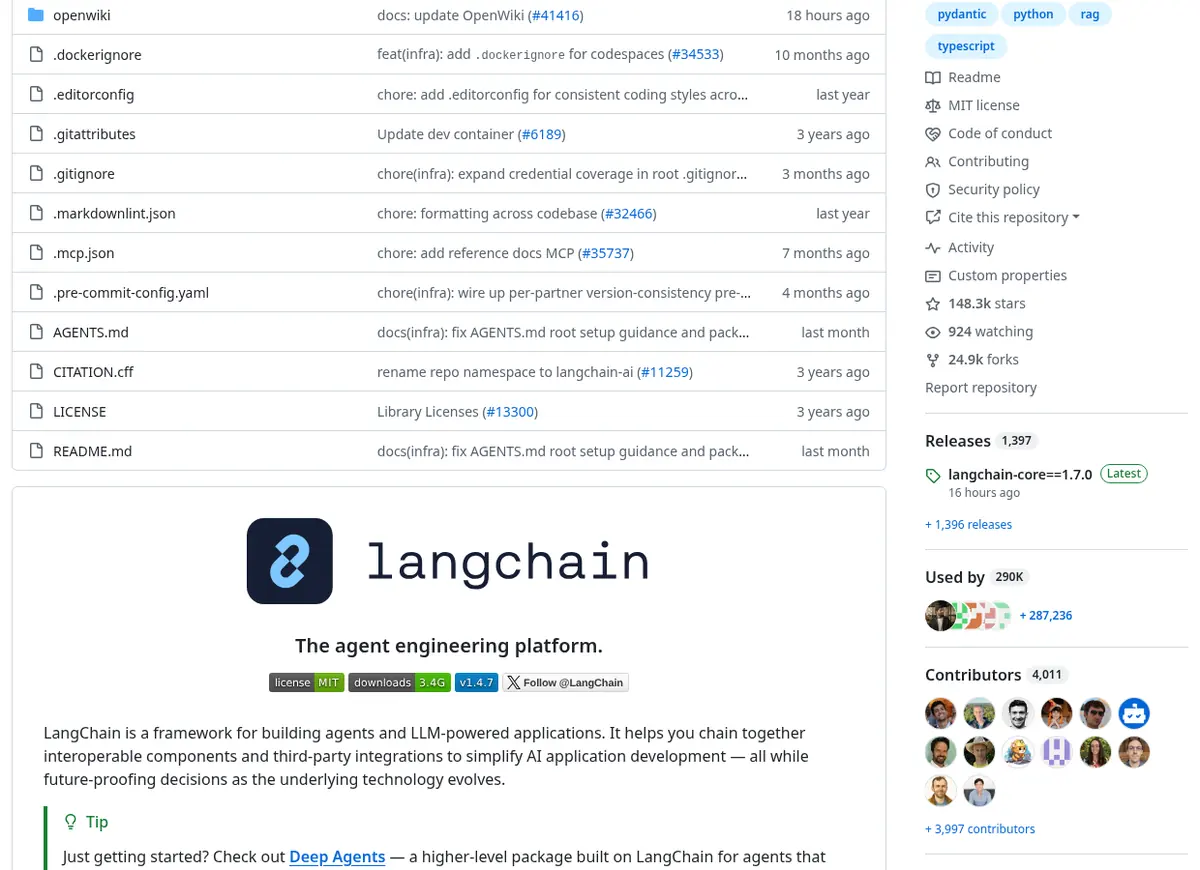
LangChain gives you create_agent, a small agent loop where you pick the model, the tools, and the middleware that shapes each step. Version 1.4.7 shipped on October 21, 2026, the repository has 148,312 stars, and the package was downloaded 170.5 million times on PyPI last month. It tagged 65 releases in the last 12 months.
The middleware is where LangChain earns its place. The built in middleware list covers summarization, human in the loop approval, model and tool call limits, model fallback, tool retry, PII detection, a to do list, LLM tool selection, and context editing. You add each one in a single line instead of writing graph nodes.
LangChain 1.x depends on LangGraph, so every LangChain agent already runs on the LangGraph runtime. You get checkpointers, streaming, and interrupts without writing a graph, and you can drop into LangGraph later without switching stacks. Our install pulled langgraph 1.2.16 automatically.
- Best for: teams that want a working agent in a few lines and plan to customize it with middleware rather than graph code.
- Pricing (October 2026): free under MIT. Tracing in LangSmith is optional, with a free Developer plan and Plus at $39 per seat per month, per the pricing page.
- Watch out for: the release pace, with 65 releases in 12 months, so pin versions and read changelogs before upgrading.
2. LangGraph: Best for Stateful Workflows You Control Step by Step
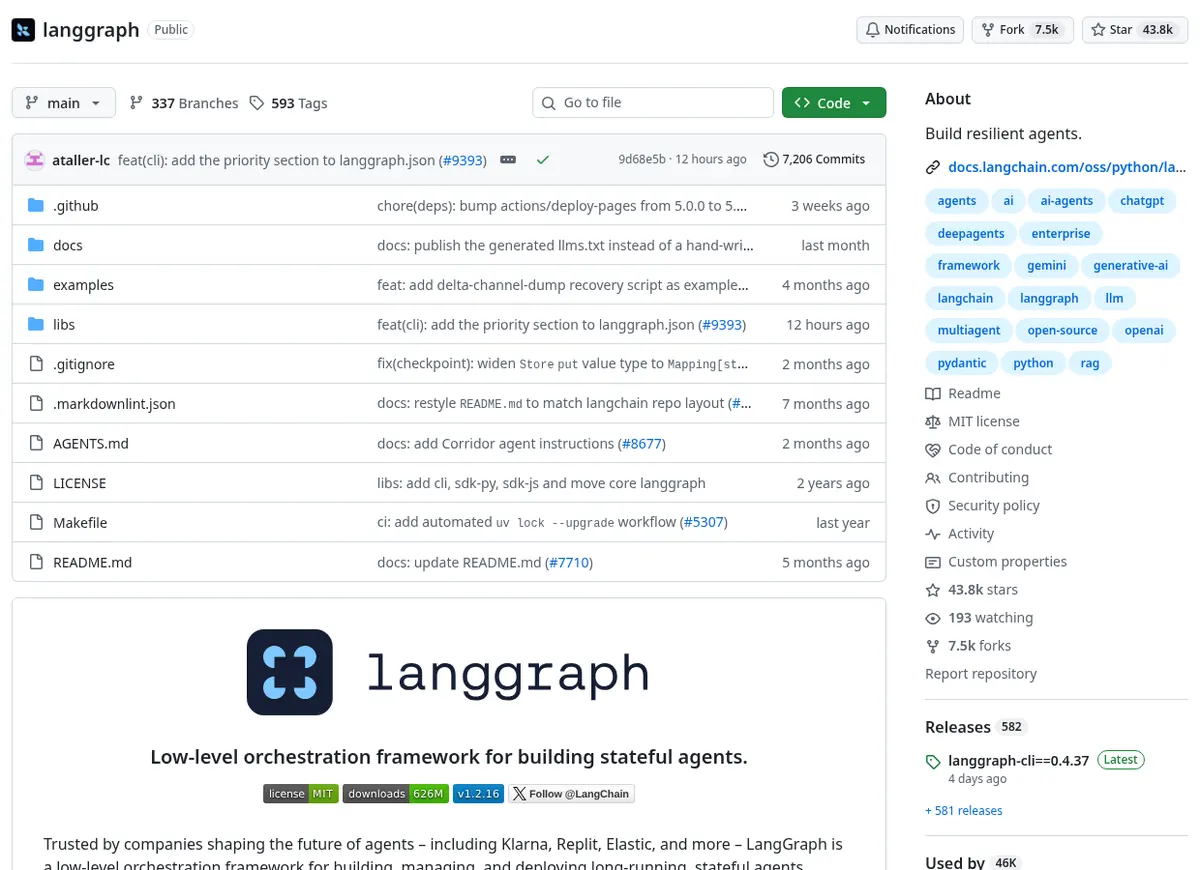
LangGraph is a low level runtime where you define the agent as a graph of nodes and edges, with state saved at every step. Version 1.2.16 shipped on October 16, 2026, the repository has 43,767 stars, and PyPI counted 44.8 million downloads last month. Its overview names Klarna, Uber, and J.P. Morgan as users.
Its strengths are durable execution, streaming, human in the loop pauses, and persistence. Per the persistence docs, checkpointers save each thread’s state so a run can resume after a crash, and stores hold memory across threads. The interrupts docs show how to pause a graph for approval and resume it later.
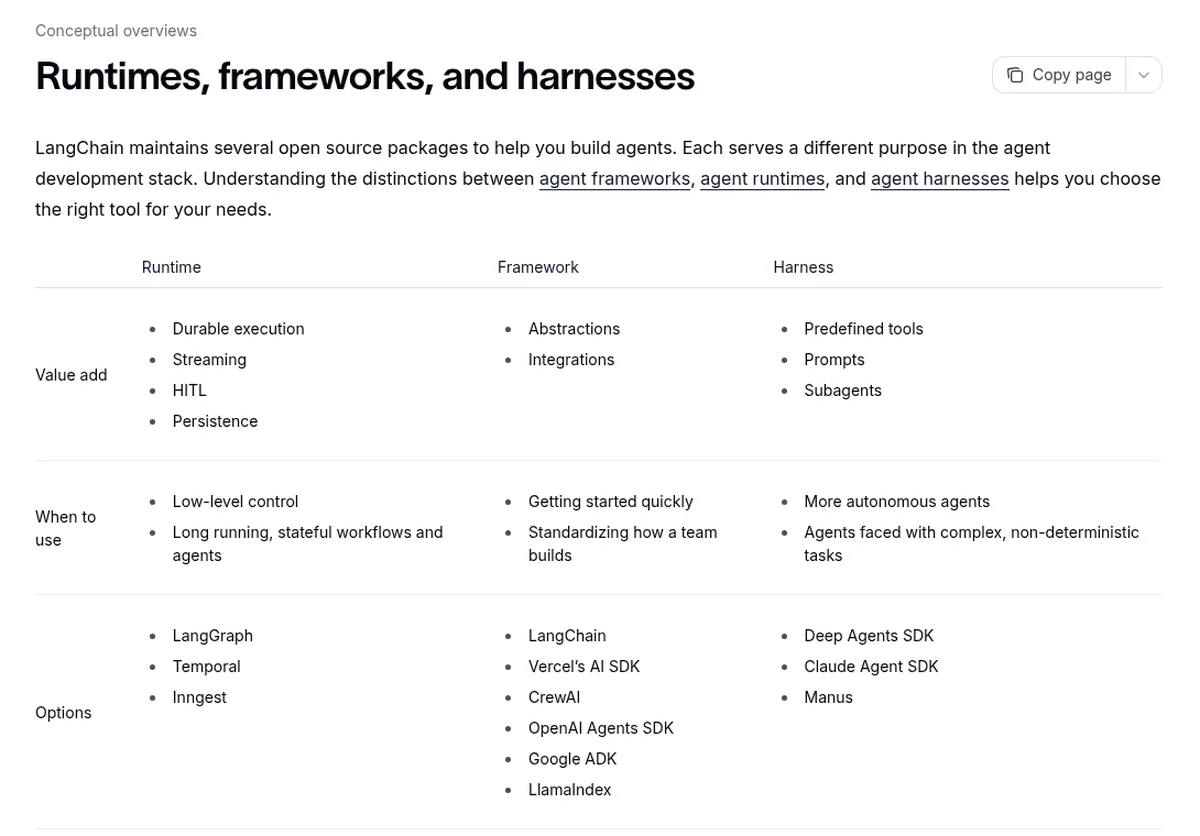
The conceptual docs place LangGraph next to Temporal and Inngest as a runtime, and LangChain next to CrewAI and the OpenAI Agents SDK as a framework. You do not need LangChain to use LangGraph, which makes it the right layer when you want fixed steps and agent steps in one auditable graph.
- Best for: teams building approval flows, long running jobs, or multi agent systems where every branch and retry must be explicit.
- Pricing (October 2026): free under MIT. Managed hosting through LangSmith Deployment needs a paid plan, starting with Plus.
- Watch out for: more code than create_agent for simple agents, and checkpoint security, since every advisory below touched checkpoint loading.
3. Deep Agents: Best for Long, Open Ended Tasks
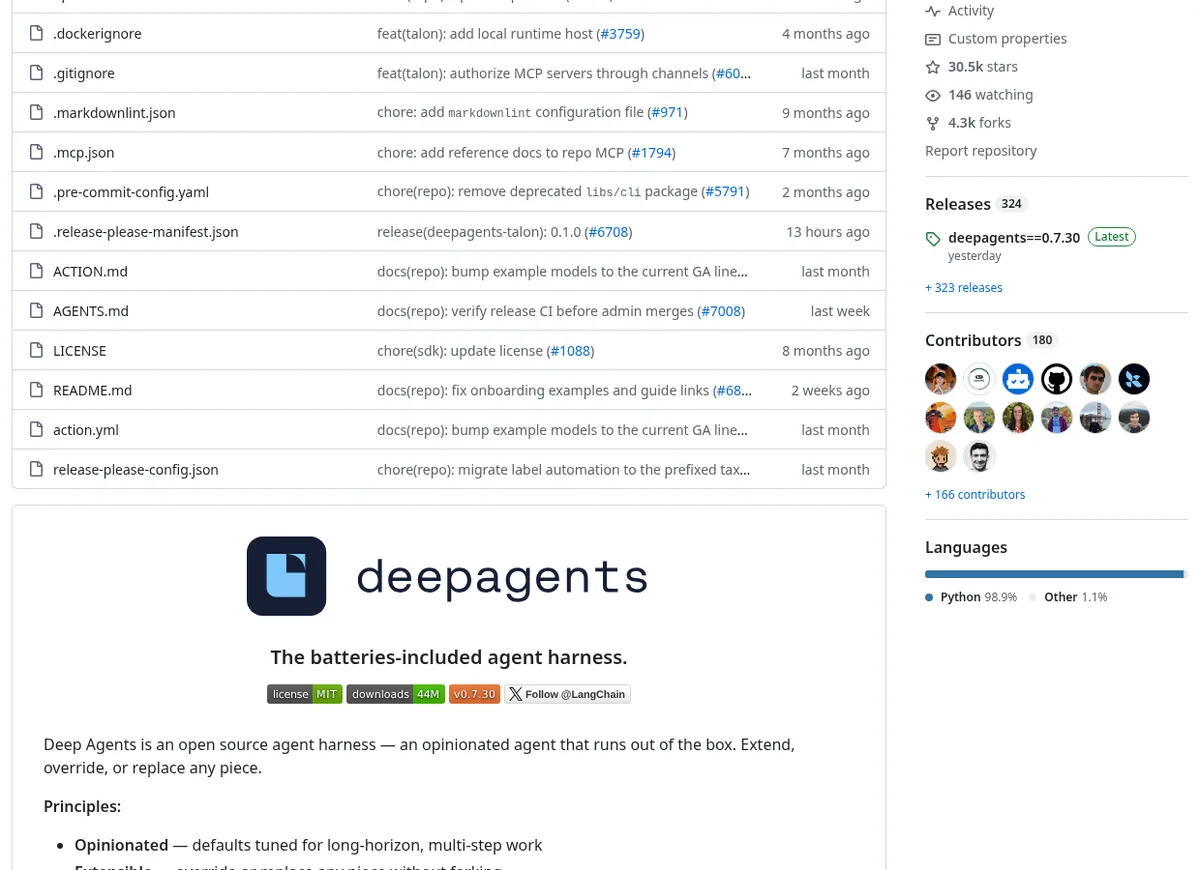
Deep Agents is a ready made harness that wraps a LangChain agent with planning, a virtual filesystem, subagents, skills, and context compression. Version 0.7.30 shipped on October 22, 2026, the repository has about 30,500 stars, and PyPI counted 5.66 million downloads last month. Its README says it was inspired by Claude Code.
It moves fast, with 115 releases in the last 12 months and a version number still below 1.0. The overview lists skills that follow the Agent Skills standard, memory loaded from AGENTS.md files, automatic summarization, and prompt caching. Planning with write_todos became opt in at version 0.7.
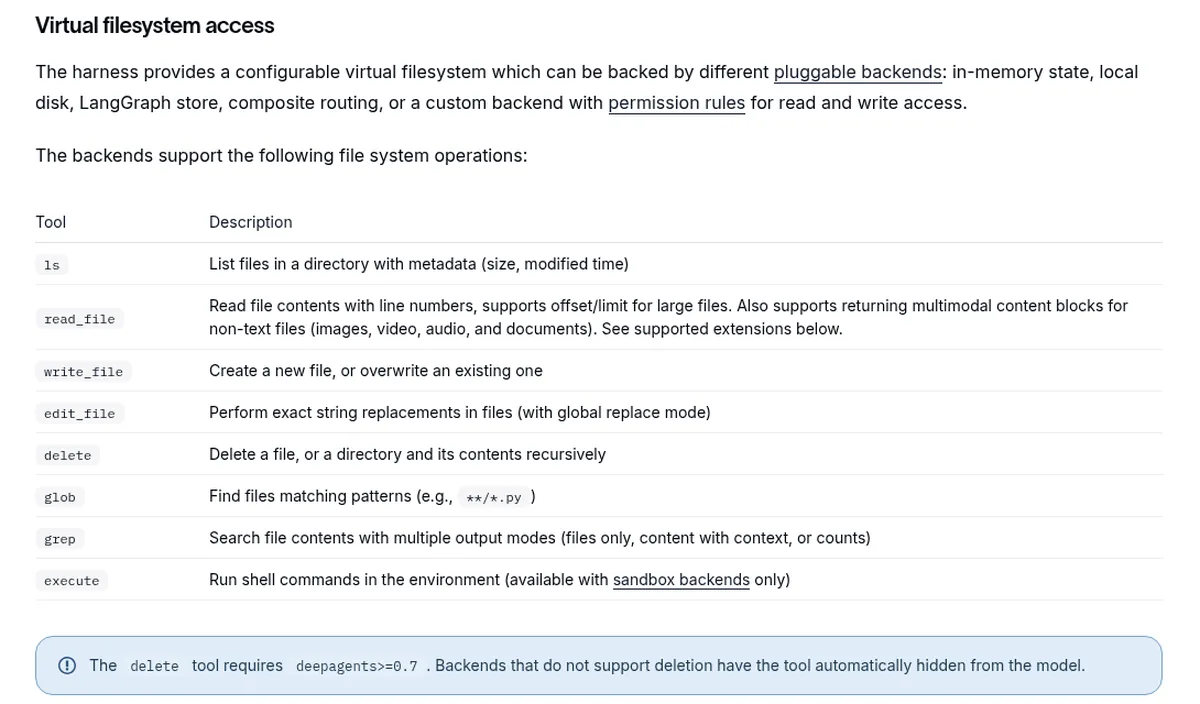
Files live in pluggable backends: in memory state, local disk, a LangGraph store, or a composite. The subagents guide covers the task tool, which spins up child agents with their own context. The README describes a trust the LLM security model, so enforce limits in tools and sandboxes rather than in the prompt.
The install is also heavier for a reason you might not expect. The package depends on the Anthropic and Google GenAI integrations, so an OpenAI only project still installs both SDKs and their dependencies.
- Best for: research, coding, and analysis agents that run many steps, write intermediate files, and split work across subagents.
- Pricing (October 2026): free under MIT. You pay for model usage, which is higher by default because of the built in tool schemas.
- Watch out for: token overhead on every call, Python 3.11 or newer, and frequent releases while it stays below version 1.0.
Maintenance and Security Across the Stack
All three packages share langchain-core and langgraph-checkpoint, so one security patch usually applies to all of them at once. OSV listed 0 known advisories for the versions we installed on October 23, 2026. The table shows each project’s pace and the recent history that matters for upgrades.
| Package | Releases, last 12 months | PyPI downloads, last month | GitHub stars | License |
|---|---|---|---|---|
| langchain | 65 | 170.5 million | 148,312 | MIT |
| langgraph | 47 | 44.8 million | 43,767 | MIT |
| deepagents | 115 | 5.66 million | about 30,500 | MIT |
| langchain-core (shared) | 91 | 144.8 million | same repo as langchain | MIT |
The shared history is worth knowing. langgraph-checkpoint fixed unsafe deserialization issues in versions 3.0.0, 4.0.0, and 4.1.1, including CVE-2026-48775, and langchain-core fixed an unsafe deserialization bug in 1.3.3 and a server side request forgery bug in 1.2.11. Keep langgraph-checkpoint at 4.1.1 or later and run an advisory scan in CI, a lesson the LiteLLM supply chain compromise also taught.
None of the three sent data outside our network until we turned LangSmith tracing on. With LANGSMITH_TRACING=true each run tried 13 to 16 connections to api.smith.langchain.com, and the refused retries stretched runs to about 13 seconds. If you trace elsewhere, compare options in our LangSmith alternatives guide.
Settings We Used for a Lean Deep Agents Setup
The harness profile below hides the built in filesystem and subagent tools for one model, which brought our Deep Agents request size back to 1,112 bytes. The LangGraph checkpointer setup is the same one all three packages use for memory across turns.
# deepagents 0.7.30: hide built in tools you do not need
from deepagents import create_deep_agent, HarnessProfile, register_harness_profile

register_harness_profile(
    "openai:gpt-5-mini",
    HarnessProfile(excluded_tools=frozenset({
        "ls", "read_file", "write_file", "edit_file",
        "delete", "glob", "grep", "task",
    })),
)
agent = create_deep_agent(model="openai:gpt-5-mini", tools=[get_price])

# langchain 1.4.7: same job with create_agent and memory per thread
from langchain.agents import create_agent
from langgraph.checkpoint.memory import InMemorySaver

agent = create_agent(model="openai:gpt-5-mini", tools=[get_price],
                     checkpointer=InMemorySaver())
agent.invoke({"messages": [("user", "My order code is ZX-71")]},
             {"configurable": {"thread_id": "shop-1"}})
InMemorySaver loses state on restart, so production setups use the Postgres or SQLite checkpointers from the persistence docs. The Deep Agents docs note that FilesystemMiddleware itself cannot be removed, so excluded_tools is the supported way to hide its tools.
When to Use Something Other Than These Three
All three tie you to the LangChain ecosystem, its shared core packages, and its fast release cadence, so an upgrade in one layer often means retesting the others. These options suit teams that want something lighter or independent, and our full frameworks guide compares nine more.
- A different framework: CrewAI, Pydantic AI, Google ADK, and the OpenAI Agents SDK all cover the framework layer with fewer dependencies on one vendor’s stack.
- MCP for tools: exposing tools over the Model Context Protocol keeps them portable if you switch frameworks later. Our MCP servers guide lists ready made ones.
- A managed harness: if you want Deep Agents style behavior without running it yourself, see our coverage of Claude Managed Agents.
- Shared skills: Deep Agents skills follow the Agent Skills standard, which our report on the Agentic AI Foundation adding Agent Skills covers.
LangChain, LangGraph, or Deep Agents: Which Should You Choose?
The right layer depends on how predictable the task is, how much control you need over each step, and how much token overhead you can carry. Match your team to a profile below, then run your own job with request bodies logged before you commit.
Product teams shipping a support or sales agent
- Start with LangChain’s
create_agentand add middleware for limits, retries, and approval. - Keep requests small by listing only the tools the agent needs.
- Score answers before launch with our AI agent evaluation tools guide.
Platform teams running approval or back office flows
- Use LangGraph for explicit steps, retries, and human approval pauses.
- Store checkpoints in Postgres and keep
langgraph-checkpointpatched. - Test failure paths with the tools in our AI agent testing tools guide.
Teams building research or coding agents
- Pick Deep Agents for planning, scratch files, subagents, and skills from the first run.
- Exclude built in tools you never call, and turn on prompt caching for supported models.
- Watch token spend per task with our LLM cost monitoring tools picks.
Teams that want traces without lock in
- Any of the three works, since none sends data out until you switch tracing on.
- Compare Langfuse vs LangSmith vs Braintrust and their pricing before you pick a trace store.
- Route model traffic through one of the LLM gateways we compared for keys and limits in one place.
Frequently Asked Questions
What is the difference between LangChain and LangGraph?
LangGraph is a low level runtime for stateful agents, where you define nodes, edges, and state, and it handles checkpoints, streaming, and interrupts. LangChain is a higher level framework whose create_agent function builds a standard tool calling agent on top of LangGraph. In our test, both sent identical requests to the model.
Is Deep Agents replacing LangChain?
No. Deep Agents is built on LangChain and installs it as a dependency, so it adds a layer on top instead of replacing it. LangChain’s docs suggest Deep Agents for batteries included agents and LangChain create_agent for highly customized ones. Many teams use both, with Deep Agents for long research tasks and LangChain for simpler agents.
Why does Deep Agents use more tokens?
Deep Agents attaches schemas for its built in tools to every model call, including ls, read_file, write_file, edit_file, delete, glob, grep, and task. In our test, that added 10,511 bytes and about 2,500 tokens per call. Excluding unused tools with a harness profile brought requests back to the same size as plain LangChain.
Can I use LangGraph without LangChain?
Yes. The LangGraph overview says you do not need LangChain to use LangGraph, and you can call any model client inside a graph node. In practice, many teams still use LangChain model and tool integrations inside LangGraph, because they plug in directly. A LangChain install already includes LangGraph as a dependency.
Do LangChain, LangGraph, and Deep Agents send data to LangSmith by default?
No. In our October 23 test, none of the three made any outside connection with default settings. With LANGSMITH_TRACING set to true and an API key present, each run tried 13 to 16 connections to the LangSmith API. Tracing is opt in, and you can send traces to other tools such as Langfuse through their LangChain callback handlers.
Related Guides
LangChain and LangGraph are one family; Mastra and Vercel AI SDK sit beside LangGraph.js for TypeScript. Our Mastra vs Vercel AI SDK vs LangGraph.js test measures install size, speed and human-approval defaults.
LangChain and LangGraph are one family; Microsoft’s Agent Framework, Semantic Kernel and AutoGen are another. Our Microsoft Agent Framework vs Semantic Kernel vs AutoGen test measures install footprint, memory defaults and migration.
If you need multi-agent patterns rather than a single Deep Agent stack, see our multi-agent frameworks comparison, which logged model calls and context leaks across ten orchestrators.
Comparing the LangChain stack with other self-hostable options? Our open source AI agent frameworks test ran 11 frameworks on the same job against a local model with internet access blocked.
For related coverage, see our LangGraph alternatives guide, LangGraph vs CrewAI vs AutoGen comparison and OpenAI Agents SDK vs Claude Agent SDK vs Google ADK comparison.
Read the agent frameworks hub, 12 best AI agent frameworks, LangSmith alternatives, Langfuse vs LangSmith vs Braintrust, LangSmith, Langfuse, and Braintrust pricing, AgentOps hub, agent observability coverage, AI agent observability tools, open source LLM observability, AI agent evaluation tools, AI agent testing tools, LLM cost monitoring tools, LLM gateways, MCP explained, MCP servers, and Claude Managed Agents. Notes on how we work sit on editorial standards, disclosure, and contact.
The Bottom Line
Choose LangChain for most agents, LangGraph when you need to control every step, and Deep Agents when the task is long enough to justify a planning harness and its token overhead. The biggest finding in LangChain vs LangGraph vs Deep Agents was cost per call, so trim the Deep Agents tools you do not use before you ship.
All three release often, so rerun a logged test after each upgrade and check this page for updates. Send corrections or your own results through our contact page.