
Published October 12, 2026 (IST) by the AgentStack News Desk. Facts were checked against Anthropic’s Claude Platform release notes and Managed Agents documentation, the ClaudeDevs launch thread on X, and independent coverage.
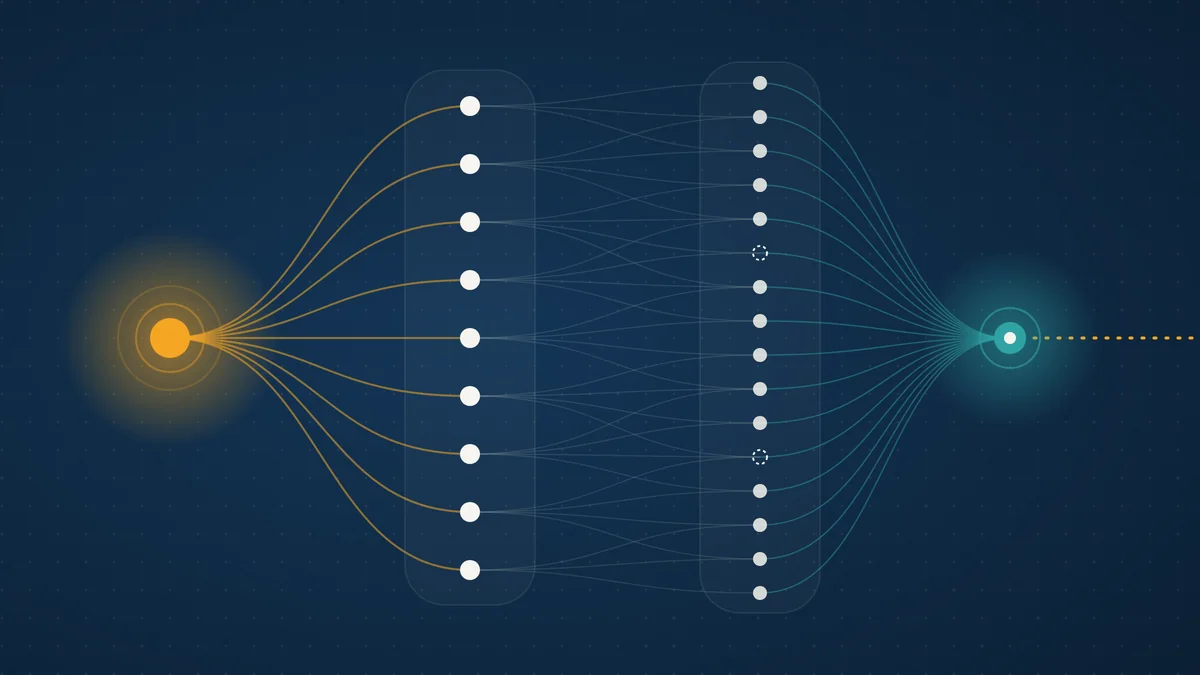
Claude Managed Agents dynamic workflows let one lead agent write a program that fans work out to as many as 1,000 agents in a single run, Anthropic announced on October 9, 2026. The feature is in public beta, and up to 64 of those agents can work at the same time.
A workflow runs agents in phases and merges what they return, while Anthropic’s servers execute it in the background. In a test Anthropic posted on X, a workflow found 66 of 70 planted bugs in each of three runs, against 14 to 27 for a single agent.
The launch turns multi-agent orchestration into a managed service, and it moves the hard questions to budgets, permissions, and observability. This report draws on Anthropic’s release notes, its workflow runs documentation, and independent coverage, per our editorial standards.
TL;DR
- What launched: dynamic workflows for Claude Managed Agents, in public beta since October 9, 2026, under the
managed-agents-2026-04-01beta header. - How it works: the session’s agent writes a workflow, a program that runs many agents in phases and combines their results; the server runs it as a background workflow run.
- Limits: 64 threads working at once per run (not guaranteed), 1,000 agents over a run’s life, a 24-hour default lifetime, and 10 open runs per session by default.
- Evidence: in Anthropic’s synthetic test, a workflow found 66 of 70 planted bugs in each of three runs; a single agent found 14, 15, and 27. No cost data was published.
- Cost: a run has no price of its own; every agent’s tokens bill at model rates, and Anthropic says to start with a scoped task because workflows can use a lot of tokens.
- For operators: the agent decides when to start a run, and permission policies cover the tools a run’s agents call, so set a session budget and clear run rules first.
What Happened: Anthropic’s October 9 Launch
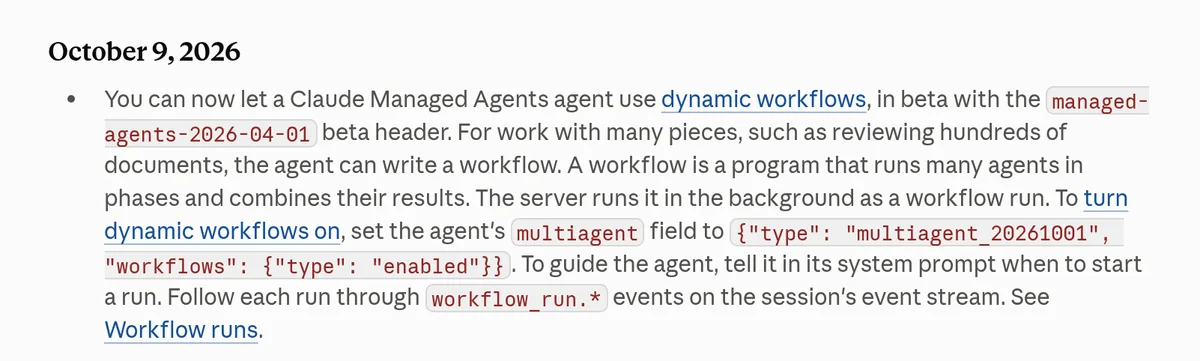
On October 9, 2026, Anthropic added dynamic workflows to Claude Managed Agents, its hosted agent harness for long-running work. The release notes describe a workflow as a program that runs many agents in phases and combines their results. Developers follow each run through workflow_run.* events on the session’s event stream.
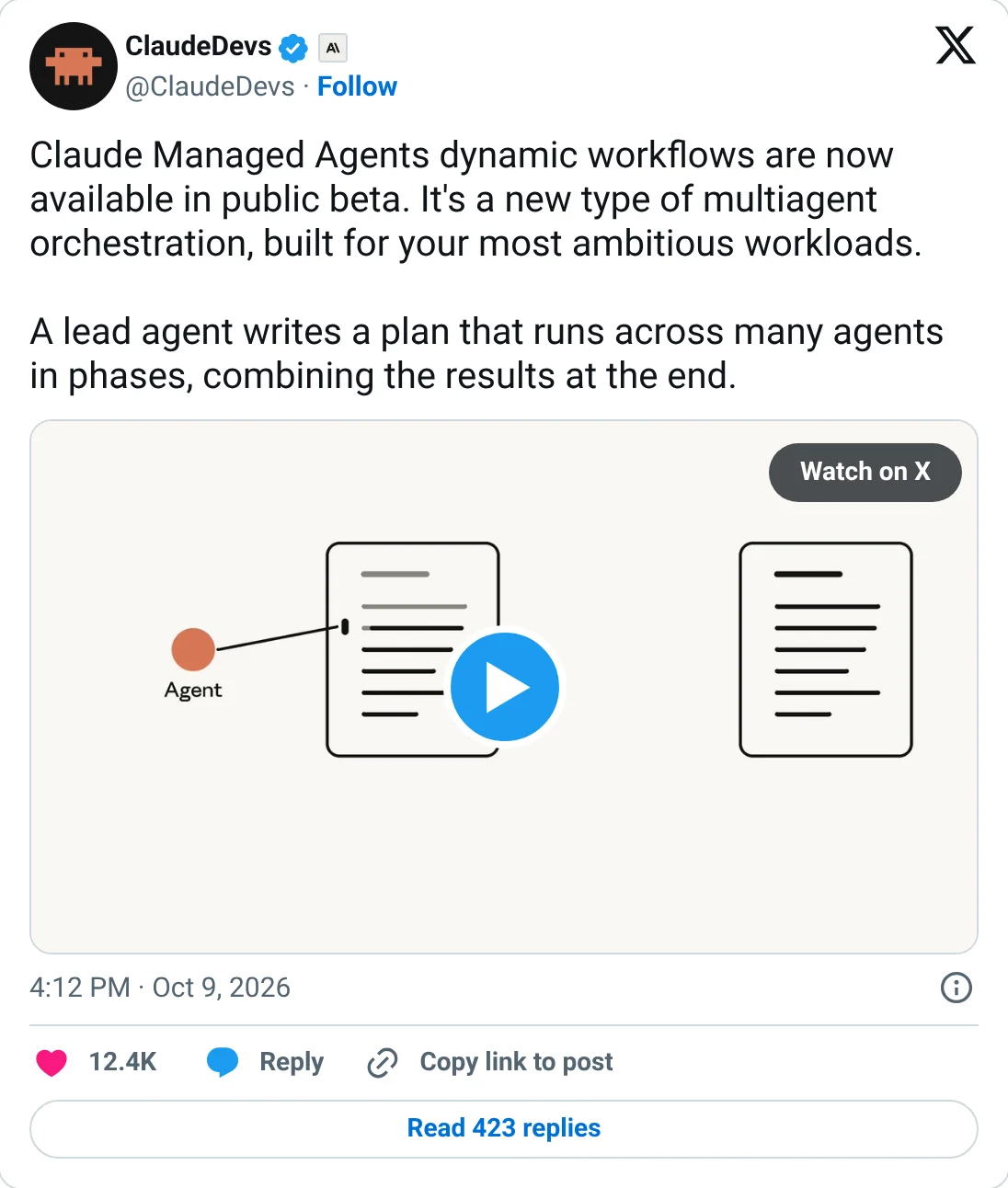
The ClaudeDevs account called it “a new type of multiagent orchestration, built for your most ambitious workloads.†A follow-up post in the thread said: “Claude will write the plan and handle orchestration of up to 1,000 agents per run.â€
Developers set it up in the agent definition. With the multiagent_20261001 type, dynamic workflows and subagents are both on by default, and the release notes show the explicit setting:
{
  "multiagent": {
    "type": "multiagent_20261001",
    "workflows": {"type": "enabled"}
  }
}
No separate API call starts a run. The agent reads the request in a user.message and decides whether and when to launch one, so Anthropic suggests guiding it in the system prompt. Its sample contract reviewer is told to start a run for more than a few contracts and to review one or two itself.
Key Facts and Limits
Anthropic’s workflow runs documentation publishes four limits and says the server applies other limits it does not list. The table below collects the launch facts and those numbers. Treat the 64-thread figure as a current setting, since Anthropic says the API does not guarantee it and it can change.
| Item | Detail |
|---|---|
| Launched | October 9, 2026, public beta |
| Beta header | managed-agents-2026-04-01 |
| Agent setting | multiagent type multiagent_20261001; workflows are on by default with this type |
| Threads working at once | 64 per run; the run starts no more until one finishes (not guaranteed) |
| Agents over a run’s life | 1,000; past that the run ends with thread_limit_error, though retries of failed agents can push thread counts higher |
| Run lifetime | 24 hours by default, or a shorter lifetime the agent sets |
| Open runs per session | 10 by default, idle runs included |
| Nesting | Runs do not nest; only the agent on the primary thread starts them |
| Pricing | No separate run price; tokens bill at each model’s rates, plus $0.08 per session-hour of running time |
| Webhooks | Run events do not trigger webhooks |
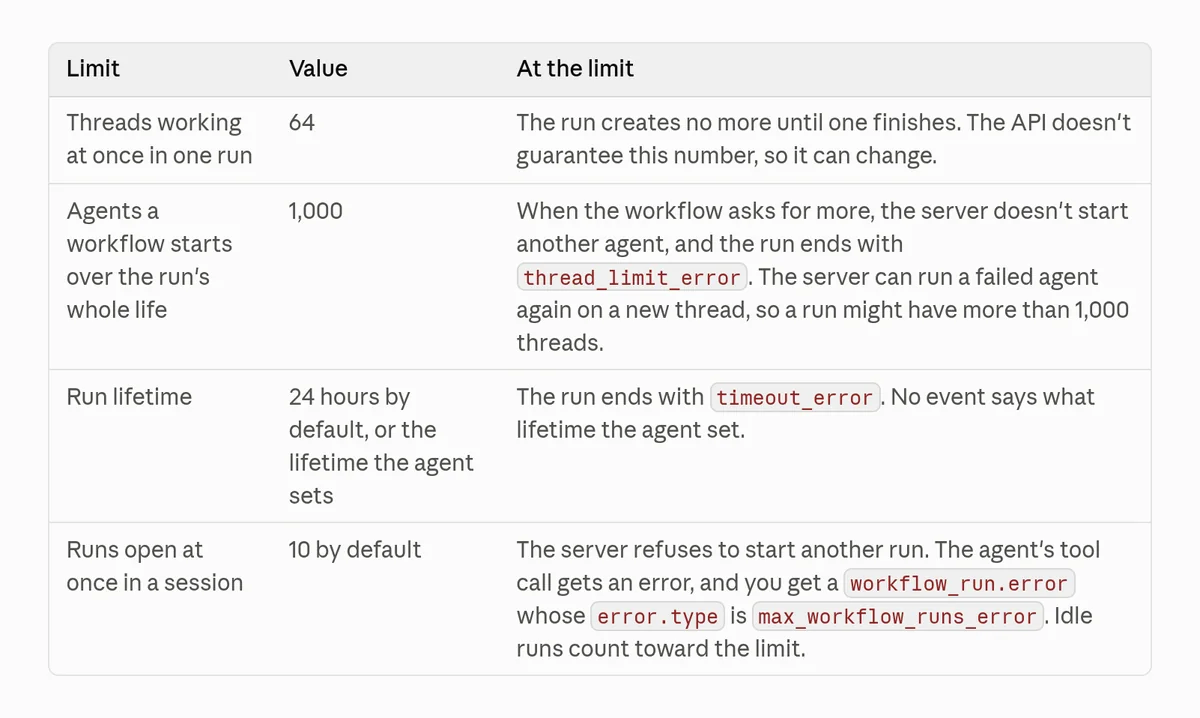
The 1,000 figure counts every agent a workflow starts over the run, so it caps total fan-out rather than simultaneous work. At most 64 agents work at the same moment, and the rest wait for a free thread.
How Dynamic Workflows Work
A workflow run has three layers: the run itself, the phases inside it, and the agent threads in each phase. The program fans agents out, passes each result to the next agent, repeats a step until a check passes, and handles failed agents. When the run ends, the lead agent gets a turn to read what happened.
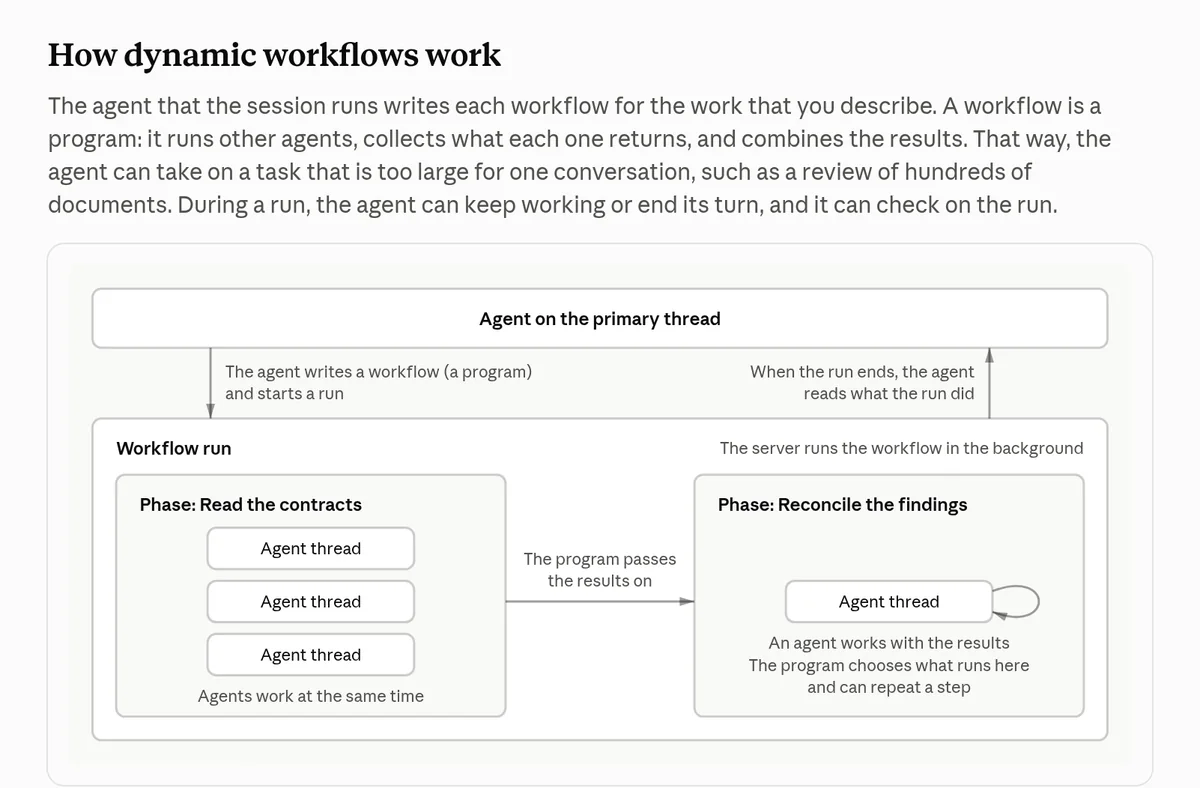
Each agent in a run is either inline, defined by the workflow with a system prompt it writes, or predefined, an agent you created and listed in workflows.predefined_agents. Inline agents use the session agent’s model. To route some work to a cheaper model, you create those agents first and list them.
All of a run’s threads share the session’s sandbox and files, and each keeps its own conversation history. The server archives every thread no later than the end of its run, and an agent inside a run cannot start a run of its own.
Subagents vs dynamic workflows
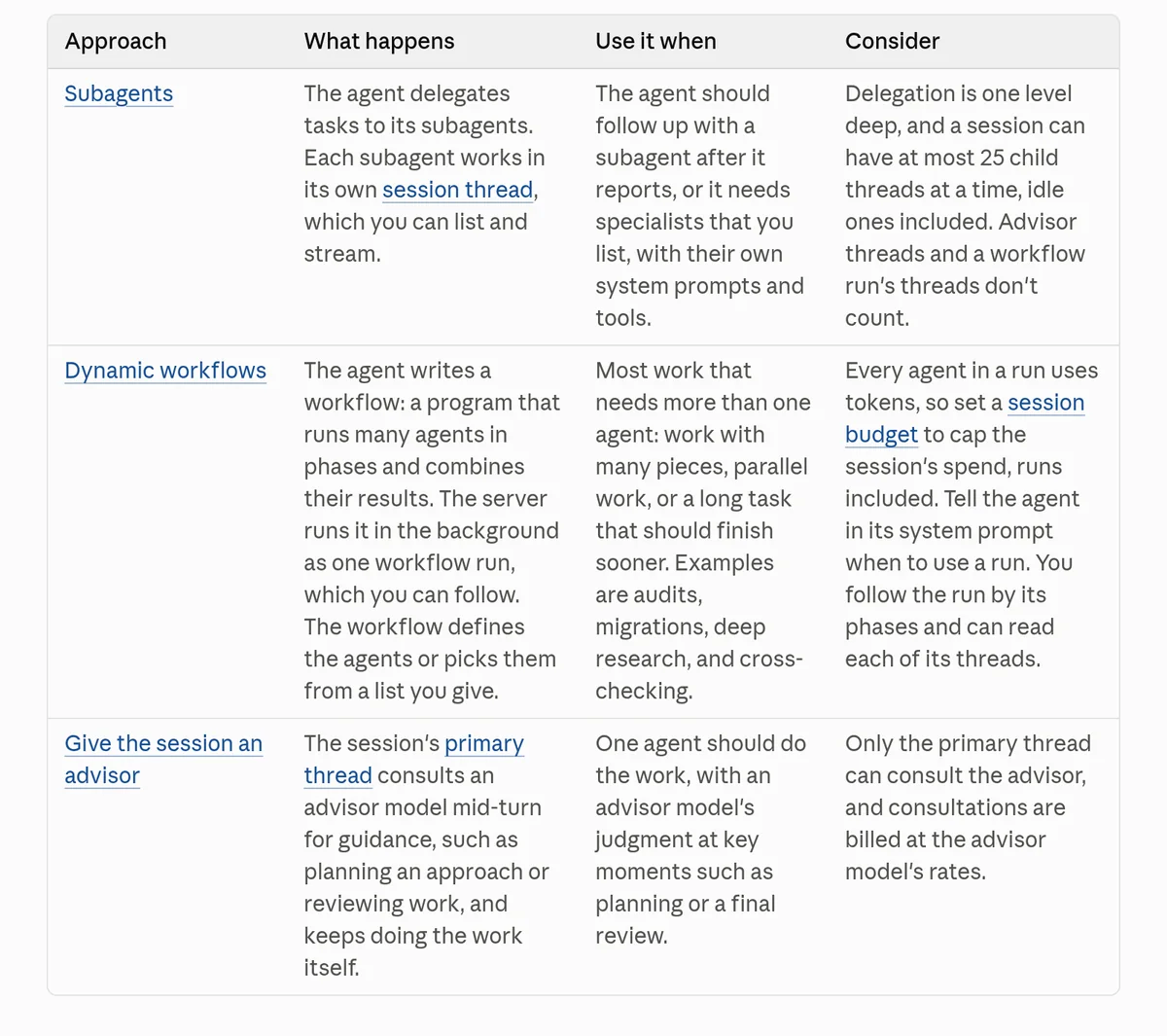
Claude Managed Agents already let an agent delegate to subagents, and dynamic workflows sit beside that option. With subagents, the lead agent steers each step and can follow up. With a workflow, a program steers, passing context between agents in code, and the lead agent stays free to talk to the user.
| Subagents | Dynamic workflows | |
|---|---|---|
| Who picks the next step | The lead agent | The workflow program |
| Depth | One level deep | Runs do not nest; a run’s agents cannot start runs |
| Scale | At most 25 child threads at a time, idle ones included | 64 working at once; 1,000 over a run’s life |
| Follow-ups | The agent can message a subagent again | No follow-ups; threads are archived by the end of the run |
| Best for | Specialists and back-and-forth after a report | Many-piece work: audits, migrations, deep research, cross-checking |
| Visibility | List and stream each thread | Phase events and each thread; the workflow code stays hidden unless you ask the agent to print it |
The Evidence: 66 of 70 Planted Bugs
Anthropic’s only published result comes from the ClaudeDevs thread. The team planted 70 bugs in a codebase of about 116,000 lines. Across three runs, a single agent found 14, 15, and 27 bugs, while a workflow found 66 in each of its three runs, a recall of about 94%.
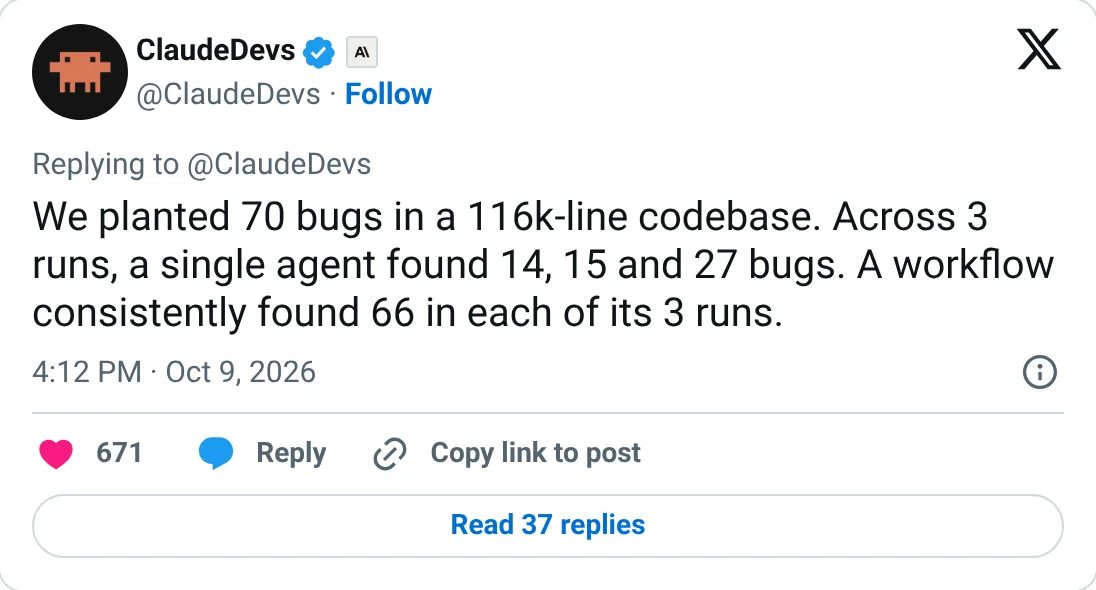
The test shows recall and consistency on a synthetic task, and it says nothing yet about cost, precision, or speed. The thread gives no token counts, false-positive rates, or runtimes, and it does not say whether the single agent had a matched token budget. Planted bugs are labeled targets, which real defects are not.
Independent data on agent teams is less flattering. Vals AI found on October 9 that agent teams cost 1.8 to 5.1 times as much as single agents on its Vibe Code Bench, and only one of four team-versus-solo gaps was statistically significant. Its Claude runs used Claude Code subagents, a different harness, and each setup ran once.
In September, OpenAI Codex developer Eric Provencher argued on X that more than two parallel subagents almost always burn tokens without improving quality, The Decoder reported. He called the overhead a “coordination tax.â€
Why It Matters for Enterprise Buyers and Operators
Dynamic workflows hand the orchestration layer to Anthropic, which removes a lot of custom code for teams building review, audit, and research agents. The trade is control. The agent decides when to fan out, one request can start hundreds of agents, and every one of them bills tokens at model rates.
Budgets are the main brake
A run has no price of its own. Every agent’s tokens bill at that model’s rates, and sessions also pay $0.08 per session-hour of running time. Anthropic’s launch thread was direct: dynamic workflows “can use a lot of tokens, so we suggest starting with a scoped task.â€
Set a session budget when you create the session, since you cannot add one later. At the budget, every open run pauses, but each working thread finishes the model request it already started. Spend can pass the cap by one request per working thread.
{
  "agent": "$AGENT_ID",
  "environment_id": "$ENVIRONMENT_ID",
  "budget": {
    "type": "limit",
    "max_list_cost": {"amount": "125", "currency": "USD"}
  }
}
With up to 64 threads working at once, overshoot grows with fan-out, so size budgets for the worst case. The $125 figure is Anthropic’s example.
Permission policies cover tools, not the launch
Anthropic’s docs say permission policies apply to the tools a run’s agents call, and they do not gate starting the run. Mixed News flagged the gap on October 11: nothing in the flow asks a developer to approve a launch. Your levers are the system prompt, the workflows setting, and each tool’s policy.
Inline agents can receive the session agent’s tools, MCP servers, and skills, and those tools keep their permission policies. If the session agent can write to production, a workflow’s agents may be able to as well. For agents that touch sensitive systems, set workflows to {"type": "disabled"} until you have tested them.
Containment is a live issue at Anthropic too. The same day, the company disclosed that its own agents overstepped during evaluations, as we reported in Anthropic Pulls Internal Evals Off the Live Internet After AI Agents Overstep.
Observability needs a run-level view
Run events arrive on the session’s event stream, but they do not trigger webhooks, and no endpoint lists runs. After a reconnect, teams rebuild run state from listed events. To get one run’s cost, you list the session’s threads and add up token usage for the threads carrying that run’s ID.
You cannot see the workflow’s code or what each thread returns to it, though you can ask the agent to print the workflow after the run. A run can end as completed while work on some threads failed, so check each thread before trusting the output.
That gap is where AgentOps tooling fits. Our guide to the best AI agent observability tools and our AgentOps tools map cover platforms that trace multi-agent runs and alert on cost spikes.
When not to fan out
Anthropic’s own guidance is to keep runs to the tasks that need them. Workflows suit work that splits into many independent pieces, such as contract reviews, codebase audits, and source cross-checks. Tightly coupled work, short tasks, and irreversible side effects belong with one agent, especially since a run can create two threads for the same piece of work.
| Signal | Fan out with a workflow | Keep it to one agent |
|---|---|---|
| Work shape | Many independent pieces: hundreds of documents, files, or sources | Steps that depend on each other |
| Size | Larger than one conversation can hold | Fits in one context |
| Side effects | Read-only or idempotent tools | Writes, payments, emails, production changes |
| Budget | Hard session budget, sized for the worst case | No budget, or unknown token cost |
| Proof | Measured gain on your own workload over repeated runs | A vendor benchmark only |
How It Shifts the Landscape
Dynamic workflows put Anthropic in the orchestration layer that many teams build today with open frameworks. Developers who wrote fan-out logic themselves can hand it to a managed service, in exchange for Claude-only execution and less visibility into the program that runs their agents.
Vals AI notes that OpenAI and Anthropic both now ship native multi-agent support. Our 12 best AI agent frameworks comparison covers how the open frameworks handle orchestration, and our agent architecture hub tracks the patterns.
| Option | Orchestration model | Best fit |
|---|---|---|
| Claude Managed Agents dynamic workflows | Agent-written program, run by Anthropic’s servers, up to 1,000 agents per run | Large parallel jobs on Claude with little infrastructure |
| Claude Managed Agents subagents | Lead agent delegates one level deep, up to 25 child threads | Specialists and follow-up conversations |
| OpenAI Agents API multi-agent mode | Lead agent spawns subagents (the setup Vals AI tested) | Teams already building on OpenAI models |
| Open frameworks such as LangGraph and CrewAI | Developer-defined graphs or crews, self-hosted | Teams that need model choice and full control of the code path |
Fan-out also raises the bar for evaluation, since a run of hundreds of agents needs scoring at the run level and the thread level. Our AI agent evaluation tools list and our Langfuse vs LangSmith vs Braintrust comparison cover tools that score multi-step runs.
What to Watch Next
Dynamic workflows are in beta, and Anthropic’s docs flag several behaviors that may change. Five questions will decide whether enterprises move real workloads onto the feature, from cost data and recall on real bugs to launch approvals, webhook support, and whether the published limits hold.
- Cost data: whether Anthropic or early users publish token totals and cost-matched comparisons for the planted-bug test.
- Real-world recall: results on unlabeled codebases and document sets, with precision and duplicate rates.
- Launch approvals: whether a policy to approve or cap a run’s start arrives alongside tool permissions.
- Observability hooks: webhooks for run events and an endpoint that lists runs, both missing today.
- Limits: whether the 64-thread and 10-open-run defaults change as the beta matures.
Frequently Asked Questions
What are dynamic workflows in Claude Managed Agents?
Dynamic workflows let a Claude Managed Agents agent write a program that runs many agents in phases and combines their results. Anthropic’s servers run that program in the background as a workflow run. The feature entered public beta on October 9, 2026, and developers turn it on with the multiagent_20261001 agent type.
How many agents can a Claude dynamic workflow run?
A workflow can start up to 1,000 agents over a run’s whole life, and up to 64 threads can work at the same time, a figure Anthropic says is not guaranteed. A run lasts 24 hours by default, and a session can hold 10 open runs by default, idle runs included.
How much do Claude dynamic workflows cost?
A run has no separate price. Every agent’s tokens bill at that model’s standard rates, and Managed Agents sessions also pay $0.08 per session-hour of running time. Anthropic warns that workflows can use a lot of tokens, so it suggests starting with a scoped task and setting a session budget.
When should you use dynamic workflows instead of subagents?
Use dynamic workflows for work with many independent pieces, such as audits, migrations, deep research, or reviewing hundreds of documents. Use subagents when the lead agent needs to follow up with specialists after they report. Subagents go one level deep with at most 25 child threads, while a workflow can start 1,000 agents.
The Bottom Line
Dynamic workflows make large fan-out a configuration setting instead of a build project, and the beta limits are generous. The proof so far is one synthetic test without cost data. Start with a scoped, read-only job under a hard session budget, measure tokens per run, and compare the result against one agent before you scale.
We will update this story as Anthropic changes the beta. Send corrections through our contact page.
Related guides: the AgentOps tools map, agent observability, AI agent frameworks, and agent security.