

Last updated October 19, 2026. Features, plan limits, and prices were checked against each vendor’s documentation and pricing pages on that date.
The best prompt management tools for production LLM apps in 2026 are Langfuse for open-source teams, Braintrust for eval-gated releases, and PromptLayer for teams where non-engineers own the wording. LangSmith, Pydantic Logfire, MLflow Prompt Registry, Arize Phoenix, and Portkey complete the shortlist for LangChain shops, server-side canaries, ML platform teams, Phoenix users, and gateway-first stacks.
Choose Langfuse when prompts must be self-hosted next to your traces. Choose PromptLayer or Logfire when you want a 10% canary configured on the server instead of written in your code. None of these tools pays off when prompts change less than once a week and only engineers edit them, because a string in git is free and reviewed with the code.
A prompt management tool is a system that stores prompt templates outside application code, versions every change, and controls which version production serves. This guide sits in the evaluation layer of our AgentOps tools map. No vendor paid for placement or reviewed this page, per our editorial standards and disclosure policy.
TL;DR
- Open source and self-hosted: Langfuse (MIT core) and MLflow Prompt Registry (Apache 2.0) are free to run yourself, and Arize Phoenix is free under the Elastic License 2.0.
- Eval-gated releases: Braintrust treats each prompt as a function you score on datasets, with environments on Pro at $249 a month.
- Server-side traffic splits: PromptLayer dynamic release labels and Logfire rollout weights send a set percentage of requests to a new version with no router code.
- LangChain and LangGraph teams: LangSmith adds Staging and Production environments, rollback history, and prompt owners, at $39 per seat on Plus.
- Gateway-first stacks: Portkey, now Prisma AIRS AI Gateway after its Palo Alto Networks acquisition, renders labeled prompts inside the gateway call.
- Left off: Helicone is in maintenance mode, Humanloop shut down on September 8, 2025, and Agenta now prices an agent workspace.
8 Best Prompt Management Tools at a Glance
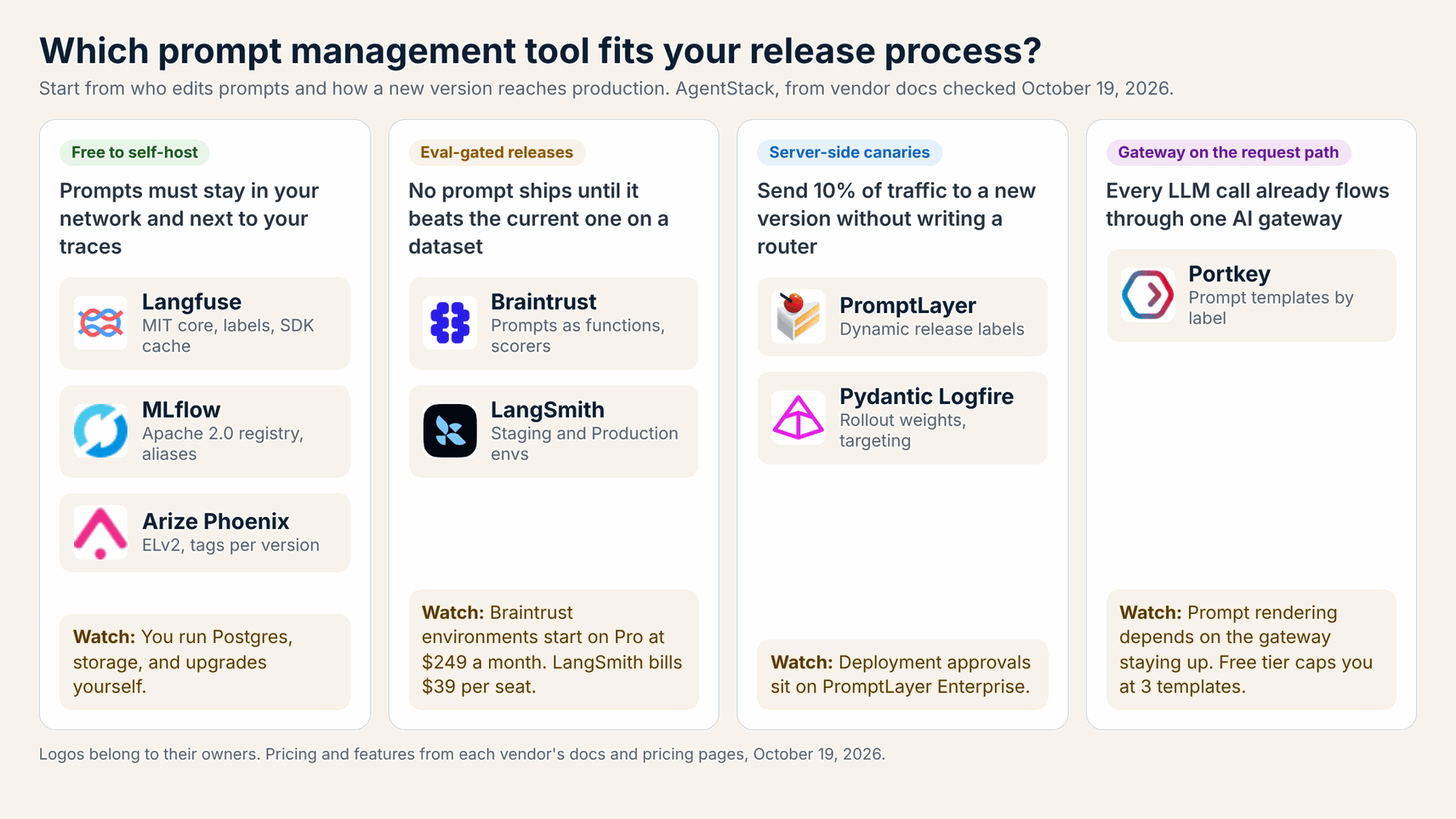
Pick a prompt management tool by release mechanism first: labels your code resolves, server-side traffic splits, or prompts rendered inside a gateway. The table below compares all eight on that mechanism, self-hosting, and entry pricing. Every cell reflects vendor documentation and pricing pages checked on October 19, 2026, so confirm current limits before you sign.
| Tool | Best for | Release control | Traffic split | Self-host | First paid plan |
|---|---|---|---|---|---|
| Langfuse | Open source, prompts linked to traces | Labels such as production | In your code | Free (MIT core) | Core $29/mo |
| Braintrust | Eval-gated prompt releases | Environments, pinned versions | In your code | Hybrid or on-prem (Enterprise) | Pro $249/mo |
| PromptLayer | Non-engineers editing prompts | Release labels | Server side, percent and segments | Enterprise only | Pro $49/mo |
| LangSmith | LangChain and LangGraph teams | Staging and Production environments | In your code | Enterprise only | Plus $39/seat/mo |
| Pydantic Logfire | Canaries tied to traces | Labels on a managed variable | Server side, weights and targeting | Enterprise only | Team $49/mo |
| MLflow Prompt Registry | ML platform teams on MLflow | Mutable aliases | In your code | Free (Apache 2.0) | Free; Databricks for managed |
| Arize Phoenix | Teams already tracing with Phoenix | Version tags | In your code | Free (ELv2) | Arize AX Pro $50/mo |
| Portkey | Prompts rendered in the AI gateway | Publish plus labels | Not documented for prompt versions | Enterprise VPC | Production $49/mo |
Verdict: Langfuse is the default when you want open source and traces in one place. PromptLayer and Logfire are the only two here that split traffic between versions on the server. Braintrust wins when a release must pass an eval suite first, and LangSmith wins inside a LangChain codebase.
How We Chose These Prompt Management Tools
We kept tools that version prompts immutably, let production resolve a version by label or environment without a redeploy, and connect each version to traces or evaluations. We started from the leading prompt management roundups, then checked every claim against vendor documentation and pricing pages on October 19, 2026.
- Versioning: saved versions are immutable, carry history, and support diffs or commit messages.
- Promotion: a label, tag, alias, or environment decides what production serves, and saving stays separate from releasing.
- Rollout: whether the platform splits traffic between versions or leaves that to your application.
- Runtime path: SDK fetch with a cache and fallback, or prompt rendering inside a gateway on every call.
- Evaluation link: running a candidate version over a dataset or tying it to production traces.
- Price and hosting: a published free tier, a clear first paid plan, and a self-hosting option.
We did not run paid bake-offs, so there are no star ratings. Ranking follows fit for production release work, with open source weighted for teams with data residency rules. Pure tracing tools belong in our AI agent observability tools roundup.
What Separates Prompt Management From Prompt Versioning?
Prompt versioning records what changed, while prompt management also controls which version production serves and how fast a change reaches users. Every tool here versions prompts well. They differ on promotion, rollout, approvals, and what happens when the vendor API is unreachable, and those four controls decide production risk.
- Promotion: moving a
productionlabel or environment pointer instead of editing code. - Rollout: sending 10% of traffic to a candidate version, sticky per user or tenant.
- Approvals: limiting who can move the production pointer, which several vendors reserve for paid tiers.
- Failure mode: a cached copy or code default when the prompt service is down, or a hard failure on a gateway path.
1. Langfuse: Best Open-Source Prompt Management Linked to Traces
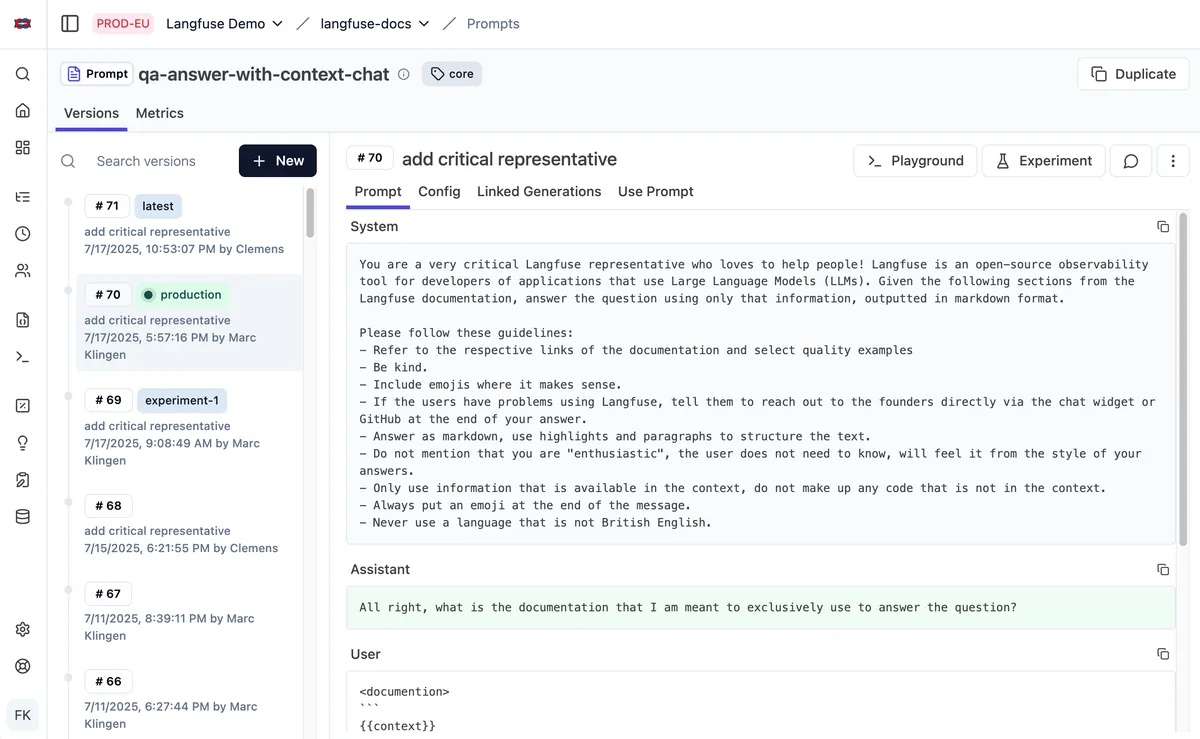
Langfuse is the strongest default for teams that want prompt management, tracing, and evals in one open-source product they can self-host. Each prompt gets numbered versions, and labels such as production decide what the SDK returns. The Langfuse prompt management docs cover linking prompts to traces, so you can compare quality, latency, and cost by version.
The SDKs cache prompts client-side with a 60-second default TTL, serve a stale copy while refreshing in the background, and accept a fallback prompt, per the caching docs. Langfuse measured a 37 ms median uncached fetch over 1,000 calls on Langfuse Cloud. Its license keeps the core under MIT, with ee/ folders licensed separately and copyright held by ClickHouse, Inc.
- Best for: Engineering teams that want free self-hosting and prompt versions tied to production traces.
- Pricing (October 2026): Hobby free (50k units, 2 users); Core $29/mo with 100k units and unlimited users; Pro $199/mo; Enterprise $2,499/mo, per Langfuse pricing.
- Watch out for: Traffic splitting between two versions lives in your application code, and protected deployment labels need the $300/mo Teams add-on on Pro or Enterprise.
2. Braintrust: Best for Eval-Gated Prompt Releases
Braintrust fits teams whose release gate is an eval suite, because every prompt is a function you can score on a dataset before it ships. Apps call a prompt by slug with invoke(), which runs and logs the model call, or with loadPrompt() to build messages for their own client, per the Braintrust prompt docs.
The TypeScript and Python loaders cache prompts in memory and on disk and fall back to the last cached copy if Braintrust is unreachable. Changes made in the UI take effect immediately unless code pins a version or an environment, so pin production calls from day one. The built-in Loop agent can generate test cases and iterate on prompts.
- Best for: Product teams that will not promote a prompt until it beats the current version on scored datasets.
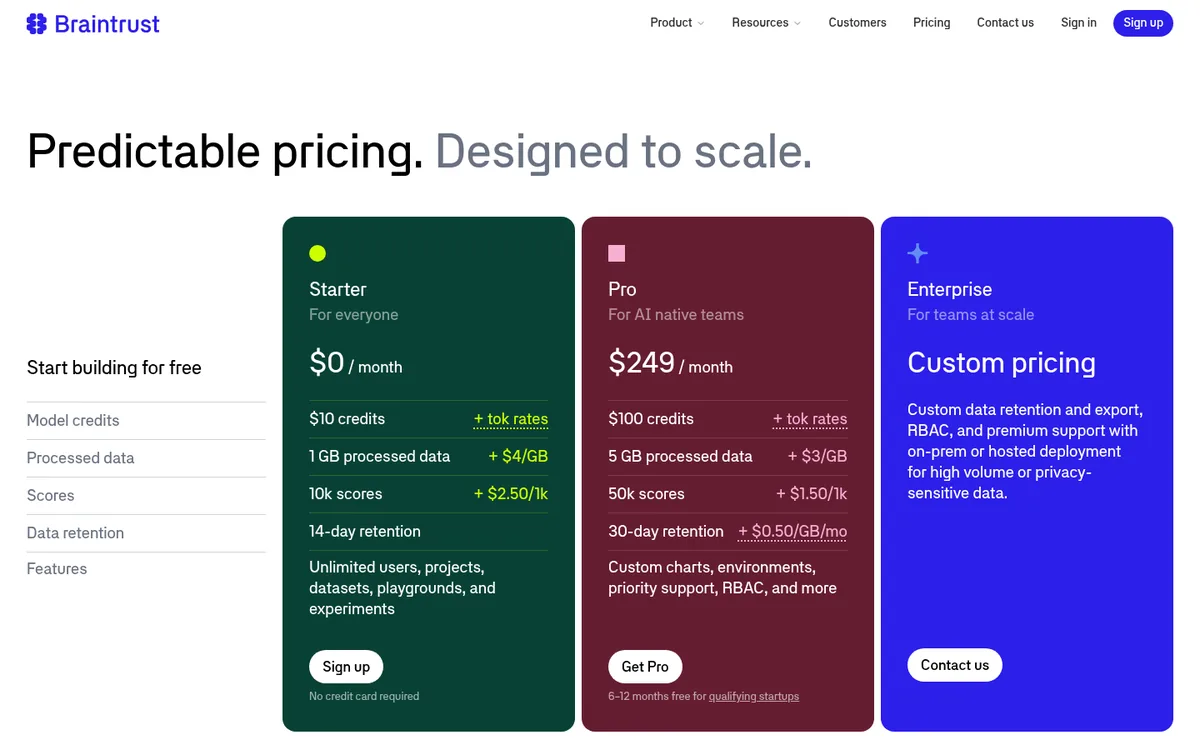
- Pricing (October 2026): Starter $0 (1 GB processed data, 10k scores, 14-day retention, unlimited users); Pro $249/mo with environments, RBAC, and 50k scores; Enterprise custom with on-prem or hosted deployment, per Braintrust pricing.
- Watch out for: Environments that separate staging and production start on Pro, and the platform is closed source.
3. PromptLayer: Best for Non-Engineers and Server-Side A/B Releases
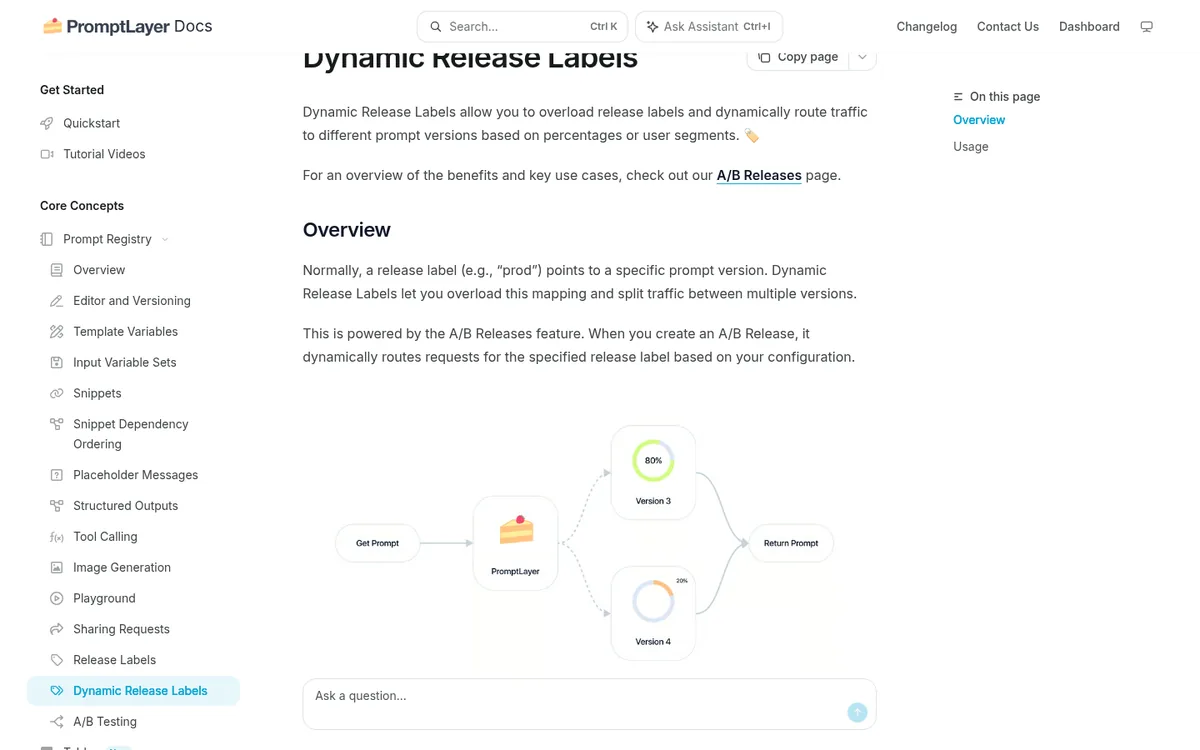
PromptLayer is the best fit when product, support, or domain experts own prompt wording and should publish without waiting on an engineer. The visual registry shows a diff before each save and asks for a commit message, per its editor and versioning docs. Release labels such as prod decide which version code receives.
Dynamic release labels split one label across versions by percentage, which must total 100%, and route segments by request metadata such as user or company ID. Log the version returned rather than the label, because the label always points to the base version in logs.
- Best for: Cross-functional teams that want a no-code prompt CMS with server-side A/B releases.
- Pricing (October 2026): Free (5 users, 2.5k requests/mo, 10 prompts); Pro $49/mo with unlimited prompts and $0.003 per transaction overage; Team $500/mo for 25 users; Enterprise custom, per PromptLayer pricing.
- Watch out for: Deployment approvals, RBAC, and self-hosting sit on Enterprise, so a reviewer gate for non-engineer edits costs extra.
4. LangSmith: Best for LangChain and LangGraph Teams
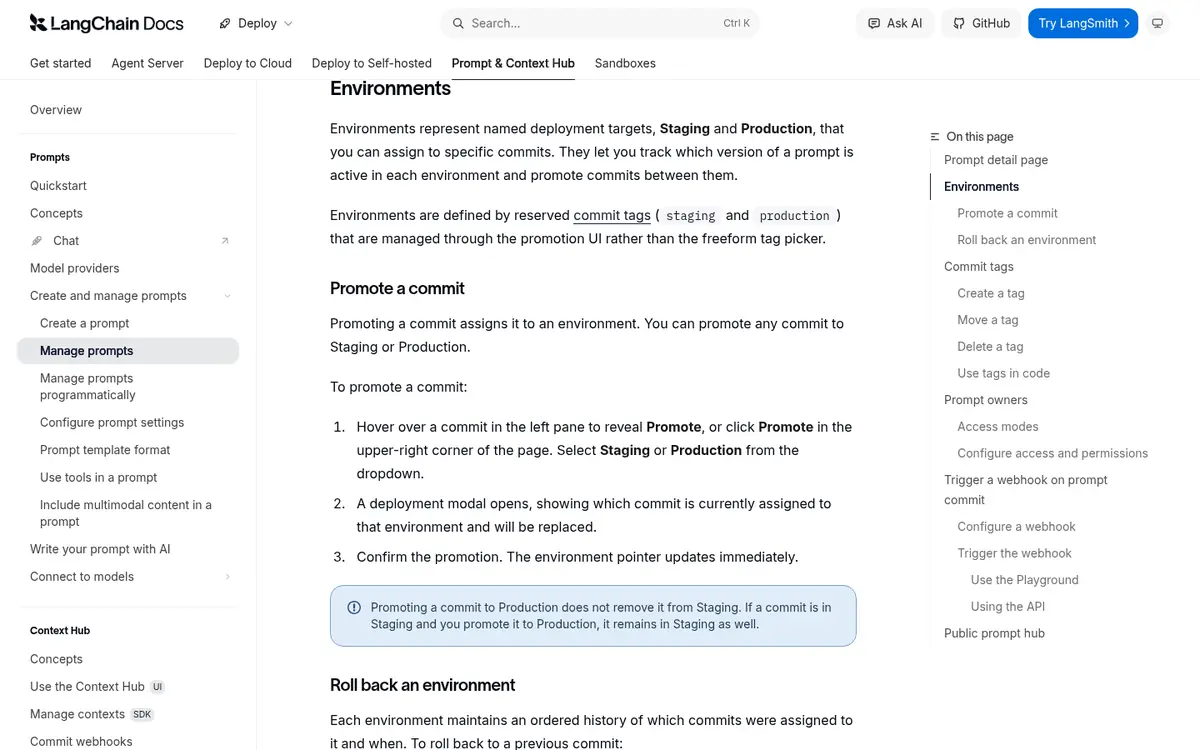
LangSmith is the natural choice when agents already run on LangChain or LangGraph, since prompts, traces, and datasets share one workspace. Every save is a commit, and reserved staging and production tags work as environments you promote into through a confirmation modal, per the LangSmith manage prompts docs.
Each environment keeps an ordered rollback history, and prompt owners can restrict who promotes a commit. Code pulls by environment, as in client.pull_prompt("support-agent:production"). The newer Prompt and Context Hub versions whole skills and agent bundles the same way.
- Best for: Teams building on LangChain or LangGraph that want promotion, rollback, and owner controls without another vendor.
- Pricing (October 2026): Developer $0 (1 seat, 5k base traces/mo); Plus $39/seat/mo with 10k base traces; Enterprise for self-hosted and hybrid deployment, per LangSmith pricing.
- Watch out for: Per-seat pricing makes every prompt editor a paid seat, and percentage canaries between commits are application code.
5. Pydantic Logfire: Best for Server-Side Canaries Tied to Traces
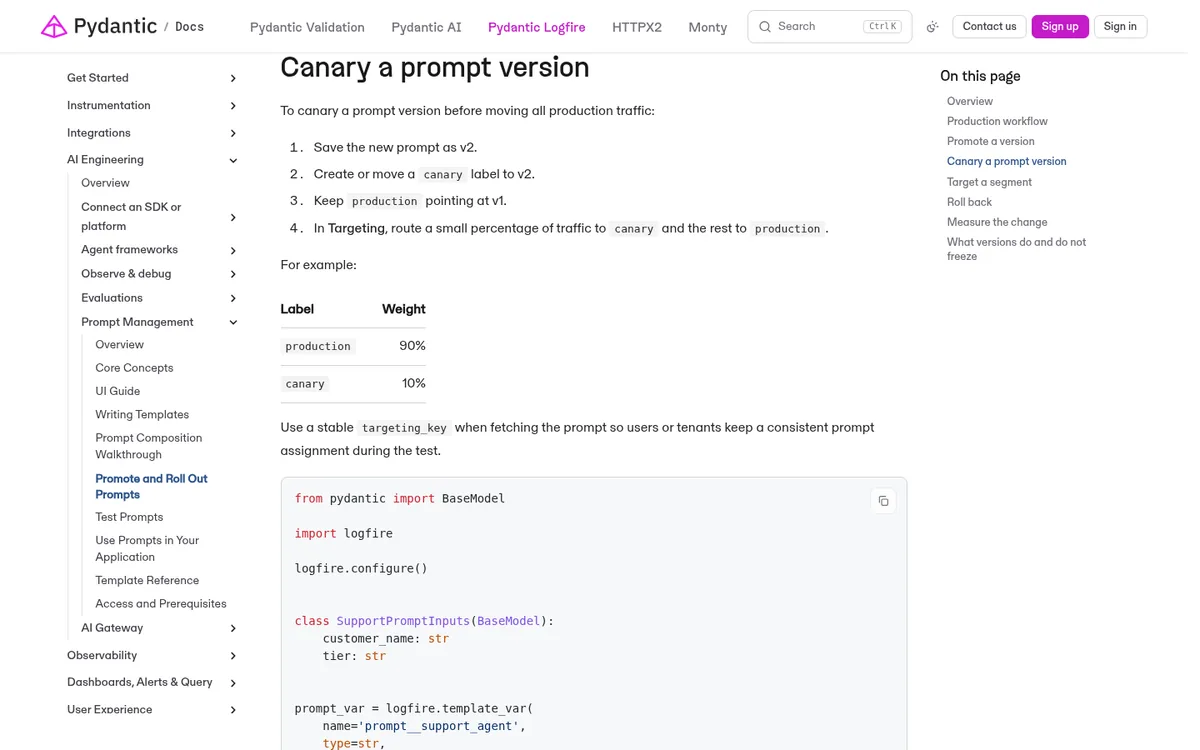
Pydantic Logfire suits teams that want percentage rollouts and user targeting configured on the server, with the served version recorded on every trace. Each saved version freezes the template, and a production label on the backing managed variable decides what the SDK resolves, per the Logfire promotion and rollout docs.
A canary is a weight table, such as 90% production and 10% canary, with a stable targeting_key keeping each user or tenant on one version. Passing label='production' bypasses rollout. The prompt management overview adds test scenarios and datasets.
- Best for: Python and TypeScript teams that want canaries and per-tenant targeting without writing a router.
- Pricing (October 2026): Personal free (10M records/mo, 1 seat); Team $49/mo with 5 seats and $25 per extra seat; Growth $249/mo; Enterprise for dedicated or self-hosted, per Logfire pricing.
- Watch out for: Self-hosting is Enterprise only, and the prompt workflow is younger than Langfuse’s or LangSmith’s.
6. MLflow Prompt Registry: Best Free Registry for ML Platform Teams
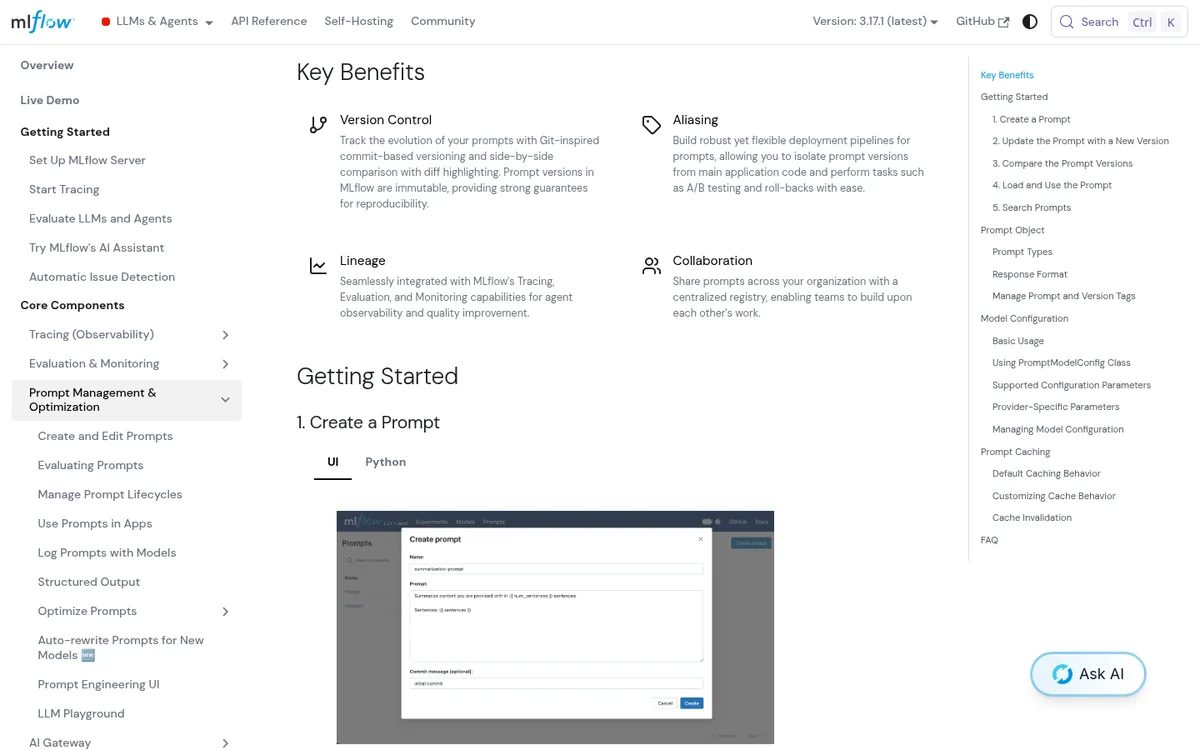
MLflow Prompt Registry is the best free option for ML platform teams that already run MLflow for tracing, evaluation, and model lifecycle. Versions are immutable with Git-style commit messages and diffs, and mutable aliases such as production point at the version apps load, per the MLflow Prompt Registry docs.
Apps call mlflow.genai.load_prompt() by version or alias. Version-pinned loads cache indefinitely, and alias loads refresh every 60 seconds by default. Each version can store model settings such as temperature, and Jinja2 templates render in a sandboxed environment by default.
- Best for: Data and ML platform teams on open-source MLflow or managed MLflow on Databricks.
- Pricing (October 2026): Free and open source under Apache 2.0; managed hosting through Databricks.
- Watch out for: Stored model configuration stays mutable after a version is created, so pin settings in code if reproducibility matters, and traffic splits are yours to build.
7. Arize Phoenix: Best for Teams Already Tracing With Phoenix
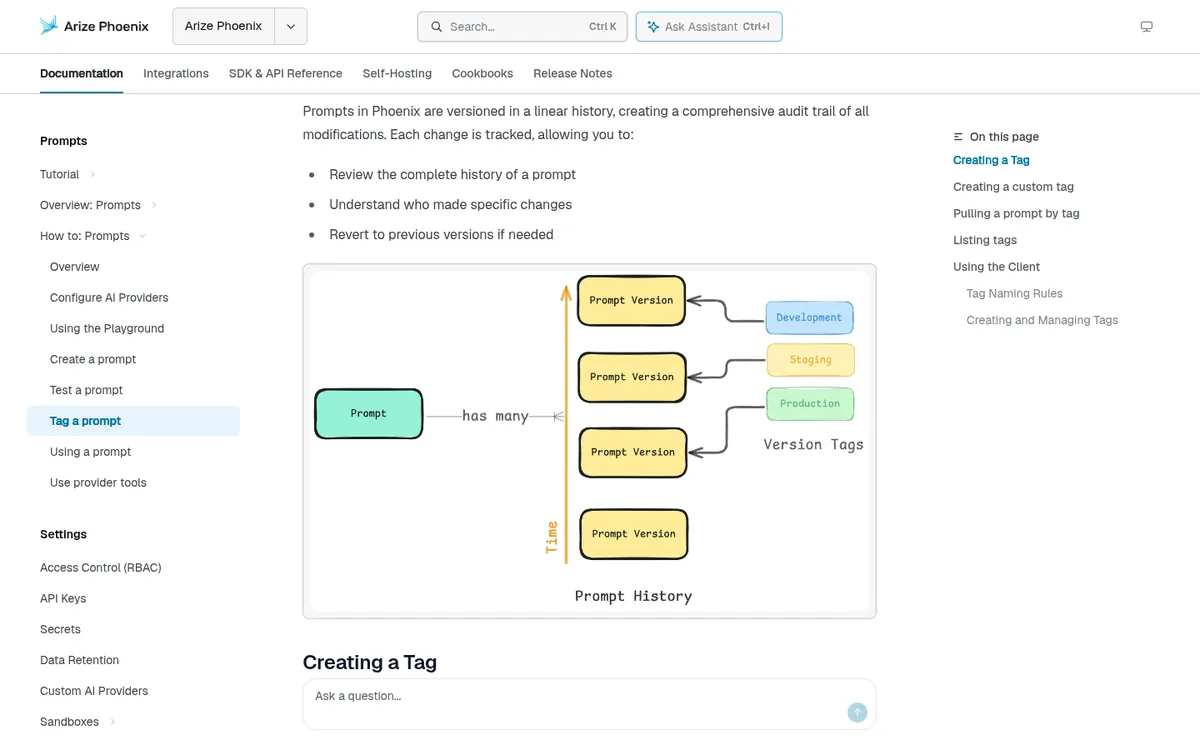
Arize Phoenix is the practical pick when Phoenix already traces your app and you want prompt releases without adding another platform. Prompts keep a linear version history, and the default production, staging, and development tags, plus custom tags, mark releases, per the Phoenix tag a prompt docs.
Code pulls a tagged version with client.prompts.get(prompt_identifier="my-prompt", tag="production"), so moving the tag changes production without a deploy, per the using a prompt guide. Version IDs never change and cannot be deleted. Phoenix is source-available under the Elastic License 2.0 and free to self-host.
- Best for: Teams on Phoenix or Arize AX that want tags, a playground, and experiments next to their traces.
- Pricing (October 2026): Phoenix free to self-host; Arize AX Free (25k spans/mo, 15-day retention) and AX Pro $50/mo, per Arize pricing.
- Watch out for: The Elastic License 2.0 is not an OSI open-source license, and there is no built-in traffic split.
8. Portkey: Best When Prompts Render Inside Your AI Gateway
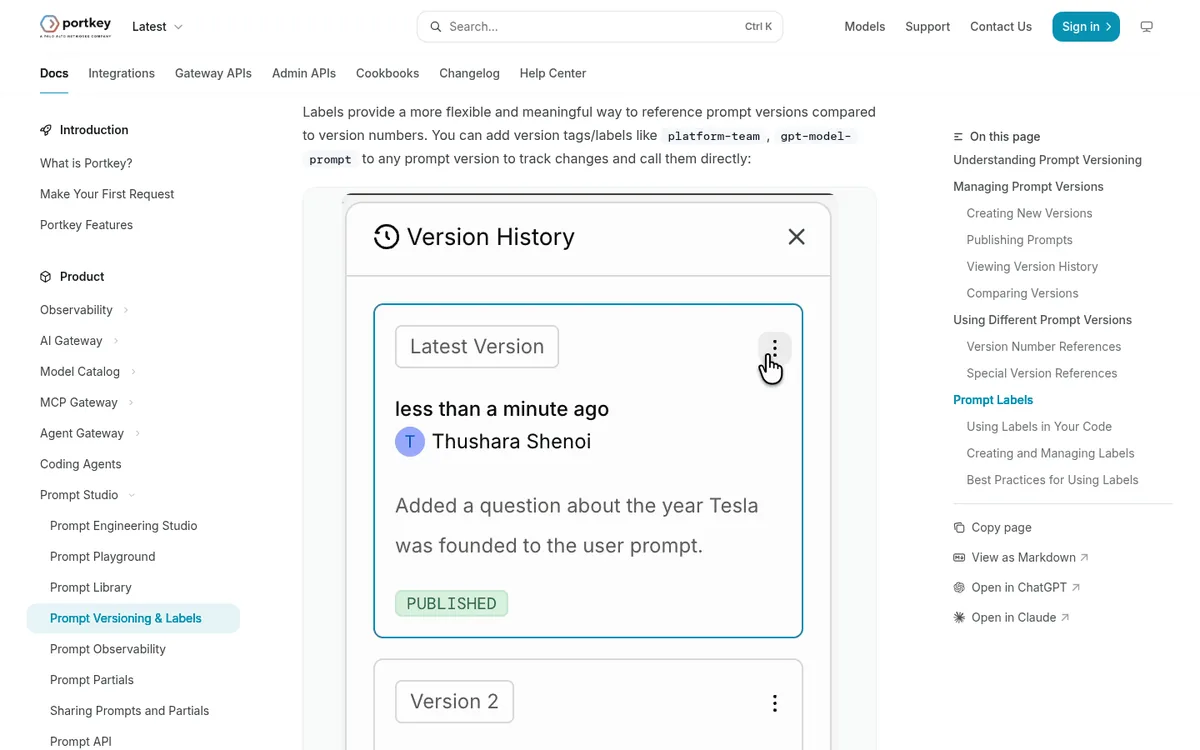
Portkey fits teams whose LLM traffic already flows through its gateway, because prompts render in the same call that handles routing, fallbacks, and guardrails. Saving a prompt and publishing it are separate steps, and versions are immutable, per the Portkey prompt versioning docs.
Code calls a prompt ID for the published version, @12 for a fixed version, or a label such as @staging. Default labels cover production, staging, and development. Palo Alto Networks completed its Portkey acquisition on May 29, 2026, and the product now ships as Prisma AIRS AI Gateway. Our Portkey vs LiteLLM vs OpenRouter comparison covers the gateway side.
- Best for: Gateway-first teams that want prompts, keys, budgets, and guardrails in one control plane.
- Pricing (October 2026): Developer free (3 prompt templates, 10k logs/mo); Production $49/mo with unlimited templates and 100k logs; Enterprise custom with VPC hosting, per Portkey pricing.
- Watch out for: Deleting a custom label makes every request to it fail, and prompt rendering depends on the gateway being reachable.
How Do Apps Fetch a Prompt Without Adding Latency?
Production apps should fetch prompts by label through an SDK cache with a code-side fallback, so a prompt service outage never blocks a user request. Langfuse, Braintrust, MLflow, and Logfire all document a cached or default path. Gateway-rendered prompts in Portkey trade that cache for one network hop that also handles routing.
# Langfuse: production label, 5-minute cache, fallback if the API is down
from langfuse import get_client
langfuse = get_client()
prompt = langfuse.get_prompt(
    "support-agent",
    label="production",
    cache_ttl_seconds=300,
    fallback="You are a support agent. Answer only from the provided context.",
)
system_text = prompt.compile(customer_name="Maya")

# MLflow: load whatever the production alias points at (60-second alias cache)
import mlflow
reg = mlflow.genai.load_prompt("prompts:/support-agent@production")
system_text = reg.format(customer_name="Maya")
Keep the fallback text in the repository and test it, because it is what users see on a bad day. Record the resolved version number on each trace or log line, since the label alone will not tell you which wording produced a bad answer a week later.
Release Controls Compared
Release controls decide how much damage one bad prompt edit can do before someone notices. The table compares how each tool promotes a version, how apps resolve it at runtime, and who can move production, based on vendor documentation checked October 19, 2026. Approval gates are the most common paid-tier feature.
| Tool | How production is chosen | Runtime fetch | Who can promote |
|---|---|---|---|
| Langfuse | Move the production label | SDK cache, 60 s TTL, fallback | Protected labels on Teams add-on or Enterprise |
| Braintrust | Environment or pinned version | Memory and disk cache, last copy fallback | RBAC on Pro |
| PromptLayer | Release label, optional A/B release | SDK fetch by label | Deployment approvals on Enterprise |
| LangSmith | Promote commit to Staging or Production | pull_prompt by tag | Prompt owners restrict promotion |
| Pydantic Logfire | Label on managed variable, rollout weights | SDK resolution with code default | Editors with variable write access |
| MLflow | Move a mutable alias | Alias cache 60 s, version cache indefinite | MLflow or Databricks permissions |
| Arize Phoenix | Move a version tag | Client fetch by tag | Phoenix RBAC |
| Portkey | Publish a version or move a label | Rendered in the gateway call | Workspace RBAC on Production |
Verdict: LangSmith and PromptLayer Enterprise have the clearest built-in gate on who can push to production. Langfuse and MLflow give the most predictable runtime behavior through documented cache TTLs. Portkey removes the cache question entirely but makes the gateway a hard dependency for every prompt.
What Prompt Management Tools Cost in 2026
Prompt management is cheap or free at the entry level, and the bill grows with traces, seats, or requests rather than with prompt count. Langfuse, MLflow, and Phoenix cost nothing to self-host. Among hosted plans, PromptLayer, Logfire, and Portkey start at $49 a month, while Braintrust Pro costs $249.
| Tool | Free tier | First paid plan | What drives the bill |
|---|---|---|---|
| Langfuse | 50k units/mo, 2 users | Core $29/mo, unlimited users | Units: traces, observations, scores at $8 per 100k |
| Braintrust | 1 GB data, 10k scores | Pro $249/mo | Processed data at $3/GB and scores |
| PromptLayer | 2.5k requests/mo, 10 prompts | Pro $49/mo | Requests at $0.003 per transaction |
| LangSmith | 1 seat, 5k base traces | Plus $39/seat/mo | Seats and traces |
| Pydantic Logfire | 10M records/mo, 1 seat | Team $49/mo, 5 seats | Records at $2 per million, extra seats |
| MLflow | Open source | Managed via Databricks | Your infrastructure |
| Arize Phoenix | Self-host free; AX Free 25k spans | AX Pro $50/mo | Spans and ingestion volume |
| Portkey | 3 templates, 10k logs | Production $49/mo | Logs at $9 per 100k requests |
Verdict: Self-hosted Langfuse or MLflow is cheapest for engineering-led teams with spare ops capacity. PromptLayer Pro is the cheapest hosted path for non-engineer editors. Braintrust costs more up front but folds evals, scoring, and environments into the same $249 plan.
For a fuller cost model across tracing and evals, see our LangSmith vs Langfuse vs Braintrust pricing breakdown.
Prompt Management Tools We Left Off, and Why
We dropped three well-known names because their October 2026 status makes them risky picks for a new production rollout. Each still appears in older roundups, so the reasons below are worth checking before you inherit one of them from a previous team or vendor shortlist.
- Helicone: Helicone joined Mintlify on March 3, 2026, and the standalone platform is in maintenance mode with security and bug fixes but no new features.
- Humanloop: the team joined Anthropic in August 2025, and the platform shut down on September 8, 2025.
- Agenta: its pricing page now sells an agent workspace billed in credits, so the prompt playground is no longer the core product.
Promptfoo, DeepEval, and similar test runners are evaluation tools, so they appear in our AI agent evaluation tools roundup instead.
When Prompts in Git Are Still the Better Choice
Prompts in git remain the better choice when they change less than weekly, only engineers edit them, and deploys take minutes. A string in the repository is free, reviewed with the code that depends on it, and has no runtime dependency. Prompt management tools add a service, a cache, and a second source of truth.
The switch makes sense once the right editor is not the right deployer, or once you need a change in front of some users and not others. A middle path works well: keep the prompt in code as the fallback, and let the platform override it by label.
Which Prompt Management Tool Should You Choose?
Match the tool to who edits prompts and how releases are approved, then check price. Use the profiles below as starting points, and treat each disqualifier as a hard stop for that pick, since none of them can be configured away on the plans available as of October 19, 2026.
- Choose Langfuse when you want open source, self-hosting, and prompts tied to traces. Skip it when you need server-side canaries without writing code.
- Choose Braintrust when every release must beat the current version on an eval suite. Skip it when $249 a month is out of budget for environments.
- Choose PromptLayer when non-engineers publish wording and you want A/B releases on the server. Skip it when you need self-hosting below Enterprise.
- Choose LangSmith when the stack is LangChain or LangGraph. Skip it when many occasional editors would each need a $39 seat.
- Choose Pydantic Logfire when canaries and per-tenant targeting must be configuration. Skip it when you must self-host without an Enterprise contract.
- Choose MLflow or Phoenix when those platforms already run your tracing. Choose Portkey when the gateway already carries every call.
Comparing the broader platforms behind these prompt tools? Start with Langfuse vs LangSmith vs Braintrust, Langfuse alternatives, or LangSmith alternatives.
Frequently Asked Questions
Do I need a prompt management tool if I already use Git?
Git is enough when prompts change rarely and only engineers edit them, because the repository already versions and reviews them. A prompt management tool earns its place once domain experts edit wording, prompts change weekly or faster, or you need a canary on part of your traffic without shipping a new build.
Can I change a production prompt without redeploying my app?
Yes, all eight tools support it. Langfuse, PromptLayer, LangSmith, Logfire, MLflow, Phoenix, and Portkey resolve a label, tag, alias, or environment at runtime, so moving it changes production. Braintrust serves UI edits immediately unless code pins a version, so pin production calls to avoid accidental releases.
Which prompt management tools are open source?
Langfuse keeps its core under the MIT license, with enterprise folders licensed separately, and MLflow is Apache 2.0. Arize Phoenix is source-available under the Elastic License 2.0 and free to self-host. Braintrust, PromptLayer, LangSmith, Logfire, and Portkey are closed platforms with Enterprise self-hosting options.
How do I roll out a new prompt to 10% of users?
Use PromptLayer dynamic release labels or Logfire rollout weights to split traffic on the server, with a stable user or tenant key for sticky assignment. In Langfuse, LangSmith, MLflow, Phoenix, and Braintrust, fetch both versions and choose between them in your application code.
Does prompt management replace LLM evaluations?
Prompt management does not replace evaluations. It controls which version runs and how widely, while evaluations tell you whether the new version is better. Pair a registry with offline evals on a dataset before promotion and online scores on production traces after release, as Braintrust, Langfuse, and LangSmith support in one product.
Related Guides
Before a new prompt version ships, our AI agent testing tools guide covers nine tools for simulating conversations and catching regressions before launch.
Read the AgentOps tools map, AI agent evaluation tools, AI agent observability tools, Langfuse vs LangSmith vs Braintrust, LangSmith vs Langfuse vs Braintrust pricing, Langfuse alternatives, LangSmith alternatives, Arize Phoenix vs Langfuse vs Helicone, open source LLM observability tools, Braintrust vs Maxim vs Galileo, LLM gateways, the AgentOps hub, and the agent evals topic page. Notes on how we work sit on editorial standards, disclosure, and contact.
The Bottom Line
Langfuse is the default open-source prompt management tool, Braintrust is the pick for eval-gated releases, and PromptLayer is the pick when non-engineers own the wording. Choose by who edits prompts and how a release gets approved, then compare the bill.
Move one high-traffic prompt into your top two candidates, wire a code-side fallback, and run a 10% canary before you migrate the rest. Send corrections or product updates through our contact page.