
Last updated October 25, 2026. We rechecked the Anthropic, LangGraph, OpenAI, Google, Microsoft, and CrewAI docs that day and built all eight patterns in LangGraph, running each 20 times against a timed local model.
AI agent architecture is the control flow around your model calls: who decides the next step, which steps run in parallel, and when the loop stops. Most production agents in 2026 use one of eight patterns, from a fixed prompt chain to a supervisor that hands work to specialist agents. Picking the right one sets your latency, token bill, and debugging effort.
This guide belongs to our agent frameworks hub. Our guide to the 12 best AI agent frameworks ranks the libraries, and this page explains the designs those libraries implement, with the class or API each framework uses for every pattern.
We built all eight patterns in LangGraph 1.2.17 on the same buyer research task and timed 20 runs of each against a local model fixed at 400 ms per call. No framework vendor paid for placement or reviewed this page, per our editorial standards and disclosure policy.
TL;DR
- Sequential steps set your latency. In our test, wall time tracked the calls that waited on each other: parallelization made 4 calls in 0.90 s, while prompt chaining made 3 in 1.34 s.
- Start with a workflow, not an agent. Anthropic’s guidance is to pick the simplest pattern that works, and five of the eight patterns here are fixed code paths.
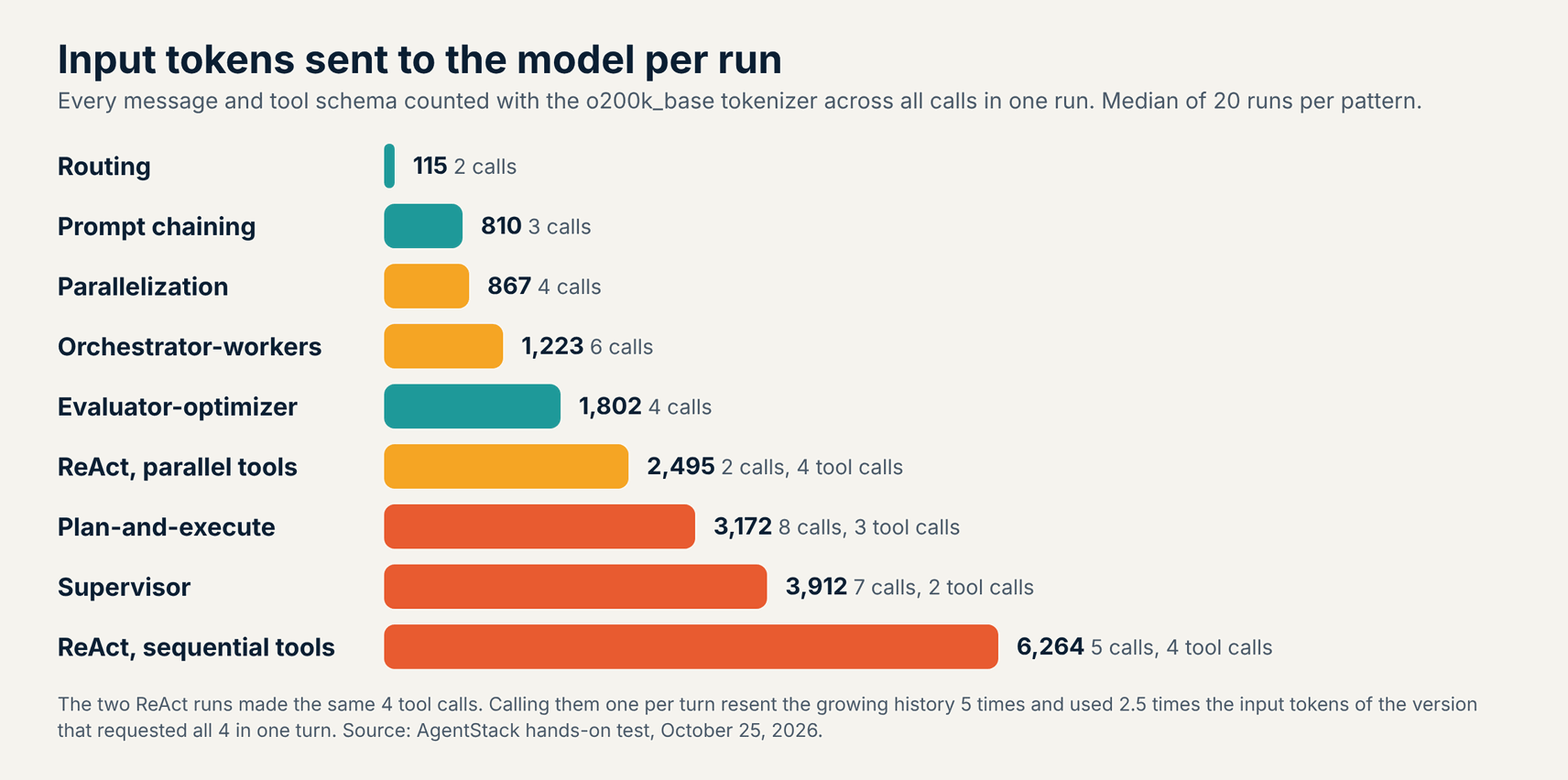
- Batch tool calls when you can. The same 4 tool calls cost 6,264 input tokens and 2.24 s one per turn, against 2,495 tokens and 0.90 s in one turn.
- Supervisors pay a routing tax. In our supervisor run, 3 of 7 model calls only chose who went next, and the run took 3.14 s.
- Multi-agent systems spend far more tokens. Anthropic reports about 4 times the tokens of chat for one agent and about 15 times for a multi-agent system.
- Every major framework covers the core patterns. LangGraph uses graphs and the Send API, OpenAI uses handoffs and agents as tools, ADK uses workflow agents, Microsoft ships five orchestrations, and CrewAI has two processes.
The 8 AI Agent Architecture Patterns at a Glance
The eight patterns fall into two groups. Workflows run model calls along paths you write in code, while agents let the model choose the next action in a loop. The table lists each pattern with its control flow, what it cost in our LangGraph test, and the job it fits best.
| Pattern | Who decides the next step | Calls in our test (sequential) | Median wall time | Best for |
|---|---|---|---|---|
| 1. Prompt chaining | Your code, fixed order | 3 (3) | 1.34 s | Tasks with clear, checkable stages |
| 2. Routing | A classifier call picks one branch | 2 (2) | 0.89 s | Mixed traffic that needs different handling |
| 3. Parallelization | Your code fans out fixed branches | 4 (2) | 0.90 s | Independent subtasks or voting |
| 4. Orchestrator-workers | A model splits work at run time | 6 (3) | 1.34 s | Subtasks you cannot list in advance |
| 5. Evaluator-optimizer | A grader model loops until pass | 4 (4) | 1.79 s | Output with clear quality criteria |
| 6. ReAct tool loop | The model, one tool turn at a time | 5 (5) | 2.24 s | Open ended tasks with tools |
| 7. Plan-and-execute | A planner writes steps, executors run them | 8 (8) | 3.59 s | Long tasks that need a visible plan |
| 8. Supervisor multi-agent | A supervisor model picks the next agent | 7 (7) | 3.14 s | Broad research across separate contexts |
Verdict: Default to prompt chaining or routing, add parallelization when subtasks are independent, and move to a tool loop only when the steps cannot be scripted. Keep supervisors and plan-and-execute for tasks where the extra calls buy real quality, since they were the two slowest patterns in our test.
Workflows vs Agents: The First Design Choice
Anthropic’s Building effective agents guide, published December 19, 2024, splits agentic systems in two. Workflows run models and tools through predefined code paths, while agents let the model direct its own process and tool use. The guide recommends the simplest solution that works and adding complexity only when it pays off.
- Workflows give predictable cost and latency, so they suit well defined tasks: patterns 1 to 5 in this guide.
- Agents trade latency and cost for flexibility, so they suit tasks where you cannot predict the number of steps: patterns 6 to 8.
- The building block for both is what Anthropic calls the augmented LLM: one model with retrieval, tools, and memory attached.
- Tools increasingly arrive through the Model Context Protocol, covered in our MCP explainer.
Anthropic added a note to that post saying much of the tooling it describes has changed since December 2024, and it points readers to its newer managed agents work. Our report on Claude Managed Agents dynamic workflows covers that update, and the five workflow patterns below still map cleanly onto every framework we checked.
1. Prompt Chaining
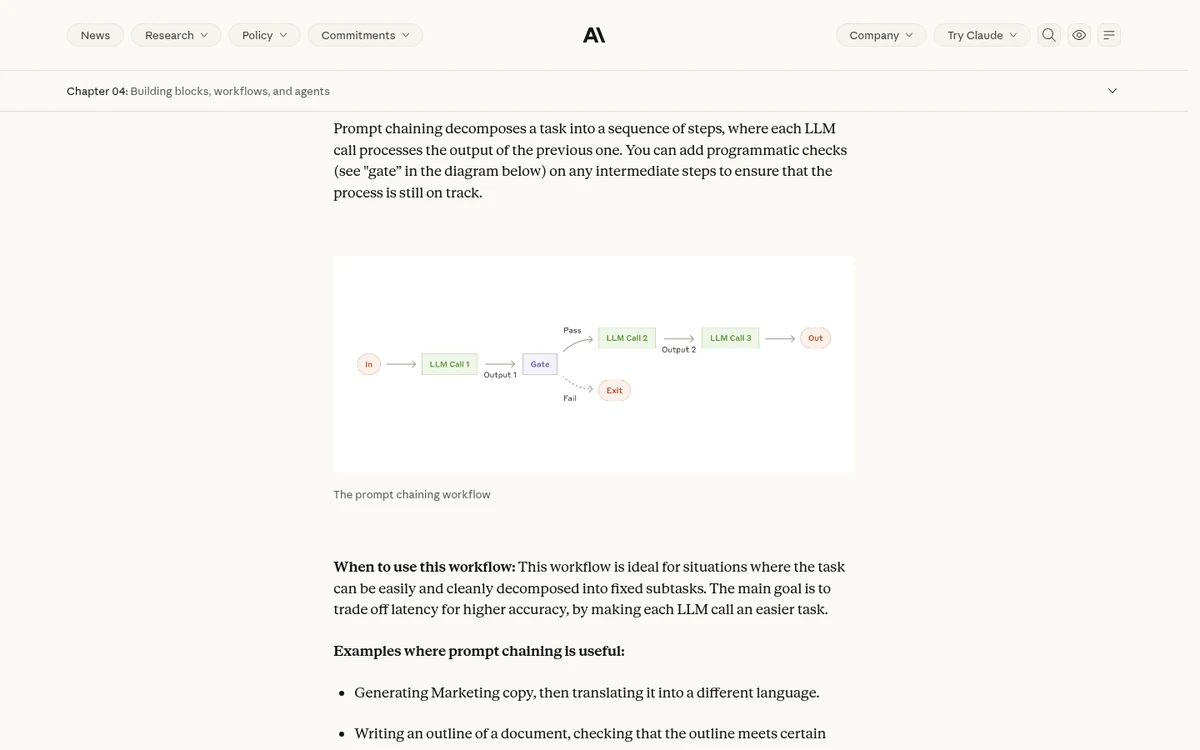
Prompt chaining splits a task into fixed steps, and each model call works on the output of the one before. You can add a programmatic gate between steps, so a weak outline stops the run before you pay for a draft. Our chain ran outline, gate, draft, and polish as 3 sequential calls in a median 1.34 s.
- Use it for: writing an outline then a draft, extracting data then formatting it, or translating after generating copy.
- Cost profile: one call per stage, so latency grows in a straight line with the number of stages.
- Framework fit: plain edges in a LangGraph
StateGraph,SequentialAgentin Google ADK, andProcess.sequentialin CrewAI.
2. Routing
Routing sends each input to one specialist path after a classifier call. Routing was the cheapest pattern in our test, with 2 calls and just 115 input tokens per run. The first call labels the request, and a conditional edge picks the billing, technical, or general handler, so each prompt stays short and focused on one job.
- Use it for: support triage, sending easy questions to a small model and hard ones to a large model, or splitting by language.
- Watch for: misroutes, since a wrong label sends the whole request down the wrong path. Log the label so your observability tool can show route accuracy.
- Framework fit:
add_conditional_edgesin LangGraph and a triage agent with handoffs in the OpenAI Agents SDK.
3. Parallelization
Parallelization runs independent model calls at the same time and merges the results. Anthropic describes two forms: sectioning, where each call takes one part of the task, and voting, where several calls attempt the same task. Our three section writers and one aggregator made 4 calls but only 2 sequential steps, finishing in 0.90 s.
- Use it for: checking one answer against several guardrails, reviewing code for different issue types, or gathering several views on a document.
- Cost profile: total tokens match the sequential version, but wall time drops to the slowest branch plus the merge step.
- Framework fit: several edges from
STARTin LangGraph,ParallelAgentin ADK, Concurrent orchestration in Microsoft Agent Framework, andasyncio.gatherwith the OpenAI Agents SDK.
4. Orchestrator-Workers
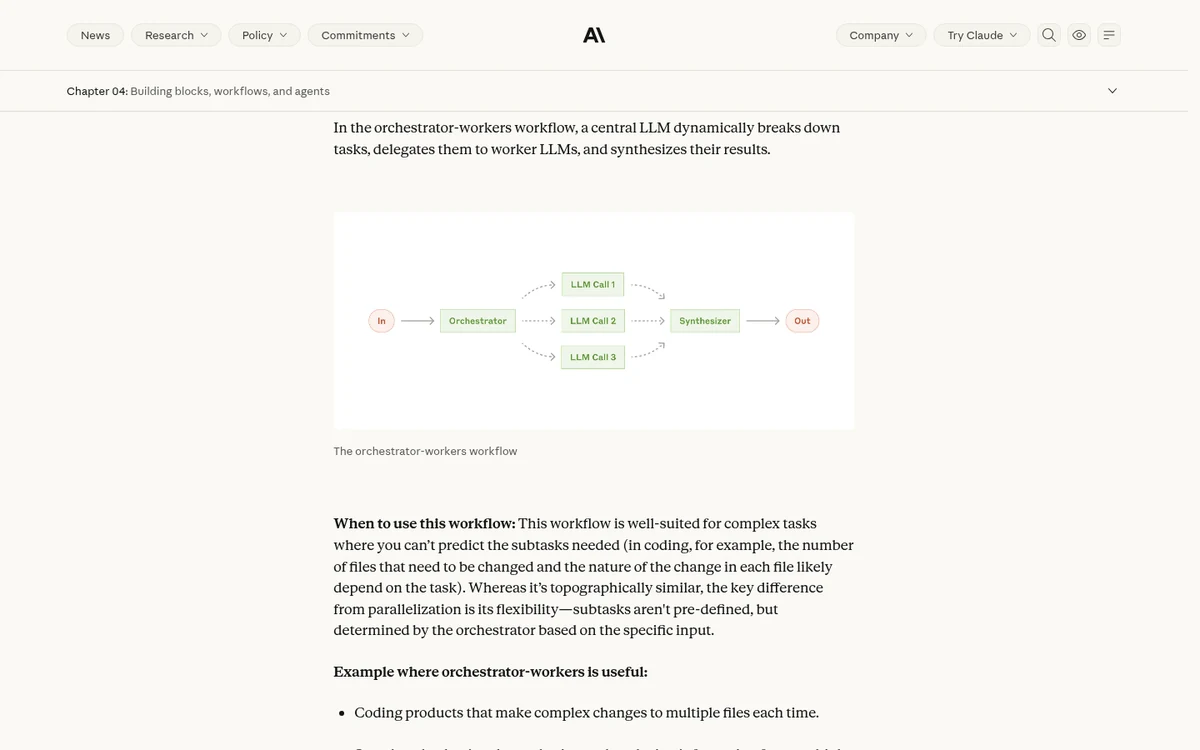
Orchestrator-workers looks like parallelization, with one difference: a model decides the subtasks at run time. The orchestrator call returns a list of subtasks, the framework starts one worker per item, and a final call merges their output. Our orchestrator split the brief into 4 sections, so the run made 6 calls in 3 sequential steps and took 1.34 s.
LangGraph handles this with the Send API, described in its workflows and agents docs. A conditional edge returns one Send object per section, and each worker writes to a shared state key that the synthesizer reads. The code below is the core of our test graph.
from langgraph.types import Send

def assign_workers(state):
    # one worker per section the orchestrator returned
    return [Send("worker", {"section": s, "task": state["task"]})
            for s in state["sections"]]

g.add_conditional_edges("orch", assign_workers, ["worker"])
g.add_edge("worker", "synth") # workers append to state["done"]- Use it for: coding changes across an unknown number of files, or research where the number of sources is not known up front.
- Framework fit:
Agent.as_tool()in the OpenAI Agents SDK, Magentic orchestration in Microsoft Agent Framework, andProcess.hierarchicalin CrewAI.
5. Evaluator-Optimizer
Evaluator-optimizer pairs a generator with a grader that returns pass or fail plus feedback, looping until the draft passes or a round cap hits. Each extra revision round adds two sequential calls, about 0.9 seconds per round at 400 ms per call. Our grader failed the first draft and passed the second, giving 4 calls in 1.79 s.
- Use it for: translation with nuance, search tasks that need several rounds, or any output with written acceptance criteria.
- Set a cap: our graph stopped after 3 rounds no matter what, and
LoopAgentin Google ADK takes amax_iterationsargument for the same reason. - Reuse the grader offline: the same criteria can score releases in agent evaluation tools.
6. ReAct Tool Loop
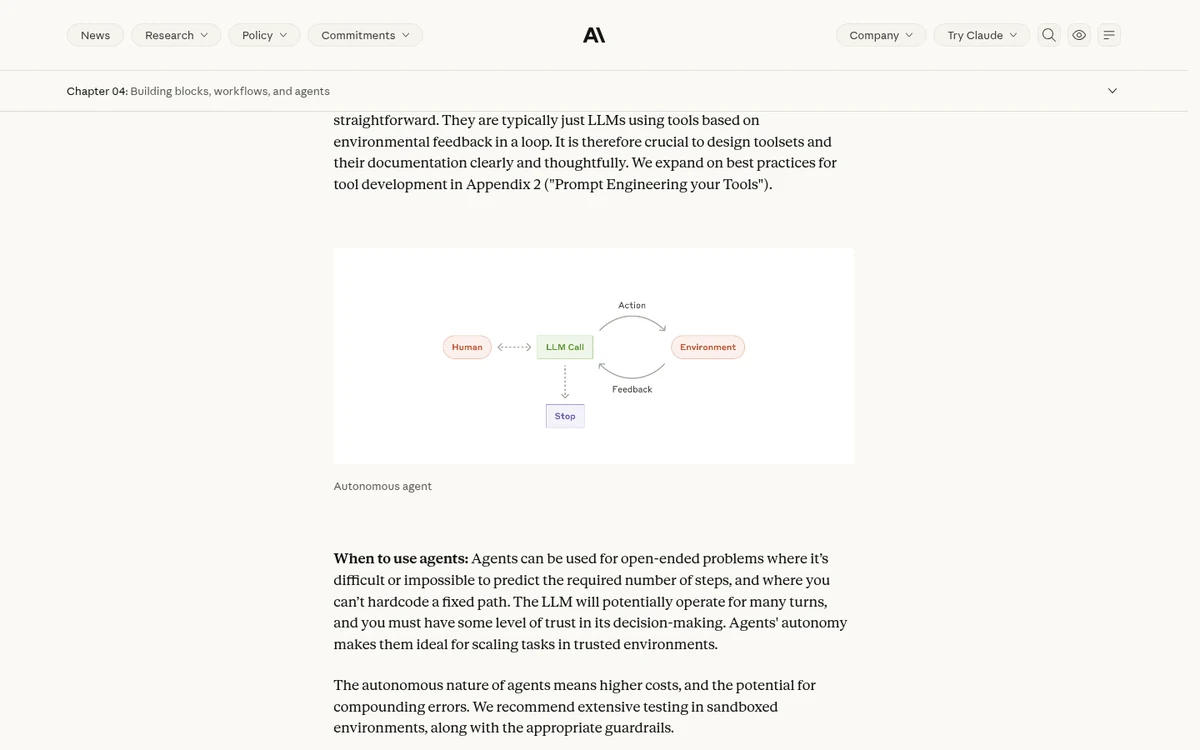
The ReAct loop, named after the 2022 ReAct paper on reasoning and acting, is what most people mean by an agent. The model picks a tool, reads the result, and repeats until it can answer. Every turn resends the whole conversation, including earlier tool results, so input tokens grow with each step.
Our sequential version called 4 tools one per turn and used 5 model calls, 6,264 input tokens, and 2.24 s. The parallel version asked for all 4 tools in its first turn and finished with 2 calls, 2,495 tokens, and 0.90 s. Both versions made the same 4 tool calls with the same arguments.
- Framework fit:
ToolNodeandtools_conditionin LangGraph, the defaultRunnerloop in the OpenAI Agents SDK, and anLlmAgentwith tools in ADK. - Prompt for batching: tell the model to request independent lookups together, and keep parallel tool calls turned on in the model API.
- Trim history: summarize or drop old tool output once it has been used, since it is resent on every later turn.
7. Plan-and-Execute
Plan-and-execute separates thinking from doing. A planner call writes a step list, an executor runs each step, often as a small tool loop, and a final call writes the answer. It was the slowest pattern in our test at 3.59 s, because its 3 steps ran one after another and each needed 2 model calls.
- Use it for: long tasks where a human or a log should see the plan before work starts, or where steps need different models.
- Speed it up: run independent steps in parallel with the Send API, which turns 6 sequential executor calls into 2 waves.
- Framework fit: a custom LangGraph graph, a planner agent chained to workers in the OpenAI Agents SDK, or the
planningoption on a CrewAI crew.
8. Supervisor Multi-Agent Systems
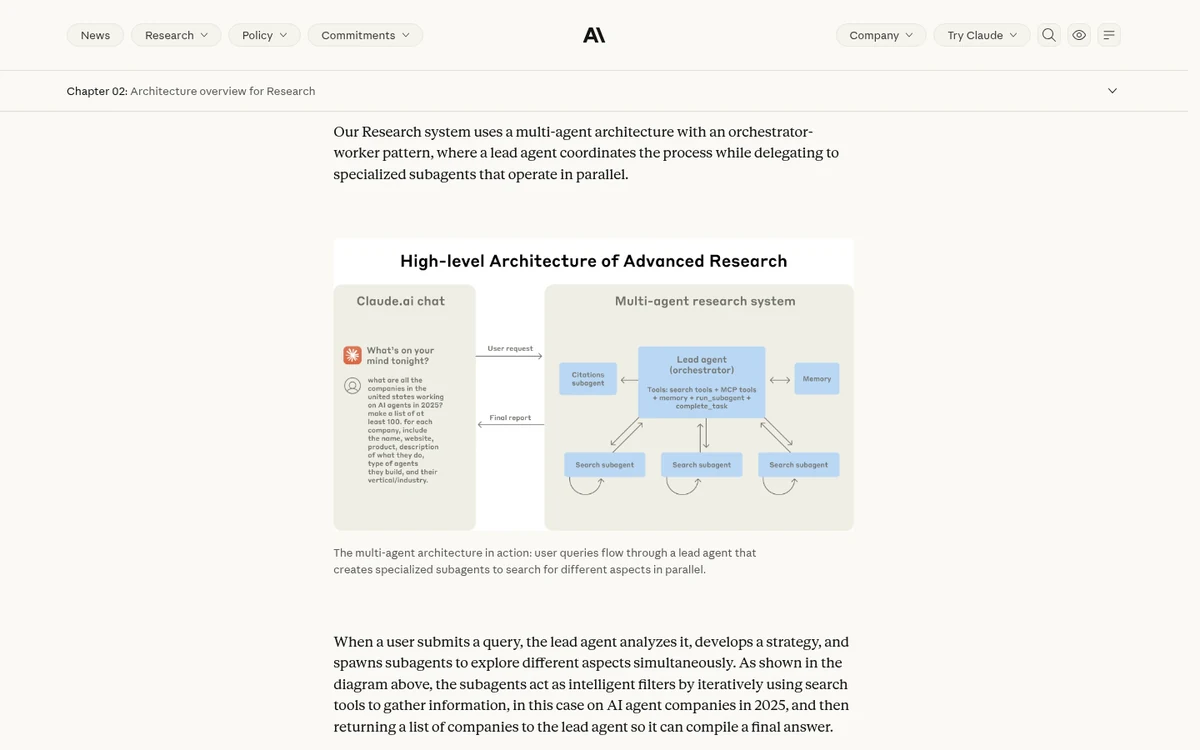
A supervisor is an agent whose tools are other agents. It reads the conversation, picks the next specialist, and decides when the work is done. Our supervisor run made 7 calls in 3.14 seconds, and 3 of those calls only chose who went next. That routing cost buys separate context windows and narrower prompts for each specialist.
Anthropic’s multi-agent research system post, published June 13, 2025, gives the strongest public data on the trade. A lead Claude Opus 4 agent with Claude Sonnet 4 subagents beat a single Claude Opus 4 agent by 90.2% on its internal research eval. Running 3 to 5 subagents in parallel, each using 3 or more tools at once, cut research time by up to 90% on complex queries.
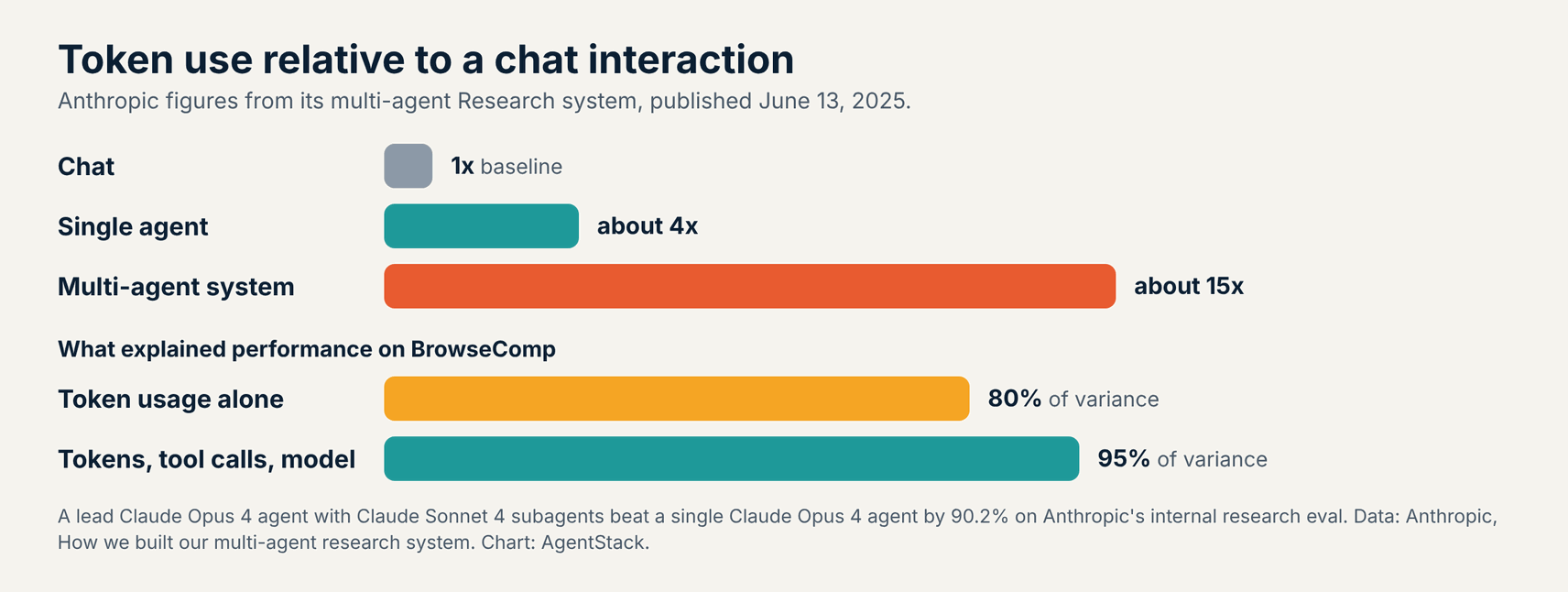
- Tokens drive results: token usage alone explained 80% of the variance on BrowseComp, and tokens, tool calls, and model choice together explained 95%.
- Scale effort to the task: Anthropic’s prompts give simple fact finding 1 agent with 3 to 10 tool calls and direct comparisons 2 to 4 subagents with 10 to 15 calls each.
- Poor fits: Anthropic says most coding tasks and tasks where every agent needs the same context gain little from multi-agent designs.
How the Eight Patterns Map to Five Frameworks
Every major framework covers the core patterns, under different names. LangGraph expresses them as graphs, the OpenAI Agents SDK as handoffs and agents as tools, Google ADK as workflow agents, Microsoft Agent Framework as named orchestrations, and CrewAI as processes. The table maps each pattern to the API we found in each framework’s docs.
| Pattern | LangGraph | OpenAI Agents SDK | Google ADK | Microsoft Agent Framework | CrewAI |
|---|---|---|---|---|---|
| Prompt chaining | add_edge in a StateGraph | Chain agents in code | SequentialAgent | Sequential | Process.sequential |
| Routing | add_conditional_edges | Triage agent with handoffs | LLM agent with sub agents | Handoff | Flow with a router |
| Parallelization | Several edges from START | asyncio.gather | ParallelAgent | Concurrent | Async tasks |
| Orchestrator-workers | Send API | Agent.as_tool() | Graph or dynamic workflow (ADK 2.0) | Magentic | Process.hierarchical |
| Evaluator-optimizer | Conditional edge back to the generator | While loop with an evaluator agent | LoopAgent | Custom workflow | Flow with a router |
| ReAct tool loop | ToolNode and tools_condition | Runner default loop | LlmAgent with tools | Agent with tools | Agent with tools |
| Supervisor | Supervisor node plus subgraphs | Manager agent with agents as tools | LLM agent with sub agents | Magentic or Group Chat | Process.hierarchical |
Verdict: LangGraph gives the most direct control over every pattern, since each is just nodes and edges. Google ADK and Microsoft Agent Framework ship the most ready made orchestrations, the OpenAI Agents SDK leaves workflow patterns to plain Python, and CrewAI fits teams that think in roles and tasks.
LangGraph
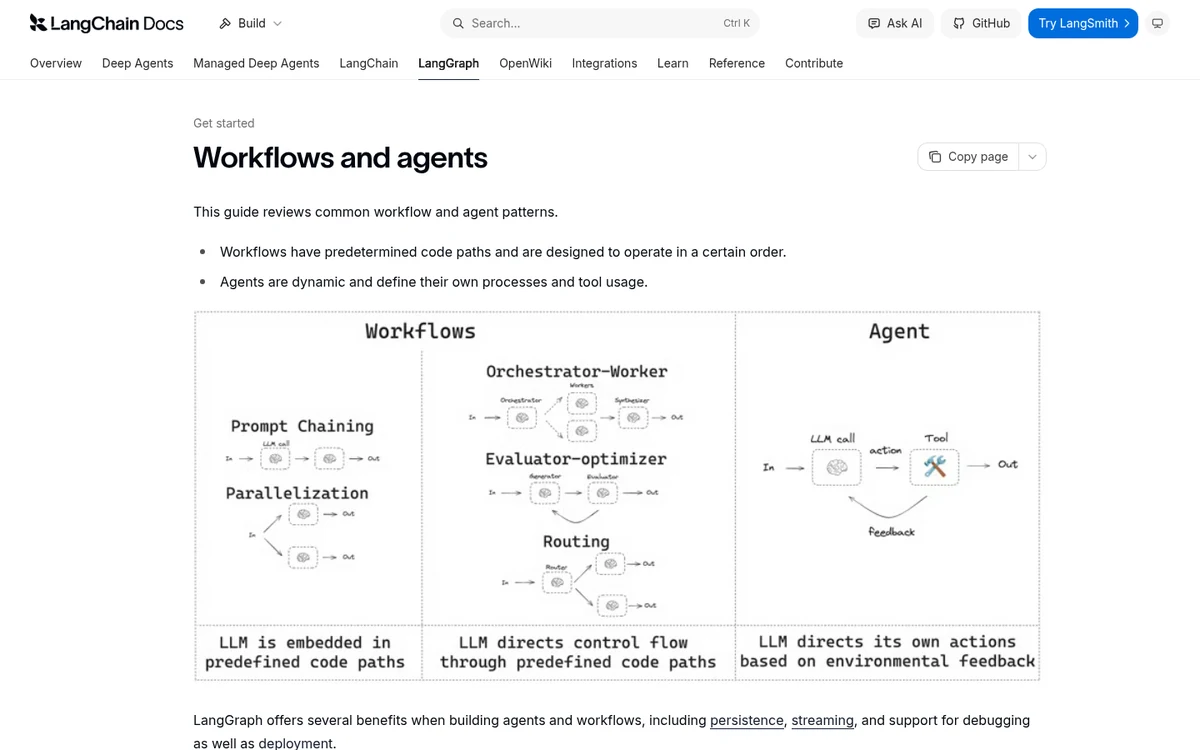
The LangGraph workflows and agents page shows each Anthropic pattern in both the graph API and the functional API, which uses @task and @entrypoint decorators. All nine graphs in our test, including the parallel tool variant, took under 30 lines each with StateGraph, Send, and ToolNode.
OpenAI Agents SDK
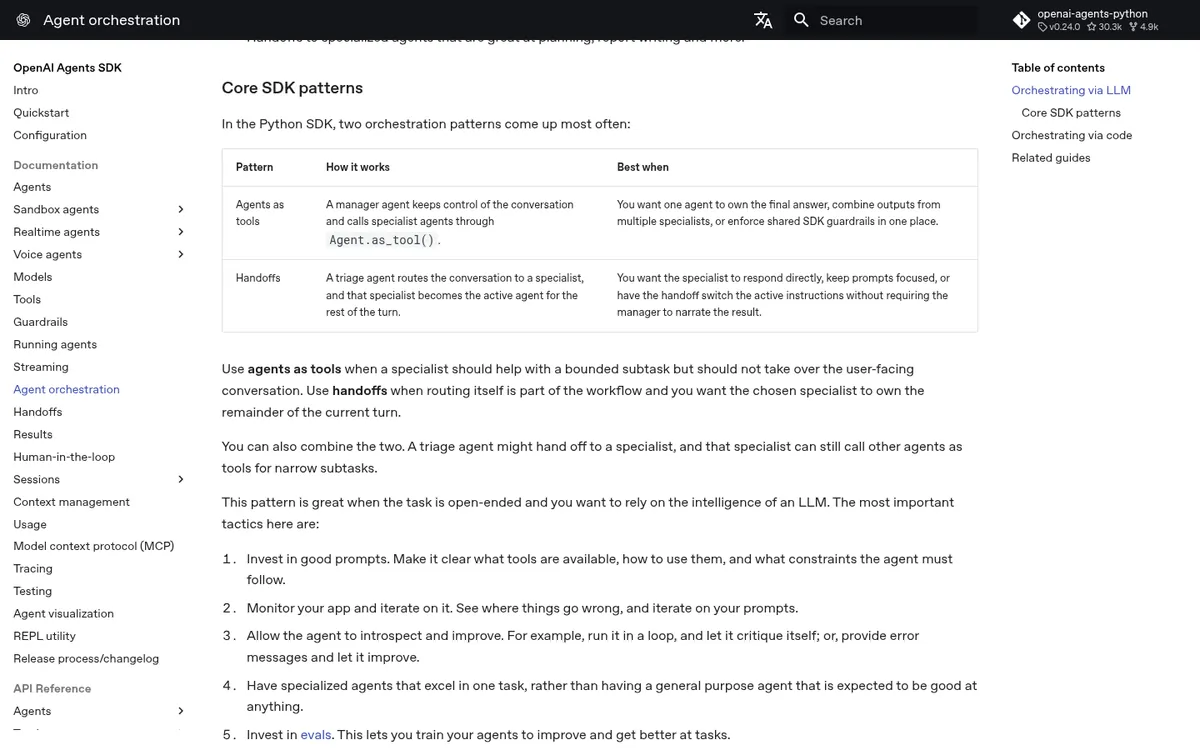
The OpenAI Agents SDK orchestration guide names two core patterns. With agents as tools, a manager calls specialists through Agent.as_tool() and keeps the final answer. With handoffs, a triage agent passes the conversation to a specialist who then owns the turn.
For workflow patterns, the guide recommends orchestrating in code: structured outputs for routing, chained agents, a while loop with an evaluator agent, and asyncio.gather for parallel runs.
Google ADK
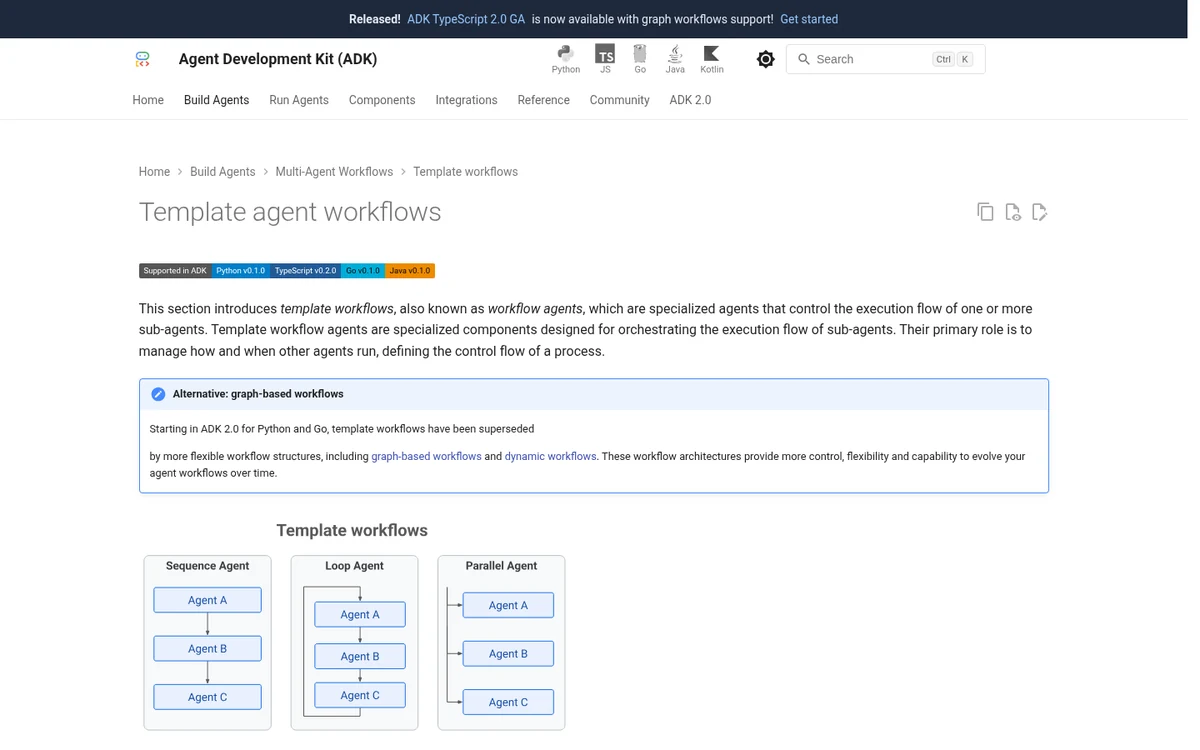
Google ADK ships three template workflow agents: SequentialAgent, LoopAgent, and ParallelAgent. They run sub agents in a fixed order without asking a model. The ADK docs now say that from ADK 2.0 for Python and Go, graph based and dynamic workflows supersede these templates.
Microsoft Agent Framework
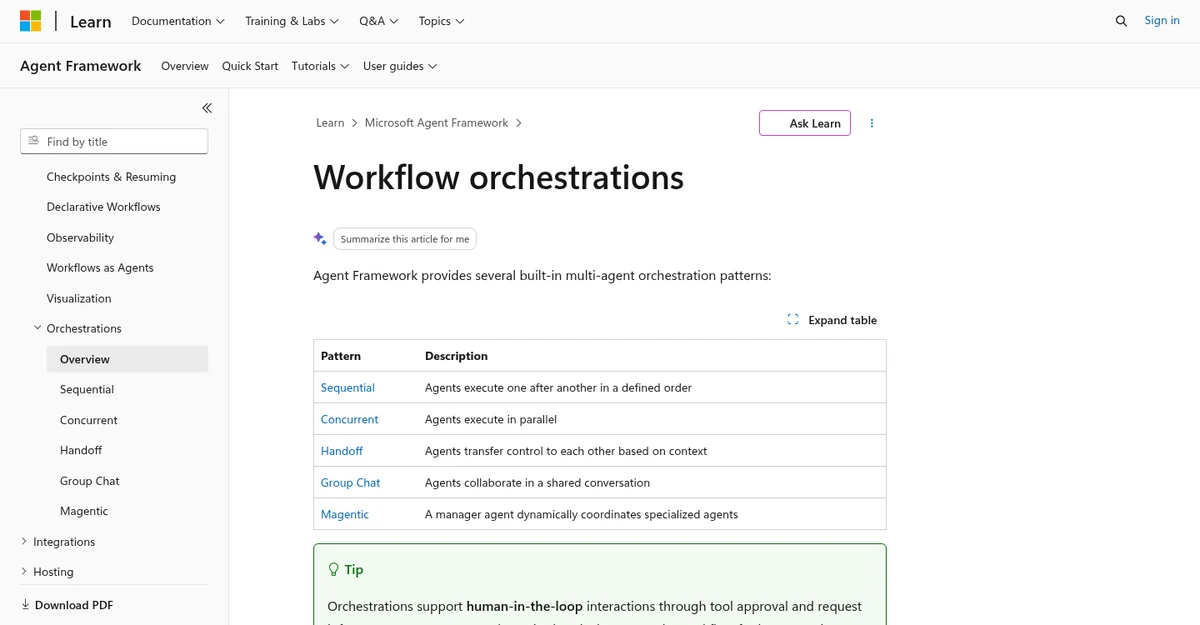
Microsoft Agent Framework lists five built in workflow orchestrations: Sequential, Concurrent, Handoff, Group Chat, and Magentic, where a manager agent coordinates specialists. Orchestrations support human in the loop review through tools that need approval before they run.
CrewAI
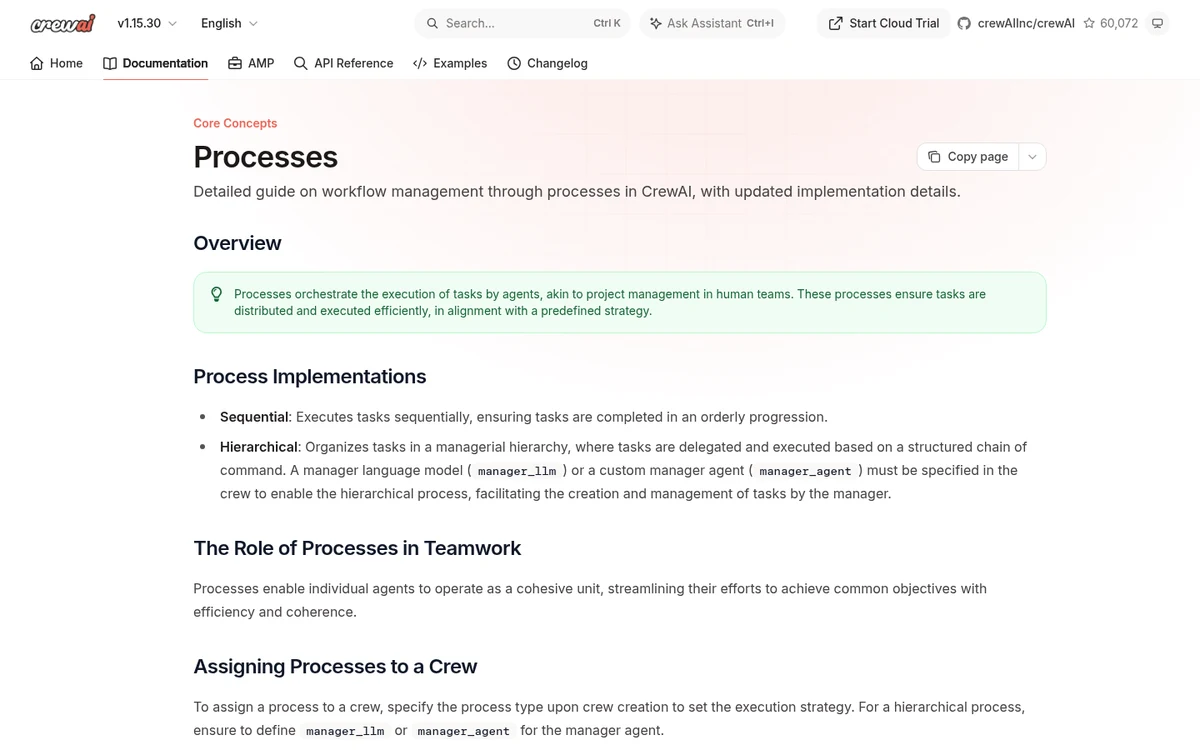
CrewAI documents two processes. Process.sequential runs tasks in list order and passes each output to the next, and Process.hierarchical adds a manager that delegates tasks. The hierarchical process requires either manager_llm or manager_agent on the crew.
Our Hands-On Test: Latency and Tokens by Pattern
We wrote all eight patterns, plus a parallel tool version of ReAct, as LangGraph graphs on one task: a 400 word buyer brief on observability pricing. A local model that always answered in 400 ms took model speed out of the picture, so every difference comes from the architecture. Each graph ran 22 times, and we kept the last 20.
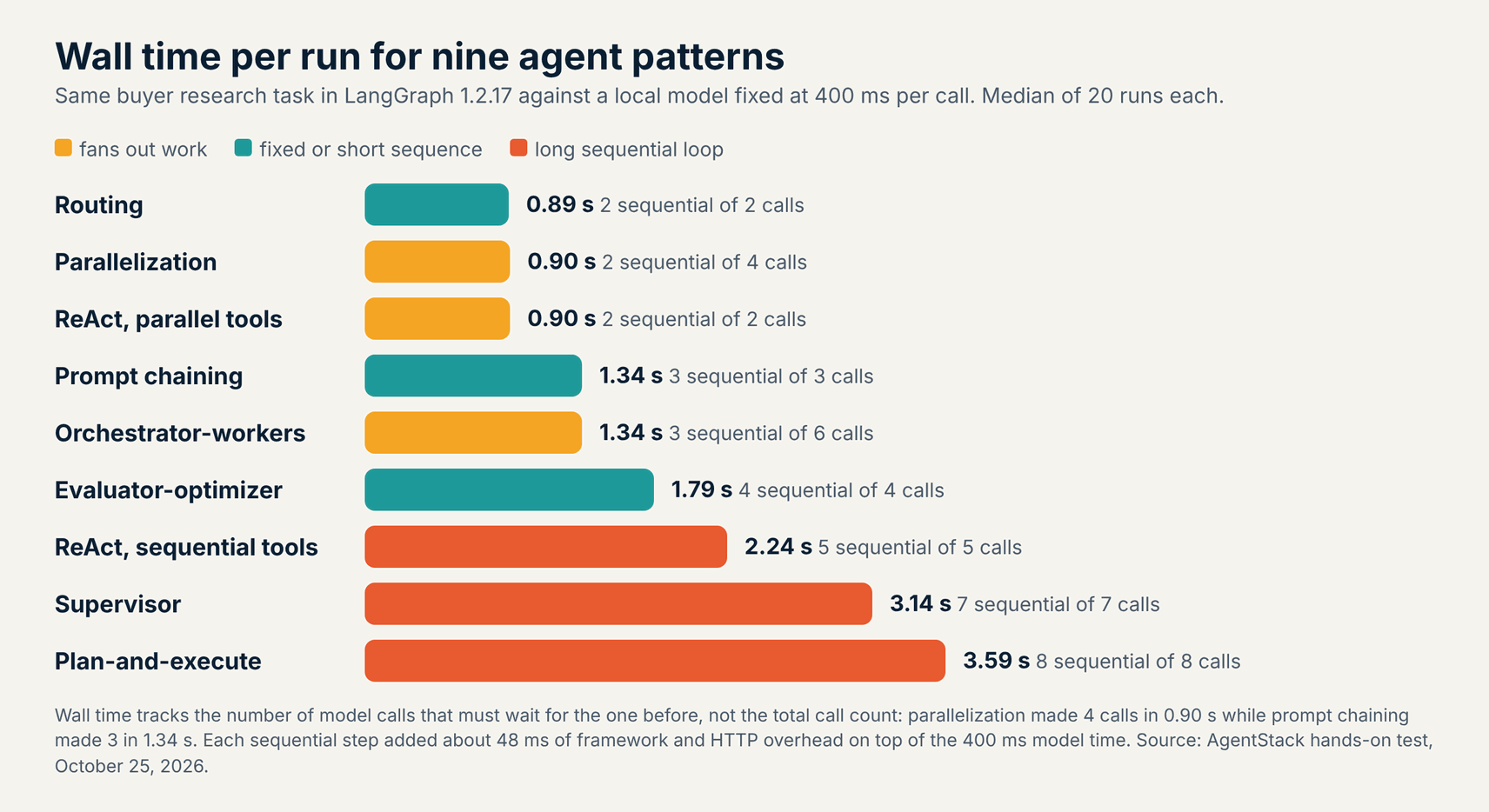
Wall time followed the number of sequential steps almost exactly, at about 448 ms per step: 400 ms of model time plus about 48 ms of framework and HTTP overhead. Total call count mattered far less. Orchestrator-workers made twice as many calls as prompt chaining in the same 1.34 s.
| Pattern | Model calls | Sequential steps | Tool calls | Input tokens | Largest prompt | Wall time |
|---|---|---|---|---|---|---|
| Routing | 2 | 2 | 0 | 115 | 60 | 0.89 s |
| Prompt chaining | 3 | 3 | 0 | 810 | 566 | 1.34 s |
| Parallelization | 4 | 2 | 0 | 867 | 708 | 0.90 s |
| Orchestrator-workers | 6 | 3 | 0 | 1,223 | 936 | 1.34 s |
| Evaluator-optimizer | 4 | 4 | 0 | 1,802 | 614 | 1.79 s |
| ReAct, parallel tools | 2 | 2 | 4 | 2,495 | 2,202 | 0.90 s |
| ReAct, sequential tools | 5 | 5 | 4 | 6,264 | 2,215 | 2.24 s |
| Plan-and-execute | 8 | 8 | 3 | 3,172 | 579 | 3.59 s |
| Supervisor | 7 | 7 | 2 | 3,912 | 1,137 | 3.14 s |
Verdict: Cut sequential steps first, since they set latency. Then cut resent context, which drives input tokens in tool loops and supervisors, and only then worry about the raw call count.
- Stack: Python with langgraph 1.2.17, langchain-core 1.7.0, and langchain-openai 1.7.2, talking to a local OpenAI compatible server.
- Model: a scripted local server that returns fixed outputs per role after exactly 400 ms and logs every request.
- Tools: two lookup tools that return the same pricing excerpt of 516 tokens, so tool time is close to zero.
- Limits: real models vary in speed and output length, so treat the ratios between patterns as the finding and the absolute seconds as a floor.
Which AI Agent Architecture Should You Pick?
Start from how predictable the task is and how much latency your users accept. The four profiles below cover most teams, and each one points to the pattern with the fewest sequential steps that still does the job. Measure before you add an agent loop, since every extra step shows up in latency.
Support and product features with tight latency
- Use routing plus a short chain, which cost 2 to 3 sequential calls in our test.
- Send easy routes to a cheaper model through one of the LLM gateways we reviewed.
Content and data pipelines
- Use prompt chaining with gates, and parallelize sections that do not depend on each other.
- Add an evaluator loop with a hard round cap only where a written rubric exists.
Tool heavy assistants and coding agents
- Use a ReAct loop, prompt for batched tool calls, and trim old tool output from history.
- Add agent testing tools early, since open loops fail in ways a fixed chain cannot.
Deep research across many sources
- Use orchestrator-workers or a supervisor with 3 to 5 parallel subagents, as Anthropic does.
- Track spend per run with LLM cost monitoring tools, since multi-agent runs used about 15 times the tokens of chat in Anthropic’s data.
Frequently Asked Questions
What is AI agent architecture?
AI agent architecture is the control flow around model calls. It sets who picks the next step, which steps run in parallel, how tools are called, and when the run stops. Common designs include prompt chaining, routing, parallelization, orchestrator-workers, evaluator-optimizer, ReAct tool loops, plan-and-execute, and supervisor multi-agent systems.
What is the difference between an AI workflow and an AI agent?
A workflow runs models and tools along code paths you define, so cost and latency stay predictable. An agent lets the model choose its next action in a loop until it finishes. Anthropic recommends starting with the simplest workflow that works and moving to agents only when the steps cannot be scripted.
Which agent architecture pattern is fastest?
The pattern with the fewest sequential model calls. In our LangGraph test at 400 ms per call, routing, parallelization, and ReAct with parallel tool calls each finished in about 0.9 seconds. Plan-and-execute was slowest at 3.59 seconds because its 8 calls ran one after another.
When should I use a multi-agent architecture?
Use one for broad research or tasks that exceed one context window, where subagents can work in parallel. Anthropic found a lead agent with subagents beat a single agent by 90.2% on its research eval, but used about 15 times the tokens of chat. Most coding tasks gain less.
Which framework is best for building agent design patterns?
LangGraph gives the most direct control, since every pattern is nodes and edges. Google ADK and Microsoft Agent Framework ship ready made sequential, parallel, and loop or group orchestrations. The OpenAI Agents SDK uses handoffs and agents as tools, and CrewAI offers sequential and hierarchical processes.
Related Guides
For related coverage, see our multi-agent frameworks test, LangGraph vs CrewAI vs AutoGen comparison, OpenAI Agents SDK vs Claude Agent SDK vs Google ADK comparison, Microsoft Agent Framework vs Semantic Kernel vs AutoGen guide, AI agent memory frameworks comparison, Temporal vs Inngest vs Restate durable execution comparison and best MCP servers guide.
Read the agent frameworks hub, 12 best AI agent frameworks, Claude Managed Agents workflows, AWS agent runtime report, Cloudflare vs Vercel vs AgentCore, AgentOps hub, AgentOps tools, agent observability tools, agent evaluation tools, agent integration platforms, and AI agent governance.
The Bottom Line
Pick the AI agent architecture with the fewest sequential steps that still solves the task, and add loops or extra agents only when they measurably raise quality. Our test showed latency tracks sequential steps, and Anthropic’s data shows multi-agent designs buy quality with far more tokens.
Framework APIs change fast, so check the docs linked above before you build. We will update this page as frameworks ship new orchestration features, and you can send corrections through our contact page.